
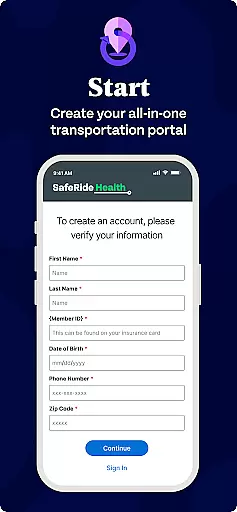
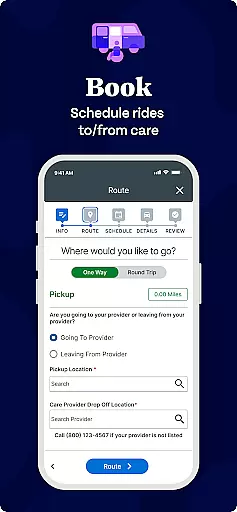
MySafeRide by SafeRide Health is a specialized medical transportation app designed to help users book and manage rides to and from healthcare appointments with ease. The app supports both on-demand and scheduled transportation options, including wheelchair-accessible vehicles, ambulatory services, and rideshare options. It is particularly beneficial for individuals enrolled in specific health insurance plans that include transportation benefits. By offering real-time ride tracking, notifications, and 24/7 management of transportation benefits, MySafeRide ensures users never miss an appointment due to transportation issues.
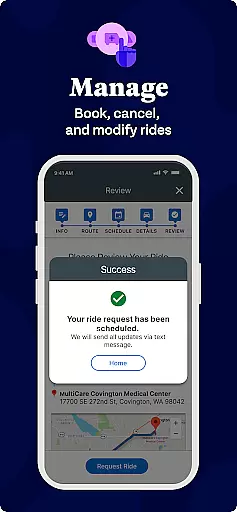
The app also allows caregivers to assist in managing rides, making it ideal for elderly patients or those requiring additional support. With features like recurring ride scheduling and the ability to cancel rides when needed, MySafeRide provides a reliable solution for maintaining consistent access to healthcare services. Its cross-device compatibility ensures seamless access whether using a smartphone, tablet, or computer.
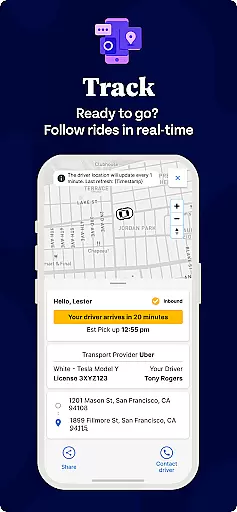
MySafeRide offers a comprehensive set of features tailored to simplify healthcare transportation. Users can book individual or recurring rides based on their needs, ensuring flexibility for both routine and urgent medical visits. Real-time ride tracking and notifications keep users informed about their driver's location and estimated arrival times, reducing uncertainty and wait times. Additionally, the app provides 24/7 access to transportation benefit management, empowering users to monitor their available rides and plan accordingly.
Another standout feature is its multi-device accessibility, allowing users to manage their transportation from any device with internet connectivity. While on-demand rideshare options are available, the app also caters to specialized needs such as wheelchair-accessible vehicles and non-emergency medical transport. However, it’s important to note that some features may vary depending on the user's health insurance plan, so checking specific benefit details is recommended before booking.
In the realm of healthcare transportation, the credibility of content and expert review is paramount. MySafeRide by SafeRide Health ensures that all information provided within the app is vetted by healthcare transportation experts. This guarantees that users receive accurate and reliable data regarding their transportation options.
The app provides comprehensive details about various transportation services tailored to individual needs, including wheelchair-accessible vehicles and ambulatory services. Each option is described with clarity, ensuring users understand the specifics of the service they are selecting. This level of detail is crucial for individuals who require specific accommodations for their healthcare visits.
Furthermore, MySafeRide incorporates feedback from healthcare professionals to continually refine its offerings. This iterative process ensures that the app remains up-to-date with the latest standards and recommendations in healthcare transportation. Users can trust that their transportation choices are aligned with best practices endorsed by experts in the field.
By prioritizing medical content credibility and undergoing thorough expert review, MySafeRide enhances user confidence in managing their healthcare transportation. This commitment to accuracy and reliability supports better health outcomes by ensuring patients arrive at their appointments safely and on time.
While MySafeRide primarily focuses on providing reliable transportation to healthcare appointments, it indirectly supports the quality of teleconsultations by ensuring patients arrive on time and stress-free. Timely arrival at healthcare facilities is crucial for effective teleconsultations, as it allows patients to prepare adequately and be in the right mindset for their virtual meetings with healthcare providers.
The app's real-time update notifications play a significant role in enhancing the overall teleconsultation experience. By keeping users informed about their ride status, MySafeRide reduces anxiety and uncertainty, allowing patients to focus on their upcoming consultations. This seamless integration of transportation management contributes to a more relaxed and productive teleconsultation session.
Additionally, the ability to book and manage rides 24/7 ensures that patients have one less logistical concern when scheduling teleconsultations. Whether arranging transportation for an early morning or late-night virtual appointment, MySafeRide offers flexibility and convenience. This accessibility empowers users to prioritize their healthcare needs without transportation barriers hindering their access to telemedicine services.
Through its robust transportation management features, MySafeRide effectively supports high-quality teleconsultations by addressing potential logistical challenges. The app's reliability and ease of use contribute to a smoother healthcare journey, ultimately enhancing the patient's overall telemedicine experience.
User-friendly interface
Real-time ride updates
24/7 benefit management
Supports recurring rides
Cross-device compatibility
Limited to insured members
On-demand rides restricted
Plan-specific limitations
No independent usage
Potential delays in service

Sync your blood glucose device, log values automatically and tame your diabetes!
 4.60
4.60
Perform pure-tone audiometry and a speech intelligibility test on your phone.
4.50
The official DSM-5-TR® app
4.50
Easy access to benefits and rewards
3.70
Log your symptoms in the MyZio app — the perfect companion to the Zio monitor!
4.60
Search by insurance, see real-time openings & verified reviews, get care fast.
4.80
A comprehensive 3D atlas of the human body
4.80
Manage your health care in one easy place
4.40
The Client Portal app empowers you to manage care from one secure place
4.10
Manage your prescriptions anytime, anywhere with the Publix Pharmacy mobile app.
4.80
Amplify surrounding sounds, conversations, TV or lectures for louder hearing.
4.70
Health Care at Your Fingertips
4.60
Adaptive-learning flashcards and quizzes for the Top 250 Drugs
4.60
The MDLIVE app makes connecting with a doctor fast, easy, and convenient.
4.60
3rd trimester? Counting Kicks is what moms should do-It’s important & easy too!
4.30
A rapid reference for healthcare professionals caring for pediatric patients.
4.30
Patient Health Portal
4.20
Zepbound & Mounjaro support & resources for savings, tracking & more
3.90
Conveniently receive lab results, schedule lab appointment and pay your bills
3.70


User Reviews