
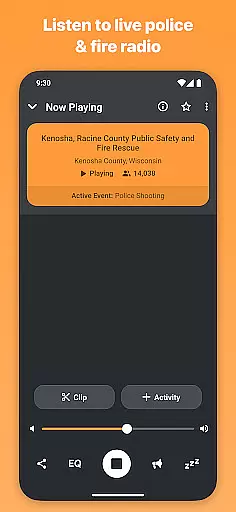
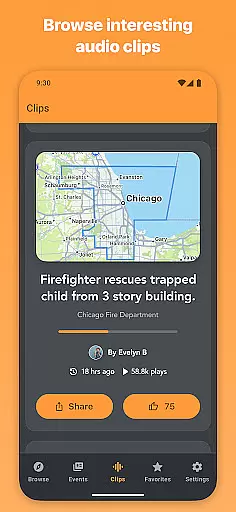
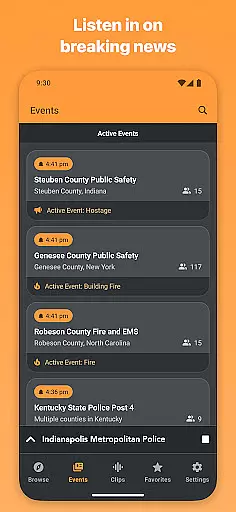
Scanner Radio is a comprehensive live audio streaming application that allows users to listen to over 8,000 police, fire, and other emergency scanners from around the world. The app provides real-time access to important events as they unfold, making it an essential tool for staying informed about breaking news.
One of the standout features of Scanner Radio is its notification system, which alerts users when major events are happening based on listener spikes. Whether you're monitoring local public safety channels or tracking global incidents, this app delivers timely updates and customizable alerts tailored to your interests.
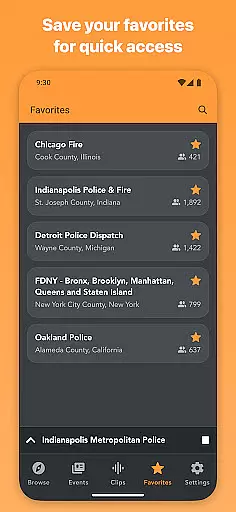
The app also supports various categories such as aviation, marine, weather, and amateur radio communications, offering a versatile listening experience. With options like favorites management, directory browsing by location or genre, and even recording capabilities in the Pro version, Scanner Radio proves invaluable for both casual listeners and dedicated enthusiasts.
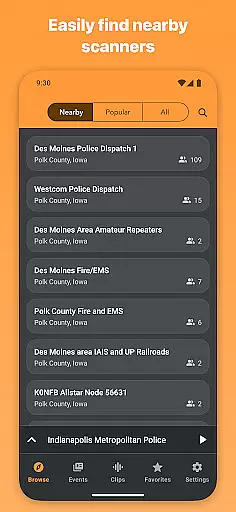
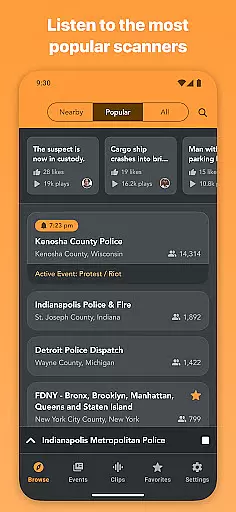
Scanner Radio offers a robust set of features designed to enhance user engagement with live scanner feeds. Users can view nearby scanners, explore top-listened streams, and browse newly added stations. The Favorites feature ensures quick access to preferred channels, while the directory categorizes content by location and genre, including public safety, aviation, and weather.
Notifications play a crucial role in keeping users informed. You can configure alerts for listener thresholds on specific scanners or receive notifications when new scanners are added near you. This functionality helps users stay ahead of breaking news and significant events as they occur.
For those seeking additional benefits, Scanner Radio Pro removes ads, unlocks all theme colors, and enables audio recording. These premium features provide an enhanced, uninterrupted experience, making it easier than ever to capture and revisit critical moments from your favorite feeds.
In the realm of real-time information, Scanner Radio stands out by offering live audio streams from over 8,000 sources worldwide. These include police and fire scanners, NOAA weather stations, ham radios, air traffic control, and marine channels. The credibility of these sources is reinforced by their originu2014volunteers, official departments, and dispatch centers that provide authentic, unfiltered content.
Scanner Radio's diverse range of sources ensures users receive comprehensive coverage on various topics. Whether it's monitoring LAPD communications, staying updated with Chicago Police activities, or tracking hurricane conditions via ham radio nets, the app delivers firsthand insights into events as they unfold.
Users benefit from this credible and diverse network by gaining access to breaking news before mainstream media coverage. The ability to browse by location or genre further enhances the user experience, allowing listeners to tailor their feeds to specific interests or regions.
The app's integration with Broadcastify alerts adds another layer of reliability. Users can configure notifications for major events, ensuring they are always informed when significant incidents occur near them or within their selected favorites.
Scanner Radio places a strong emphasis on content accuracy by directly sourcing audio feeds from verified entities such as police departments, fire stations, and NOAA weather radio broadcasters. This direct line to authoritative sources minimizes the risk of misinformation and provides users with reliable data straight from the field.
The app employs a rigorous fact-checking process facilitated by its community-driven model. Volunteers and local agencies actively contribute to maintaining up-to-date and accurate streams. This collaborative effort ensures that the content remains relevant and trustworthy, reflecting real-world situations without editorial alterations.
For users, this commitment to accuracy translates into actionable insights. Whether tracking severe weather conditions, understanding public safety operations, or following aviation communications, listeners can trust that the information they receive is both timely and precise.
Additionally, Scanner Radio Pro offers advanced features like recording capabilities, enabling users to archive and review transmissions. This functionality not only supports personal fact-checking efforts but also serves as a valuable resource for verifying past events against current updates.
User-friendly interface
Real-time event alerts
Wide range of scanner categories
Customizable notification settings
Pro version offers ad-free experience
Some features locked behind paywall
Occasional audio stream interruptions
Heavy reliance on volunteer-provided feeds
Interface may feel cluttered to new users
Limited offline functionality

Noisy. Opinionated. Right.
 4.40
4.40
National, local and world news
4.10
Discover Taiwan Through News, Entertainment & Culture
4.50
Get fact-based, unbiased news coverage 24/7 with the NewsNation app.
3.20
Podcasts. Live Radio. Music.
4.90
Trusted sources, breaking headlines, and local stories all in one place.
3.70
Videos, writing, podcasts & more
4.80
Live radar, daily & hourly weather forecast, latest local & international news.
4.50
Breaking News & Social Media
3.70
LIVE Police Scanner: Hear Crime Alerts, Fire Alarm, Emergency & Weather Radio
4.80
Read millions of expert stories on business, tech, design, and current events
4.70
Daily last -minute news alerts for local headlines
4.60
Movies, music, games & much more apps for Chromecast, Google Cast and Android TV
4.50
The latest news, weather, and sports from Detroit's news leader, ClickOnDetroit.
4.40
WSJ: Award-winning business & markets coverage, breaking news & global headlines
4.30
Get Personalized Updates on Your Latest and Breaking News Feeds!
4.20
Stay informed with latest world & local news personalized for your interest
4.00
Celebrity news, entertainment buzz, true crime, free crosswords & daily games.
3.80
Listen to Live Police and Fire Radio! Stay informed by Police Scanner
3.80


User Reviews