

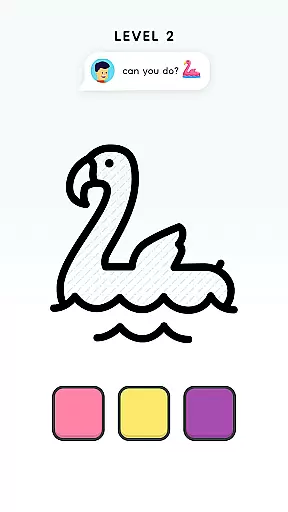






















Color Page ASMR is a creative simulation app that transforms your device into an endless coloring book. Designed for art enthusiasts of all ages, this app offers hundreds of beautifully designed images across diverse categories such as animals, nature, and more. Each picture features simple outlines and vibrant color schemes, providing both relaxation and inspiration.
The app's dual functionality allows users to either follow guided patterns or unleash their creativity by choosing custom colors. This makes it not only a tool for stress relief but also a platform for artistic skill development. Whether you're looking to improve your drawing abilities or simply enjoy some therapeutic coloring, Color Page ASMR delivers a satisfying experience that combines digital convenience with traditional art techniques.
One of the standout features of Color Page ASMR is its extensive library of images. With hundreds of pictures spanning various themes like animals, science, and vacations, users have limitless options for creative expression. The app provides both structured coloring guidelines and the freedom to experiment with different color combinations, allowing for personalized artwork creation.
Beyond basic coloring, the app serves as a learning tool for aspiring artists. Its carefully designed templates help users develop real-world drawing skills by providing easy-to-follow outlines that can be recreated on paper. Additionally, the app's user-friendly interface ensures a smooth and relaxing experience, while its anti-stress properties make it perfect for quick mental breaks throughout the day.
The combination of digital convenience and traditional art techniques creates a unique experience that appeals to both casual users and serious artists. The app's ability to save progress and revisit artworks adds another layer of practicality, making it a comprehensive solution for creative expression and skill development.
In Color Page ASMR, the economic system is cleverly embedded within the game's core mechanics. The game offers a variety of in-app purchases and upgrades that enhance the coloring experience without being intrusive. These include different brushes, color palettes, and exclusive images that can be unlocked through virtual currency earned by completing pictures or purchased directly.
The dynamic feedback mechanism is evident as players receive instant visual responses when selecting colors and applying them to their artwork. This real-time interaction not only makes the process more engaging but also helps users understand how each choice affects the overall appearance of their creations. As they progress, players unlock new tools and features, creating an evolving ecosystem where creativity flourishes alongside skill development.
For users, this means a balanced approach to monetization that doesn't compromise the relaxing nature of the app. They can enjoy countless hours of artistic expression while having the option to enhance their experience with additional resources. This thoughtful integration ensures that both casual players and dedicated artists find value in the game's offerings.
Ultimately, the economic system in Color Page ASMR serves to enrich the user's creative journey rather than hinder it. By providing meaningful choices and rewarding progression paths, the game maintains its position as a top-tier simulation app for budding digital artists worldwide.
Color Page ASMR excels in resource management by offering players a well-balanced system that encourages creativity without overwhelming them. The primary resources in the game are virtual paints, brushes, and coloring pages, which are distributed thoughtfully to ensure a steady flow of content and maintain player interest over time.
Players begin with a basic set of tools and gradually unlock more sophisticated options as they complete pictures. This progression system is designed to keep users engaged while teaching them valuable lessons about resource allocation and planning. For instance, choosing which images to color first might depend on available colors or desired complexity, promoting strategic thinking even within this seemingly simple activity.
The game strikes an impressive balance between accessibility and challenge. While all necessary resources are obtainable through regular gameplay, optional premium items provide additional convenience for those who prefer faster access to advanced features. This dual approach caters to both casual hobbyists and serious art enthusiasts, ensuring everyone finds their perfect pace.
By maintaining this equilibrium, Color Page ASMR creates an environment where players feel empowered to experiment and grow their skills at their own speed. The result is a satisfying simulation experience that keeps users coming back for more artistic adventures while managing their virtual resources effectively.
User-friendly interface
Variety of image categories
Customizable color options
Stress-relief functionality
Skill development potential
Limited advanced tools
Some features may require purchase
Occasional performance issues
Basic social sharing options
Learning curve for beginners

An Atmospheric Vehicle Adventure Game
 4.60
4.60
Multiverse in shambles? There's a goat for that. Play on mobile now!
4.60
Start painting, match paint, merge colors and get creative in this coloring game
4.60
Merge and mine to become Gold Tycoon in this clicker game - idle Zombie Miner.
4.10
Life Business empire rich game. Boss millionaire idle games. Idle office tycoon
4.60
Inspect papers, Prevent smuggling—keep border safe or profit from corruption.
4.30
Play classic and popular PS3 games on your Android device!
3.90
A babysitting horror game
4.20
Create incredible parks in the original rollercoaster sim enhanced for mobile.
3.80
A town sim where you raise generations of residents.
4.90
Your Empire Awaits: Forge a Realm in This City-Building Idle Game!
4.80
Explore the open world and run your business empire in this real life simulator!
4.50
Build rockets, airplanes, and more and explore highly detailed 3D planets.
4.30
Merge chips, craft upgrades, and power up your microcircuit to earn more!
4.30
Raise crops and animals in this farming simulator!
4.20
Cook in the kitchen, Serve food: Manage the dash fever in my restaurant games!
4.20
Build your base, fight zombies, and survive the post-apocalyptic war!
4.20
Rediscover your engineering creativity in this bridge building masterpiece.
4.10
Play on ANY CITY in the world!
3.70


User Reviews