
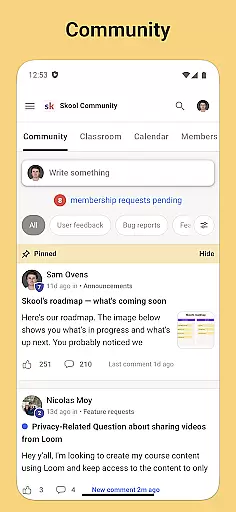

Skool is a dynamic social platform designed to keep users engaged with their online communities through an accessible mobile experience. The app serves as a hub for community interaction, offering features like group discussions, event tracking, and direct messaging. With Skool, users can actively participate in discussions through posts and comments while receiving real-time updates via push notifications. This makes it an essential tool for those seeking to maintain constant connection with multiple communities on the go.
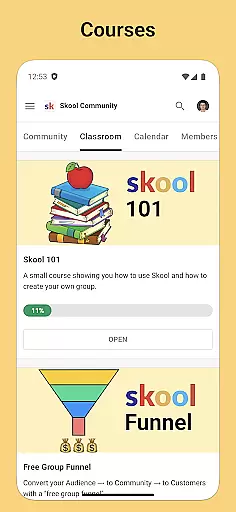
In addition to its discussion capabilities, Skool also supports educational engagement by providing access to courses that include both video and text-based lessons. Users can enhance their learning experience without being tied to a desktop, making it ideal for individuals who value both knowledge sharing and community building. Whether you're looking to engage in meaningful conversations or expand your learning horizons, Skool offers a comprehensive solution tailored to modern social needs.
Skool stands out with its robust set of features designed to foster community interaction and streamline communication. One of its core functionalities is the Community section, where users can create and engage in group discussions using posts and threaded comments. This feature not only encourages collaboration but also helps build stronger connections among members. Additionally, the app provides a Courses module, enabling users to learn from multimedia lessons that cater to various learning styles.
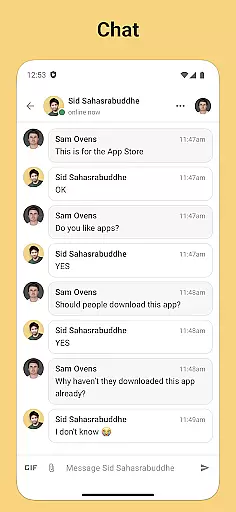
Beyond communication and education, Skool incorporates practical tools such as a Calendar for tracking upcoming community events and a Chat function for private messaging within communities. These features ensure users never miss important happenings and can communicate seamlessly with peers. Push notifications further enhance user engagement by delivering timely updates. By combining these diverse yet complementary features, Skool delivers a well-rounded social experience that prioritizes connectivity, learning, and organization.
User profile customization is a crucial aspect of any social platform, allowing users to express their individuality and establish their digital identity. Skool offers a comprehensive profile setup where users can input various details about themselves, ranging from basic information to more personalized content such as interests and expertise.
Authenticity verification is equally important in creating a trustworthy community. Skool incorporates a verification system that helps ensure the people you interact with are who they claim to be. This process not only deters fake accounts but also enhances the overall quality of interactions within the community.
By providing robust options for profile customization alongside a stringent verification process, Skool empowers its users to create genuine connections. Members can trust that they are engaging with real individuals, thus fostering a more meaningful and productive online environment.
The combination of these features results in an enhanced user experience, where personal expression and trustworthiness go hand-in-hand, making every interaction within the Skool communities both authentic and valuable.
Connection discovery is a pivotal feature in social applications, enabling users to find and connect with like-minded individuals. Skool's platform is designed to facilitate this process by implementing intelligent algorithms that suggest potential connections based on shared interests, participation in similar courses, or involvement in the same community discussions.
Skool allows members to easily navigate through different groups and discussions, promoting serendipitous encounters with new contacts. The app's course feature further enhances connection discovery by grouping users who are interested in the same educational content, thereby laying the groundwork for networking and collaboration.
With the inclusion of direct messaging capabilities, Skool ensures that once a potential connection is discovered, reaching out and establishing communication is seamless. This ease of initiating conversations helps transform initial contact into lasting professional or personal relationships.
Ultimately, Skool's approach to connection discovery enriches the social experience by helping users expand their networks in a relevant and engaging manner, ensuring that every member can derive maximum value from being part of the community.
User-friendly interface
Real-time notifications
Integrated learning modules
Event tracking system
Private messaging options
Limited customization
Occasional bugs
Requires constant updates
Heavy on notifications
No offline mode

Video call and chat, live stream and making friends around the world!
 4.60
4.60
Watch, Edit, Upload and Share Gaming Clips
4.00
Meet Strangers Online, Live Video Chat & Make Random Video Calls on Joi!
4.30
Meet local people, make friends & network: Join a community, group, host events
4.00
Live video chat to connect with people around the world. Video chatting on Olive
4.40
Date single & make friend
4.60
Dating for singles. Meet lonely people nearby online. Find your match here!
4.20
Unlimited calls & texts | WiFi voice line plus group txt | Call & text now
4.50
Instant messaging — simple, fast, secure, and synced across all your devices.
4.00
Raise cute Pengus with friends
4.70
Widget Together, Share Whatever! Keep Pets & Share Sleep, Poop, Moods on Screens
4.70
Live pics from your friends - Only the photos you want to see
4.60
Build Your Team With One App
4.30
Looking for a date or a friend? Swipe to match and meet open-minded singles.
4.20
Positive social
4.20
Honest dating app where real people find genuine love and real matches.
4.20
Meet online & chat with people! Talk, have fun, make connections in real time!
4.00
Find your next obsession.
3.50
Follow the Truth! Join America's leading free-speech social platform.
3.10


User Reviews