

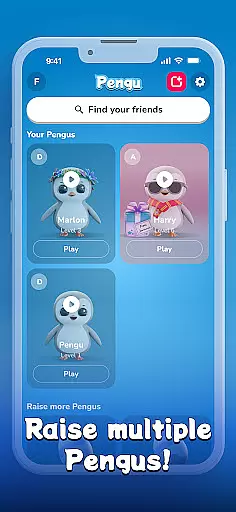





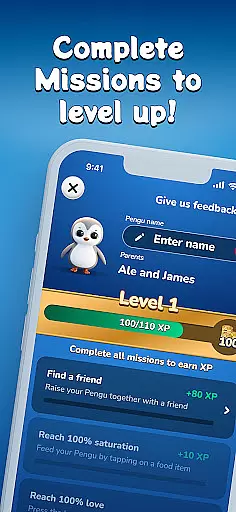
Pengu is a virtual pet social app that allows users to raise and nurture their own digital penguin while connecting with friends. The core feature of the app is co-parenting, where you can collaborate with friends or family to take care of your Pengu. This interactive experience lets users customize their pet's environment by adding outfits, accessories, and wallpapers, making each Pengu unique. Additionally, the app offers mini-games that provide an engaging way to earn in-app currency, which can be used to unlock exclusive items. With its focus on social connectivity, Pengu also provides a widget that keeps your pet accessible directly from your home screen, ensuring you stay connected to your virtual companion at all times.
Whether you're looking for a fun way to pass time or seeking to strengthen bonds with friends through shared responsibilities, Pengu offers a delightful mix of pet care, gaming, and social interaction. Its combination of customization options, collaborative features, and regular rewards ensures that users remain engaged while fostering meaningful connections with others.
Pengu stands out with its diverse range of features designed to enhance user engagement and social interaction. One of the key highlights is the co-parenting functionality, allowing multiple users to share the responsibility of raising a virtual penguin. This feature not only fosters teamwork but also strengthens relationships as users work together to keep their Pengu happy and healthy. Another notable aspect is the extensive customization available within the app; users can personalize nearly every aspect of their pet’s life, including outfits, accessories, and living space decor, providing a creative outlet and enhancing emotional attachment to their Pengu.
In addition to these core features, Pengu includes several mini-games that offer both entertainment and practical benefits. By playing these games, users can earn coins that are redeemable for new items, creating a rewarding loop that encourages continued use. Furthermore, the app incentivizes consistent engagement by offering regular rewards for taking good care of your Pengu. Lastly, the inclusion of a convenient home screen widget ensures that your virtual pet remains easily accessible, keeping users connected to their Pengu throughout the day. These thoughtful design elements make Pengu a standout choice in the realm of virtual pet applications.
User profile customization is a crucial aspect of any social application as it allows users to express their individuality and create a unique digital identity. In Pengu, this feature takes on an exciting twist by letting users customize not just their personal avatars but also the virtual space of their penguin. The ability to add outfits, accessories, and wallpapers ensures that each user's Pengu is a reflection of their personal taste and style.
Authenticity verification adds another layer of trust and security within the app. By implementing features that verify the authenticity of user profiles, Pengu fosters a safe environment where users can confidently engage with others. This process may include verifying user details through various checks or associating real-life actions with in-app activities, thus ensuring that every interaction is genuine.
The combination of extensive customization options and robust authenticity verification makes Pengu stand out in the Social category. Users benefit from an immersive experience where they can truly be themselves while also being assured of the legitimacy of their connections. This dual focus enhances both personal expression and community trust, which are essential for meaningful social interactions.
Connection discovery is a pivotal feature in social apps like Pengu, designed to help users find and connect with friends, family, and like-minded individuals. Through co-parenting functionalities, Pengu encourages collaboration by allowing users to team up with friends and loved ones to raise their virtual penguins together. This shared responsibility not only strengthens existing relationships but also facilitates the creation of new bonds within the app's community.
Pengu employs intelligent algorithms to recommend potential connections based on common interests, interactions, and gameplay patterns. These recommendations ensure that users are presented with relevant opportunities to expand their social circles. Moreover, engaging mini-games and rewarding systems incentivize regular interaction, further promoting active participation within the community.
By integrating connection discovery seamlessly into its ecosystem, Pengu offers more than just a platform for raising virtual pets; it creates a vibrant social network centered around shared experiences and mutual engagement. Users enjoy enhanced connectivity, continuous engagement, and the joy of building lasting relationships, all while nurturing their adorable penguins.
User-friendly interface
Engaging mini-games
Customizable pet environment
Social co-parenting feature
Regular reward system
Limited pet variety
Occasional bugs
Ads between games
Coin earning is slow
Some items are pricey

Global short video platform: epic effects, trending videos & vibrant community!
 4.40
4.40
Meet Strangers Online, Live Video Chat & Make Random Video Calls on Joi!
4.30
Live video chat to connect with people around the world. Video chatting on Olive
4.40
Follow the Truth! Join America's leading free-speech social platform.
3.10
Sell unwanted items and buy preloved stuff in your local community.
4.10
The official Skool app. Stay connected to your communities on the go.
4.20
Watch 24/7 great live stream, or go live to boost your social followers!
4.50
TikTok Lite - Designed for speed, simplicity, and saving your phone’s space!
4.40
Join your friends and discover videos you love, only on TikTok
4.10
Widget Together, Share Whatever! Keep Pets & Share Sleep, Poop, Moods on Screens
4.70
Get your NGL Link
4.60
Reddit is where you’ll find your people and feel at home in every conversation.
4.60
A gathering place for 300 million people's life interests and hobbies
4.30
Second phone number for phone calls & texts. Text & SMS me now with a 2nd number
4.20
A warm, simple dating app for adults seeking real connection.
4.20
Discover an open-minded dating experience when you download today
4.10
The world's leading social networking app for gay, bi, trans, and queer people.
4.10
Unlimited messages, WiFi Calling, Texting app. Text now with Second Phone Number
4.10
Watch, Edit, Upload and Share Gaming Clips
4.00


User Reviews