
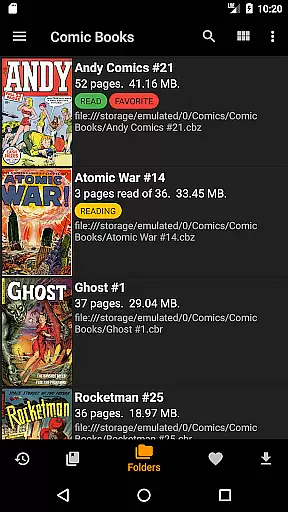
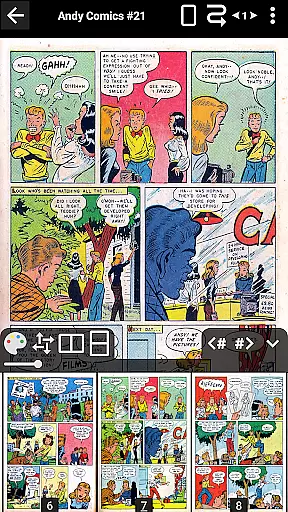
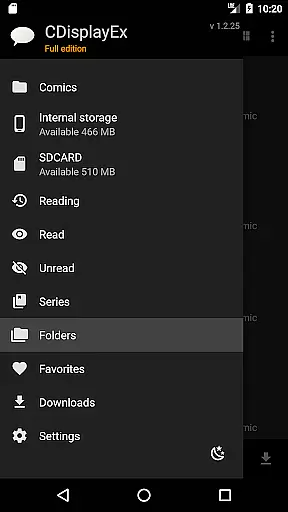
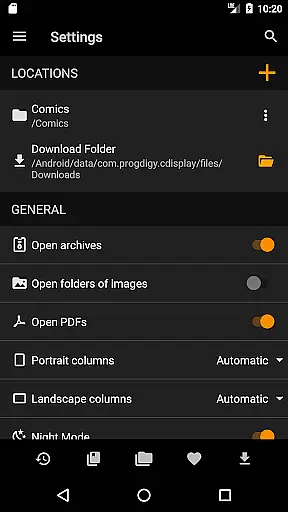
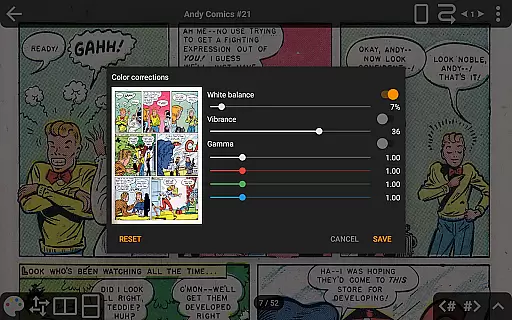
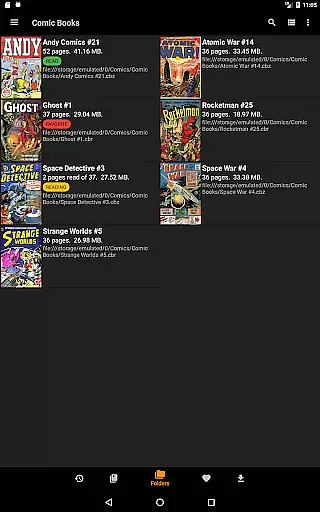
CDisplayEx Comic Reader is a premier comic book reader designed for enthusiasts who demand both functionality and performance. This app supports all major comic formats including .cbr, .cbz, and .pdf, making it versatile for various reading preferences. Its hallmark is the immediate loading capability and fluid reading experience, ensuring users can seamlessly browse through their favorite comics.
Beyond basic reading, CDisplayEx offers advanced features such as continuous page scrolling in both horizontal and vertical orientations, advanced scaling options, and support for multiple cloud services like OneDrive and Dropbox in its Pro version. The app also integrates library management, allowing users to organize their collections by series and easily find volumes through an integrated search function.
Whether you're at home or on the go, CDisplayEx provides a comprehensive solution for comic lovers, enhancing the digital reading experience with features like night mode, S-Pen support, and bookmarking capabilities.
CDisplayEx Comic Reader stands out with its robust feature set tailored for comic aficionados. The app's ability to handle all comic formats ensures that no matter the source file, users will enjoy a seamless reading experience. Advanced page scaling options allow readers to customize their view precisely, while continuous page scrolling in both directions caters to individual reading styles.
The Pro version unlocks additional functionalities such as access to cloud services like OneDrive, Dropbox, Komga, Kavita, and Mega, enabling users to manage their libraries across devices effortlessly. Network file opening without full downloads (Samba) and image export functions further enhance usability, especially for those managing extensive collections.
Library management features are another highlight, offering automatic grouping of comics by series and suggesting the next album to read. Integrated search capabilities ensure quick access to specific volumes, while extras like night mode, customizable interface language, and S-Pen support provide a personalized touch to each user's experience.
CDisplayEx Comic Reader offers an extensive and versatile comic library that caters to a wide array of preferences. The application supports all popular comic book formats, including .cbr, .cbz, and .pdf files, ensuring that users can access their favorite comics without compatibility concerns.
The integrated library management system allows users to organize their collections efficiently. By simply indicating where your comics are stored, the reader groups them by series or suggests the next album to read in your collection. This feature not only enhances the user experience but also simplifies navigation through vast libraries.
Additionally, CDisplayEx provides an integrated search function that enables users to find specific volumes instantly. Whether you're looking for a particular issue or exploring new series, the app's powerful search capability ensures quick and easy access to your desired content.
Authenticity and proper licensing are crucial aspects of any digital content platform, and CDisplayEx Comic Reader excels in these areas. The app ensures that all comics available through its platform are properly licensed, providing users with peace of mind regarding copyright compliance.
Moreover, CDisplayEx supports connections to various cloud storage services such as OneDrive, Dropbox, Komga, Kavita, and Mega in its Pro version. These partnerships further reinforce the legitimacy of the content accessible via the app, as they involve authorized and regulated platforms.
By prioritizing content authenticity and adhering to licensing agreements, CDisplayEx not only respects intellectual property rights but also fosters trust among its user base. Users can enjoy their reading experience knowing that the content they access is both legal and ethically sourced.
User-friendly interface
Supports multiple formats
Advanced scaling options
Cloud service integration
Efficient library management
No Google Drive support
Pro version is paid
Limited free features
Occasional bugs reported
Interface can be complex

A free paradise specially built for comic lovers. When you step into this comic universe full of surprises, it is like opening a door to endless joy. You are immediately immersed in the wonderful world brought by reading and enjoy the infinite charm of reading.
 4.3
4.3
Read manga, comics, and manhwa
4.1
Daily updates & FREE chapters
4.00
Official digital-manga store. Quality translations that support artists.
3.10
Comic reader app: open ZIP, RAR, CBZ, CBR, and PDF files
3.00
File management and show images, comics and pictures in compressed cbr, pdf file
4.70
Artists wanting to use decent hand reference on the go, this app is for you!
4.70
Read Manga, Comics & Manhwa of Romance, Action, Fantasy, Drama, BL and more!
4.40
Get the latest manga chapters daily, released simultaneously with Japan.
3.10
Official from Japan
4.80
Find free mangas in Spanish
4.70
A gathering place for a massive collection of genuine comics.
4.50
Draw the comics with glow brushes! Easy and relax!
4.40
Discover manga stories & stream anime series with unlimited entertainment access
4.40
Read latest manga with this minimal reader with NO ADS.
4.30
Read comics, manhwa, manga & novels Official webtoons with daily updates
4.30
Browse and read all your comics and mangas from YACReaderLibrary
4.20
Arabic manga reader
4.00
More fun from BOM! Hurry up and do the following self-test, if you meet more than one item, come and experience the brand new world of comics!
3.40


User Reviews