

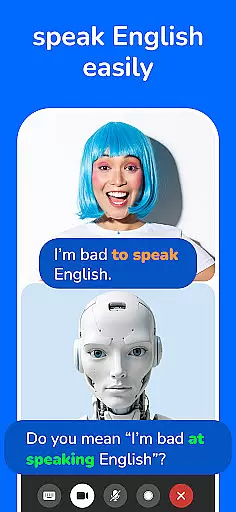
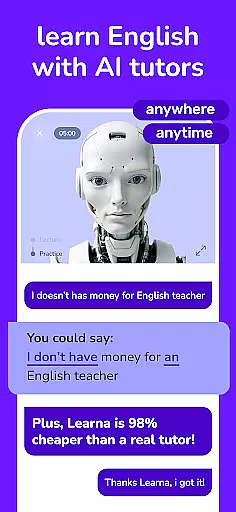
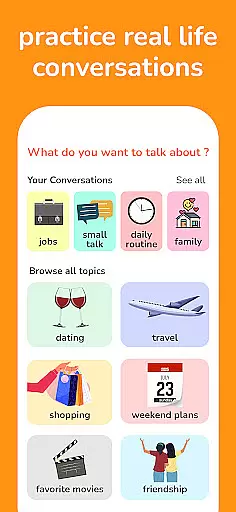
Learna is an AI-powered language learning app designed to help users master English or Spanish effectively. The app offers interactive grammar lessons, vocabulary builders, pronunciation tools, and real conversation practice, making it suitable for both beginners and advanced learners. With its personalized approach, Learna ensures that users can learn at their own pace while building confidence in speaking, listening, and writing skills.
One of the standout features of Learna is its AI Virtual Chat Character, which provides tailored support and real-time feedback during language practice sessions. This innovative tool allows users to engage in meaningful conversations, helping them refine their pronunciation and expand their vocabulary. Whether you're practicing daily conversations or focusing on specific language aspects like grammar and spelling, Learna adapts to your needs and goals.
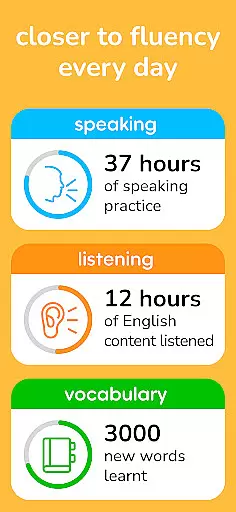
The app's comprehensive tracking system enables users to monitor their progress through detailed performance metrics and milestones. By setting specific learning objectives, users can celebrate achievements and stay motivated throughout their language-learning journey. Learna transforms traditional language education into a dynamic, engaging experience that empowers users to speak confidently and fluently.
Learna stands out with its diverse range of features tailored to enhance language acquisition. One of the core functionalities is the AI-driven conversation practice, where users can engage in interactive dialogues with the Learna AI Virtual Chat Character. This feature not only improves speaking and listening skills but also provides instant feedback on pronunciation and grammar mistakes, ensuring continuous improvement.
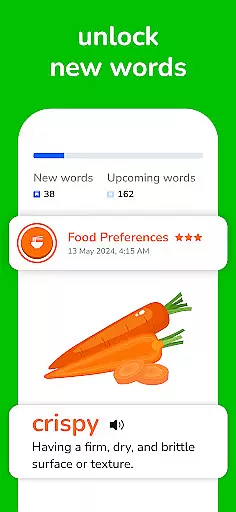
In addition to conversation practice, Learna offers specialized lessons in grammar, vocabulary, and reading skills. Users can access tailored grammar exercises that reinforce essential rules and structures, while vocabulary builders introduce practical words and phrases for everyday use. The app also includes pronunciation exercises designed to help users sound more authentic, along with spelling checks to refine written communication.
Another significant advantage of Learna is its progress-tracking system, which allows users to set goals and measure achievements over time. Detailed analytics provide insights into areas of strength and opportunities for improvement, keeping learners focused and motivated. With these robust features, Learna creates a holistic learning environment that caters to various aspects of language mastery.
When learning a new language, having accurate and authoritative content is crucial for effective progress. Learna ensures that all its lessons are meticulously crafted and reviewed by language experts to guarantee correctness in grammar, vocabulary, and pronunciation guidance. This attention to detail provides learners with reliable information they can trust.
The app's content undergoes rigorous checks to maintain high standards of linguistic precision. Each lesson is designed not only to teach but also to reinforce proper usage through interactive exercises. By engaging with these verified materials, users develop a solid foundation in English or Spanish, avoiding common pitfalls associated with less scrupulous resources.
Users benefit from this commitment to quality as they advance through their language-learning journey. With Learnau2019s authoritative content, learners gain confidence in their speaking and writing abilities, knowing that the information they receive adheres to recognized language norms. This assurance empowers them to communicate effectively in real-world situations.
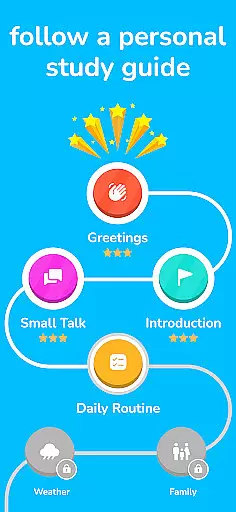
A personalized approach to learning can significantly enhance the educational experience. Learna leverages AI technology to create tailored learning paths for each user based on their current proficiency level and specific goals. This customization ensures that every learner receives an individualized plan that addresses their unique needs and aspirations.
The adaptive algorithms within Learna continuously assess performance and adjust the difficulty and focus of lessons accordingly. As users interact with various modules such as grammar drills, vocabulary builders, and pronunciation exercises, the system refines its understanding of their strengths and weaknesses. This dynamic adjustment process optimizes the pace at which learners acquire new skills.
By following these customized learning paths, students remain engaged and motivated throughout their studies. They see tangible improvements in areas where they need it most while reinforcing existing competencies. Ultimately, this personalized strategy leads to more efficient learning outcomes and greater overall satisfaction with the language acquisition process.
User-friendly interface
Real-time feedback
Personalized learning paths
Comprehensive grammar lessons
Engaging conversation practice
Limited language options
Requires constant internet
Premium features costly
Occasional AI errors
No offline mode

Learn math, step-by-step
 4.30
4.30
Astronomy app ? Discover the universe scope, explore solar system model in 3D.
4.20
Welcome to the Speak Navajo Language Application - Volume 1
4.50
Explore numbers the Starfall way!
4.00
Your best partner for learning Japanese words. Based on a best-selling textbook.
2.90
Animals pop up and make sounds—learn names and noises in Peekaboo Barn!
4.3
Stargazing Guide App. Stars and constellations map. Solar system planets finder.
4.60
The "Go To" app for Airmen studying for promotion to SSgt and TSgt
4.30
School Communication
4.30
The best way to study for your amateur radio license exam.
4.90
2026 DVSA Driving Theory Test revision with Hazard Perception + Highway Code
4.60
A fast and fun way to learn guitar - works with any guitar.
4.60
An interactive enhancement of the Sesame Street classic.
4.50
A magical world of fun, building, and learning with Mickey Mouse and more!
4.20
Build math skills in: addition, subtraction, multiplication and division.
4.10
An aviator’s preparation, study and test tool for FAA Knowledge Exams.
3.90
Visit Daniel's house & make believe. Play doctor, make music, & feed fish.
3.20
Study the questions most likely to be asked during the Oral & Practical Exams.
2.80
A 2024 digital study guide for the Expert Infantryman and Expert Soldier's Badge
4.4


User Reviews