
Lithium Pro is a premium upgrade for the free Lithium app, designed to enhance your reading experience. This app unlocks advanced features that allow users to sync their data across multiple devices via Google Drive, ensuring seamless access to their library. With customizable themes, readers can personalize their interface by adjusting background and text colors. The Pro version also offers additional highlight colors and promises more features in future updates.
Designed specifically for book enthusiasts, this application provides tools that help organize and enrich your digital reading collection. Whether you're managing an extensive library or simply looking to customize your reading environment, Lithium Pro delivers essential functionalities that cater to both casual readers and serious bibliophiles.
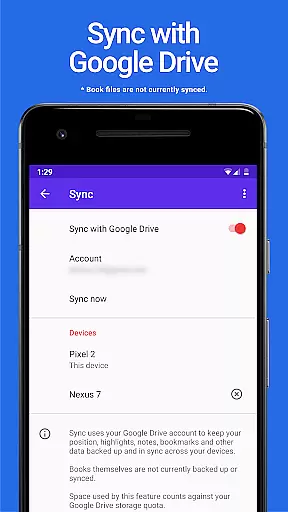
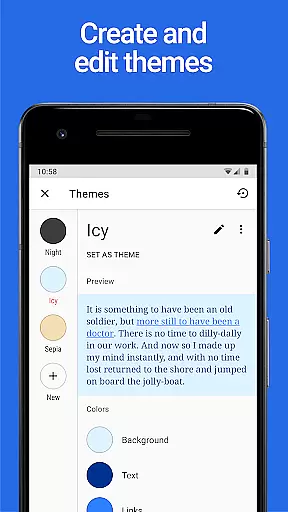
The standout feature of Lithium Pro is its robust syncing capability, which uses Google Drive to maintain consistency across all your devices. This ensures that your reading progress and notes are always up-to-date, no matter where you left off. Another significant advantage is the custom themes option; users can tailor the appearance of their app with various color schemes for backgrounds and texts.
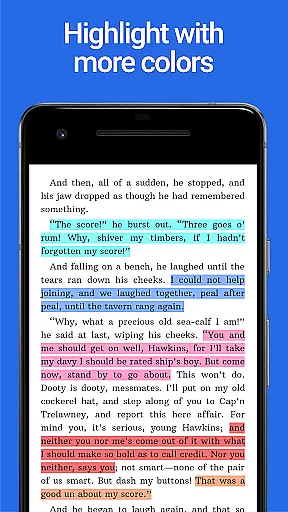
In addition to these core functionalities, Lithium Pro offers extended highlight colors, allowing for better annotation and organization of key passages within books. These enhanced features collectively provide a richer, more personalized reading experience. While current offerings focus on usability and aesthetics, the developers plan to introduce even more tools in upcoming releases, making it a continuously evolving product tailored to reader needs.
When it comes to e-books, the size of the library and the authenticity of copyrights are crucial factors for any avid reader. Lithium Pro ensures that users have access to a vast array of books, all while maintaining the integrity of copyright laws. This app works in tandem with the free version of Lithium, enhancing it with Pro features once installed.
The application leverages Google Drive to keep your data backed up and synchronized across multiple devices, ensuring you never lose your place in a book or your personal settings. Although the books themselves aren't currently included in this sync, the convenience of having your reading preferences at your fingertips on any device is invaluable.
By providing users with the ability to customize themes and offering additional features like more highlight colors, Lithium Pro demonstrates its commitment to not only expanding its e-book offerings but also enhancing the overall reading experience. These features ensure that readers can tailor their environment to suit their tastes, making every reading session both personalized and protected under copyright law.
Format compatibility is a significant aspect of any e-reading application, determining how well it can support various file types and deliver content to users. Lithium Pro excels in this area by integrating seamlessly with the free Lithium app, thereby activating Pro features that extend its format support capabilities.
Once you've installed Lithium Pro alongside the free app, you gain access to advanced functionalities such as custom themes, which allow you to modify page background color, text color, and link colors. This level of customization is indicative of the app's broader commitment to supporting diverse formats and user preferences.
Moreover, Lithium Pro promises even more features in the future, suggesting an ongoing effort to improve compatibility with different formats and enhance the reading experience. With these tools at your disposal, you can enjoy a versatile and dynamic reading experience that caters to your specific needs and adapts to various e-book formats.
Enhanced Syncing
Customizable Themes
Extended Highlight Colors
Future Feature Updates
Seamless Integration
No Book Backup
Requires Free App
Limited Initial Features
Premium Price Tag
Google Drive Dependency

Bilingual dictionary with English translations of Modern Standard Arabic words.
 4.30
4.30
This is the pro version King James bible Offline that we have
4.70
Knots 360 Pro ( 3D ) shows you animated 192 knots in 3D perspective
4.10
Translate into 100+ languages with the world’s most accurate AI translator.
4.70
Universal Zoom, learn about sizes & distances of the universe and microcosmos
4.80
"When tweetle beetles fight, it's called a tweetle beetle battle."
4.90
America's best dictionary and thesaurus - with premium content and no ads
3.40
Calculate, Knowledge, Homework
4.40
Learn to tie more than 200 knots in 3D!
4.90
What’s that bird? Just answer 5 questions, snap a photo, or record its song!
4.90
Daily rosary and gospel reflections for catholic
4.90
Bible, Catechism, Study, Saints, Mass Readings, Rosary, Prayer, Bible in a Year
4.80
Read and study the Bible and other content in over 1,000 languages.
4.80
Read unlimited novels, audiobooks, stories & Unlock ebooks, fanfiction and more!
4.70
Read aloud texts, audiobooks, PDFs or any eBook with text to speech AI audio
4.60
Master AKC Rally signs with in-depth hints, diagrams, and expert guidance.
4.50
Zerobooks Light Novel Reader by GOLDENAGATO
4.20
Novels, audiobooks, ebooks & fanfiction. Read anytime, anywhere!
3.40
Battle Royale Chapter 5 Season 2 HD Wallpapers Emotes Skins and BattlePass
3.00


User Reviews