


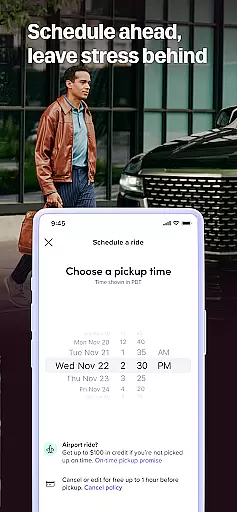

Lyft is a leading transportation app that offers multiple ways to get around, from ride-hailing services to bike and scooter rentals. The app provides users with upfront pricing, real-time tracking, and various ride options tailored to different budgets and needs. Whether commuting to work, heading out for the night, or catching a flight, Lyft ensures reliable and efficient travel solutions.
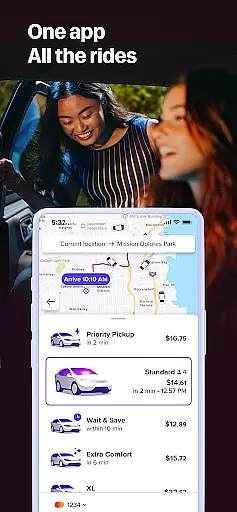
The app's intuitive interface allows users to easily input their destination, view route options, and choose from a variety of ride types including Priority Pickup, Wait & Save, and even public transit directions. Lyft also supports eco-friendly travel options like bikes and scooters, making it a versatile choice for modern commuters.
Lyft stands out with its comprehensive set of features designed to enhance user convenience. Key functionalities include real-time GPS tracking, multiple ride options such as Lyft XL and Lux, and integration with public transit systems in select cities. Users can also take advantage of the app's Priority Pickup feature for faster departures.
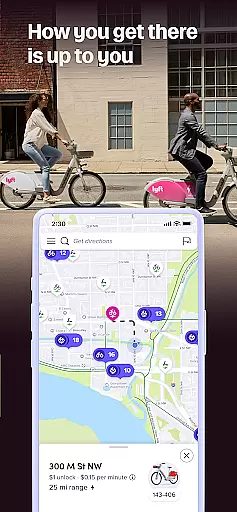
In addition to traditional rides, Lyft offers affordable alternatives like Wait & Save and eco-conscious options such as bike and scooter rentals. The app's dynamic pricing model adjusts costs based on current market conditions, ensuring competitive rates while maintaining transparency about price variations before booking.
Map accuracy is a crucial feature for any navigation app, and Lyft excels in this area. The app provides precise location data, ensuring that users can rely on the map to reach their destinations without any hiccups. With real-time updates and comprehensive coverage, Lyft's mapping functionality supports seamless travel experiences.
The application leverages advanced GPS technology and mapping data to offer highly accurate location tracking. Whether you are traveling through bustling city streets or quieter suburban roads, Lyft ensures that your route is depicted correctly. This precision helps drivers locate passengers quickly and assists riders in finding their way if they choose to walk part of the journey.
For users, this means less time spent worrying about wrong turns or missed stops and more confidence in navigating unfamiliar areas. Accurate maps enhance the overall usability of the Lyft app by providing dependable information that contributes to efficient trip planning and execution.
Route planning is an essential aspect of the Lyft app, designed to make your travel as efficient as possible. By analyzing various factors such as traffic conditions, road closures, and historical data, Lyft offers optimal routes tailored to each ride. This ensures minimal travel time and a smoother journey for both drivers and passengers.
The app provides multiple route options, allowing users to select their preferred path based on personal priorities like avoiding tolls or highways. Real-time updates keep the routes relevant even if conditions change during the trip. Additionally, estimated arrival times are continuously adjusted to reflect current circumstances, keeping users informed every step of the way.
With Lyftu2019s intelligent route planning, users benefit from reduced travel stress and enhanced predictability. Knowing that the chosen route is optimized for speed and convenience allows passengers to relax and enjoy the ride while drivers can focus on getting to the destination safely and efficiently.
User-friendly interface
Multiple ride options
Transparent pricing
Eco-friendly alternatives
Reliable service quality
Limited regional availability
Variable pricing structure
Occasional surge pricing
Dependent on driver availability
Public transit info not universal

Find AI powered cameras, ALPRs, and other surveillance infrastructure near you
 4.70
4.70
Route schedules, maps, and real-time tracking of MTA buses in New York City.
4.20
Airport parking, with airport shuttle (TPS shuttle), reservations, and Spot Club
4.80
America’s largest public fast charging network, with over 500 charging stations.
4.50
Navigate confidently with our precise Digital Compass app & Direction Compass!
4.70
Phone Tracker and GPS Location Sharing
4.20
Simple & easy to use a compass app. Get accurate directions.
4.20
Park in Chicago, NYC, Boston, SF, Houston & more!
4.70
Track friends in real-time and explore worldwide live cameras.
4.60
Find EV & Tesla charging stations with PlugShare
4.70
Route tracker, Speedometer, Odometer, Fuel, HUD mode, save route as .GPX
4.40
Find radar maps, GPS coordinates, altitude, offline maps, location, travel route
4.40
GPS navigation offers route finder, compass, translator, currency converter, etc
4.30
Avoid delays. Get real-time GPS navigation, safety alerts and live traffic.
4.10
GPS Navigation: Get map directions and find the shortest routes to avoid delays!
4.00
Navigation, weather, offline maps & tools for smarter, safer travel planning.
4.00
Get real-time bus and train schedules for easy, hassle-free city transportation.
3.90
Play in the outdoors with Android as your Handheld GPS and offline topo maps!
3.50
Fully offline 1:50k New Zealand topographical map North Island
4.4


User Reviews