

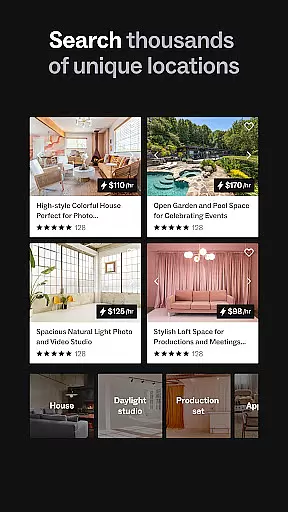
Peerspace is a leading platform for booking unique spaces by the hour, designed to cater to both hosts and guests. The app provides access to a wide variety of venues including photo studios, meeting rooms, backyards, and bars in cities worldwide. Guests can discover extraordinary locations for meetings, events, and productions, while hosts can earn extra income by listing their spaces.
The app's intuitive interface allows users to browse through diverse spaces like homes, lofts, galleries, and more. It facilitates direct communication with local hosts, making it easy to book spaces that suit specific needs. Whether you're planning a personal event or a professional gathering, Peerspace offers an extensive network of options to make your occasion memorable.
For hosts, Peerspace provides an opportunity to monetize underutilized spaces effortlessly. Listing is free and simple, allowing hosts to set their own prices and choose the activities they want to accommodate. This flexibility ensures that hosts can maximize their earnings while maintaining control over their property.
Peerspace stands out with its comprehensive features tailored for seamless space discovery and booking. One key feature is the ability to browse through thousands of unique venues, ranging from creative studios to elegant galleries. Each listing comes with detailed descriptions, high-quality photos, and user reviews, ensuring transparency and informed decision-making.
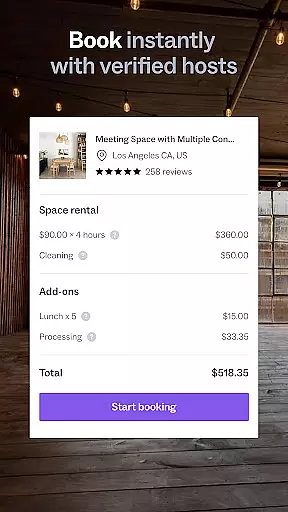
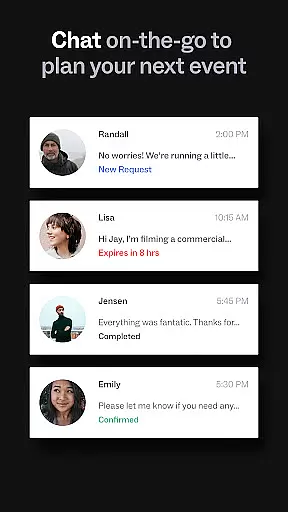
Another notable feature is the streamlined booking process. Users can easily connect with local hosts via the app's messaging system, ask questions, and confirm bookings directly on their mobile devices. Additionally, the app supports automatic notifications for new messages and booking requests, keeping users updated at all times.
For those interested in hosting, Peerspace offers tools to manage listings efficiently. Hosts can customize their space details, set pricing strategies, and receive payments directly into their bank accounts. These features empower hosts to optimize their rental business without hassle, enhancing overall user experience.
Task creation and detail customization are essential features for event planning applications like Peerspace. This functionality allows users to define specific requirements and preferences when booking spaces for meetings, events, or productions.
Peerspace offers a streamlined process where users can browse various unique venues, from photo studios to backyards, and customize booking details according to their needs. The app provides options to specify the duration, time, and additional services needed, ensuring that every booking is tailored to the user's specifications.
The benefit of this feature is evident in its ability to provide personalized experiences. Users can ensure that the space they book not only meets their logistical needs but also aligns with the thematic and aesthetic requirements of their events. This level of customization enhances the overall event quality and guest satisfaction.
Ultimately, the task creation and detail customization capabilities of Peerspace empower users to execute their events seamlessly. By allowing precise control over booking parameters, Peerspace ensures that each event is as unique as the spaces it offers, providing both hosts and guests with confidence and peace of mind.
Reminder settings play a crucial role in event management apps by ensuring users never miss an important update or booking detail. For Peerspace, this feature helps users stay informed about their reservations, messages, and any requests related to their booked spaces.
Peerspace automatically notifies users of new messages and booking requests directly through the app. This real-time communication ensures that both hosts and guests can manage their bookings efficiently and respond promptly to any inquiries or changes. Additionally, users can set up custom reminders for upcoming events, ensuring timely preparation and execution.
This functionality significantly enhances user engagement and reliability. By keeping all parties informed and up-to-date, Peerspace fosters a trustworthy environment where transactions and communications are smooth and efficient. Users can focus on their events without worrying about missing critical information.
In summary, the reminder settings in Peerspace contribute to a seamless user experience. They ensure that all users are well-prepared and informed, ultimately leading to successful events and satisfied customers. This proactive approach to communication sets Peerspace apart in the competitive landscape of event space rentals.
User-friendly interface
Wide variety of spaces
Free listing for hosts
Direct communication with hosts
Automatic notifications
Limited to certain cities
Service fees apply
Variable quality of spaces
Dependent on host responsiveness
No offline functionality

TV Garden is a video player to play your own TV streams from around the world!
 4.0
4.0
The KRUU app - plan, celebrate, remember
4.80
For weddings, parties & events
4.60
Everything you need for the Best Thursday Ever.
4.40
The official app for Sched events! View your event schedule here.
4.20
RAISE-365 makes fundraising easy and fun!
3.20
Freebie Games for Epic Games, Steam, Amazon, Rockstar etc.
4.40
Plan your wedding for free on the go: vendors, budget, website and checklists!
4.80
Discover events & experiences in NYC, LA, Chicago, DC, Miami and more!
4.70
Find Live Event Ticket Deals to Sports, Concerts, Festivals, & Comedy For Less!
4.80
Listen Full Quran MP3 Offline - Qibla Compass, Salah Timing & 99 Names of Allah
4.60
Meet people over dinner
4.40
Introducing the official Magic: The Gathering app for mobile.
4.20
Buy and sell tickets to sports, concerts, theater, festivals, and comedy events
4.10
TV Garden - World Live TV : Play & cast your videos seamlessly!
3.20
Buy event tickets easily with our user-friendly App. Stay updated on hot events
4.2
Some connections are better kept private
4.4
The Official Football Ticketing App for Fans in Qatar
4.0
Soft Proxy for Your Online World
4.0


User Reviews