
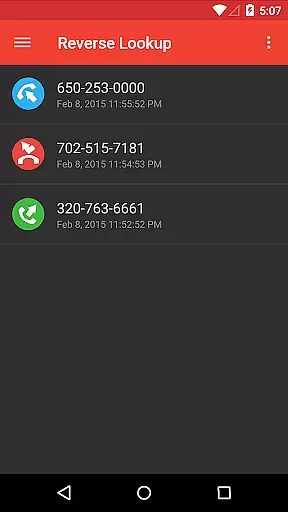
Reverse Lookup+ is a powerful communication tool designed to help users identify unknown callers and protect themselves from spam calls. The app provides detailed caller information by accessing publicly available data published by phone companies, including the caller's location when possible. This premium version is completely ad-free, offering an uninterrupted user experience while directly supporting ongoing development efforts.
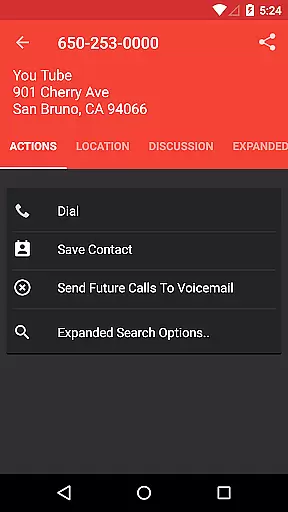
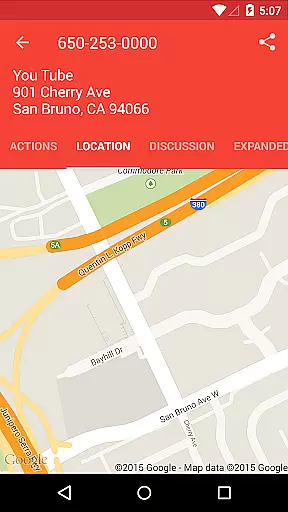
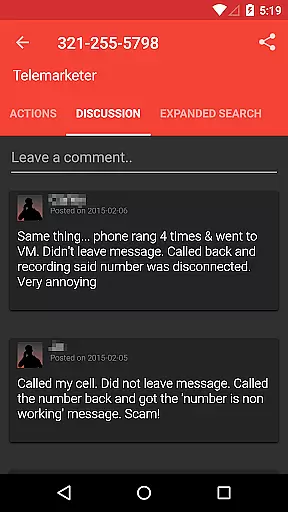
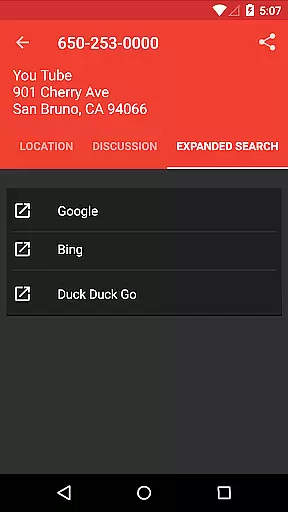
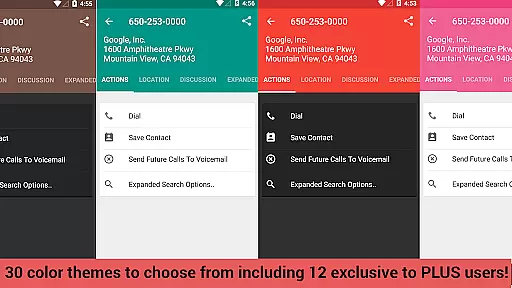
Beyond basic caller identification, Reverse Lookup+ offers advanced features that enhance user experience. Users can benefit from community insights through the comments section, save caller details as contacts, and even map the caller's location. With one-tap search expansion to popular search engines like Google, users can quickly gather more information about unknown numbers. These features make it an essential tool for maintaining control over your communication privacy.
The application proves particularly valuable in professional settings where screening calls is crucial. By enabling users to block spammers and scammers effectively, it helps prevent unwanted interruptions during important business hours. The ability to create "send to voicemail" contacts and customize notification preferences makes it an ideal solution for those who need to maintain focus while ensuring they don't miss important calls from known contacts.
Reverse Lookup+ distinguishes itself through its comprehensive feature set designed to enhance call management. The app's core functionality revolves around its ability to access and display publicly available data from phone company directories, providing users with accurate caller information. Its unique community-driven approach allows users to benefit from shared insights through the comments section, creating a collaborative environment for identifying potential spammers.
One of the app's standout features is its seamless integration with device functions and popular services. Users can easily save identified numbers as contacts, map locations when available, and expand their search through major search engines with a single tap. The application's sophisticated permission system enables advanced functionality such as automatic call filtering and voicemail redirection while maintaining transparency about data usage. These features work together to create a robust call management solution.
The app's value extends beyond basic caller identification through its proactive approach to call management. By allowing users to set up notifications for unknown numbers and automatically redirect unwanted calls to voicemail, it creates a personalized call screening system. The developers' commitment to privacy is evident in their detailed explanation of each permission requirement, ensuring users understand exactly how their data is being used. This combination of powerful features and transparent data handling makes Reverse Lookup+ a trustworthy communication tool.
Real-time messaging speed and reliability are crucial for effective communication applications like Reverse Lookup+. This app ensures that users receive instant notifications about incoming calls, allowing them to quickly identify unknown callers. The application's infrastructure is designed to minimize latency, ensuring that alerts and call details reach the user as soon as a call is detected.
The app leverages internet connectivity to access lookup databases in real time, providing immediate information on the caller. By filtering known contacts and focusing on unknown numbers, it optimizes the notification process, making sure that users are alerted without delay. This feature is particularly useful for detecting and managing spam calls efficiently.
Reverse Lookup+ also integrates with the deviceu2019s phone state to create timely notifications based on user preferences. Whether it's an alert for a potential scammer or a simple heads-up about an unrecognized number, the app delivers these messages reliably, enhancing the overall user experience by keeping them informed and in control of their communications.
Media sharing support is an essential feature for modern communication apps, enabling users to exchange various types of content seamlessly. Although Reverse Lookup+ primarily focuses on identifying and managing calls, it indirectly supports media sharing by allowing users to expand searches to popular search engines with a single tap. This functionality can help retrieve additional information about callers, including images or social media profiles, enriching the data available to the user.
In addition to its core functionalities, Reverse Lookup+ facilitates saving caller details directly into the user's contact list. While not traditional media sharing, this capability allows for an enriched contact management experience where photos and notes can be added to new contacts, improving personal organization and future interactions.
Furthermore, the app's integration with Google accounts ensures that any updates made to contacts, such as adding profile pictures or other media-related information, syncs across devices. This cross-device synchronization enhances the utility of media sharing features within the broader context of communication and contact management, offering users a comprehensive toolset for maintaining up-to-date and informative contact lists.
Ad-free experience
Community insights
Advanced blocking
Location mapping
Search expansion
Limited cellphone data
No GPS tracking
Outdated info possible
Permission intensive
Premium price

Our Black Friday sale is here. Unlock special discounts on Proton Mail now.
 4.30
4.30
Fast and mini browser with Ad Blocker,Video Downloader and Video Player
4.40
Simplify texting with Messages SMS, offline messaging, themes & smart tools!
4.30
RemoteHams.com Android RCForb Client Pre-Release
4.30
Use this SMS app standalone or as a TREK: Total Interface companion.
4.30
Weargram is an unofficial Telegram Client for Wear OS.
3.50
Threema is the messenger with the most consistent focus on security and privacy.
4.00
Manage your mobile phone plan, check unlimited 5g data usage and track rewards
4.50
Talk & text free with a second phone number plus unlimited 5G data, no fees.
4.50
فیلتر شکن قوی پرسرعت کلید جدید برای اندرویدسریع ترین وی پی ان برای همه اپراتورها
4.70
Messenger for SMS - texting message app, faster, simpler & safer, for you.
4.70
Adblock & VPN Browser: Blocks banners, pop-ups and video ads, fast downloader!
4.60
Manage BoostMobile Account
4.60
FolderSync enables easy sync of files between cloud storage and Android devices.
4.60
Connect and browse the internet with a fast VPN proxy server and IP blocker.
4.50
BiP is a fast, secure, free messaging and HD video calling app!
4.10
Share the moment!
4.10
Fast Dialer & Contact Manager with Caller ID and Spam Protection
4.00
Watchgram for Telegram: Experience seamless Telegram messaging on your watch
1.80


User Reviews