
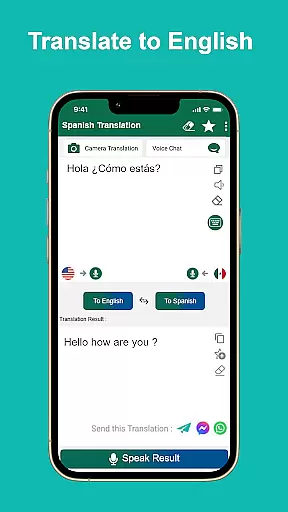
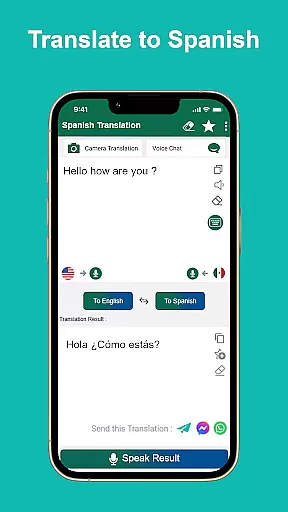
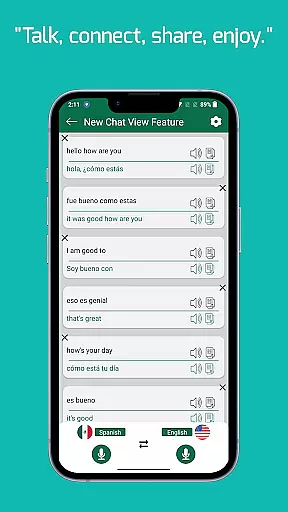
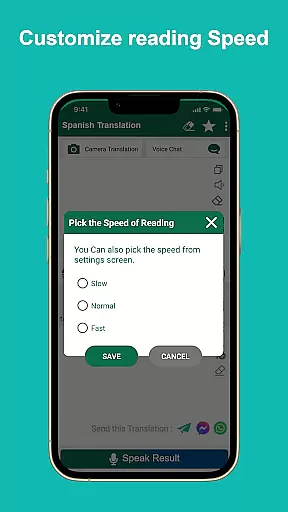
Spanish English Translator is a versatile translation tool designed to facilitate communication between English and Spanish speakers. This app allows users to translate words and texts seamlessly between the two languages, making it an essential resource for students, travelers, and professionals alike.
One of the standout features of this app is its offline functionality. Users can access translations without an internet connection, which is particularly useful when traveling in areas with limited connectivity. Additionally, the app supports voice input and speech output in both English and Spanish, enhancing accessibility and convenience.
Whether you're learning a new language, planning a trip to a Spanish-speaking country, or need quick translations for work, Spanish English Translator provides a reliable solution. Its ability to share translations with friends and contacts further extends its utility, making it a comprehensive tool for cross-language communication.
Spanish English Translator offers a robust set of features that cater to various translation needs. The app's primary function is translating text from English to Spanish and vice versa. This capability ensures that users can understand and communicate effectively in either language.
In addition to text translation, the app includes voice input functionality, allowing users to speak their queries instead of typing them. This feature is especially beneficial for those who prefer hands-free operation or need to translate spoken language quickly. Furthermore, the speech output option enables users to hear translations aloud, improving comprehension and pronunciation.
The app also functions as an offline dictionary, providing access to translations without requiring an internet connection. This makes it an invaluable tool for travelers visiting Spanish-speaking countries such as Mexico, Colombia, Argentina, and Spain. With the ability to share translations via social media or messaging apps, users can easily collaborate and communicate with others, enhancing the overall user experience.
When it comes to digital libraries, the size and authenticity of the content are crucial factors. Spanish English Translator offers a vast collection of translated texts, ensuring users have access to an extensive range of words and phrases in both English and Spanish. This app functions not only as a translator but also as a comprehensive offline dictionary.
The app guarantees the authenticity of its translations, providing accurate and reliable content that users can trust. With voice input and speech output features in both languages, users can engage with the app in a dynamic way, enhancing their learning experience. The ability to translate offline ensures that users have access to this valuable resource anytime, anywhere.
For students, tourists, or travelers looking to learn or improve their language skills, this app is an indispensable tool. It allows users to share translations with friends and contacts, fostering a collaborative learning environment. Whether you're studying Spanish or need quick translations on the go, this app delivers a robust and trustworthy library of linguistic resources.
Format compatibility is essential for any translation app, ensuring that users can interact with the content in a way that suits their needs. Spanish English Translator excels in this area by offering versatile translation options that cater to various user preferences. The app supports text input, voice input, and even provides speech output in both English and Spanish, making it highly adaptable to different usage scenarios.
One of the standout features of this app is its ability to function offline, without the need for an internet connection. This makes it incredibly convenient for users who may find themselves in areas with limited connectivity. Regardless of your location, whether in the United States, Mexico, Colombia, Argentina, Chile, Spain, or Equador, you can rely on this app to deliver seamless translations.
In addition to its functional versatility, the app also emphasizes user engagement by allowing translations to be shared with friends and contacts. This feature enhances the overall user experience, making language learning more interactive and enjoyable. For anyone seeking a reliable, versatile, and user-friendly translation tool, Spanish English Translator is an excellent choice.
User-friendly interface
Offline translation capability
Voice input and output
Free to use
Supports sharing translations
Limited language pairs
No advanced grammar tools
Occasional translation inaccuracies
Basic offline dictionary
Ads may disrupt experience

The ultimate military vehicle identification (Equipment ID) guide.
 4.40
4.40
Pretty Moon information App with Complications and Tile
4.30
Crowd-sourced listing of businesses with anti-gun signs, and pro-2a alternatives
4.60
Read the romance stories on the go. Take my breath away, The Spoiled Girl
4.30
Scan. Price. Grade.
4.60
Enjoy your favorite books
3.50
Daily rosary and gospel reflections for catholic
4.90
A KJV Bible with Apocrypha and precept-based study concordance
5.00
The Apostolic Lutheran Church hymnal
4.2
Audiobook player with cross-device progress sync, playlists, and widget support.
4.80
Full text, sheet music, and recordings of the print edition
4.60
Build family tree & discover DNA, family history heritage, origins and ancestors
4.60
Daily Bible app: King James Version with verses and audio for studying&prayer
4.40
Mirror Bible - eye-opening paraphrase translation of the NT by Francois du Toit
4.30
Essential Technical Rescue Field Operations Guide 6, the Industry Standard Guide
4.20
KJV Bible works offline with Audio, Hebrew & Greek lexicon (concordance) & more!
4.20
Guide for dōTERRA® Products
3.60
America's best dictionary and thesaurus - with premium content and no ads
3.40
University of North Carolina Herbarium presents the flora of TN, AL, & MS.
4.1


User Reviews