
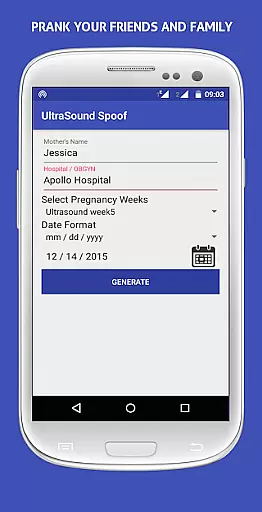
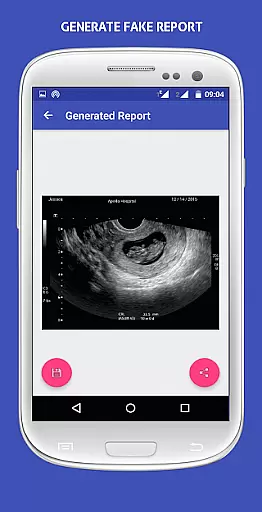
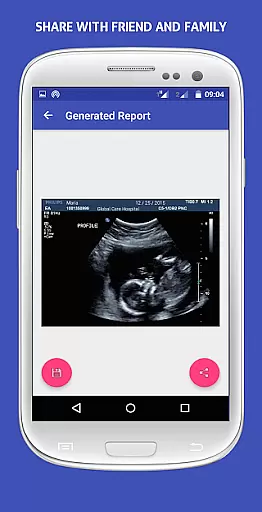
UltraSound Spoof is an innovative entertainment app that allows users to create realistic fake pregnancy reports. This unique application lets you surprise family and friends by sending them convincing ultrasound images and reports.
The app provides various customization options, enabling users to personalize the details of their fake reports. Whether it's for a prank or just some harmless fun, UltraSound Spoof delivers authentic-looking results that are sure to fool anyone who sees them.
Ideal for parties, social gatherings, or simply playing jokes on loved ones, this app brings a new level of creativity to pranks. With its user-friendly interface and attention to detail, UltraSound Spoof makes the perfect tool for those looking to add excitement to their social interactions.
UltraSound Spoof stands out with its advanced image generation capabilities. The app uses sophisticated algorithms to create ultra-realistic ultrasound images that look genuine to the untrained eye.
Users can customize every aspect of their fake reports, including baby names, due dates, and medical details. The intuitive editing tools make it easy to adjust parameters and achieve the desired effect without any technical expertise.
Additional features include multiple sharing options, allowing users to send their creations directly through messaging apps or social media platforms. With regular updates and improvements, UltraSound Spoof maintains its position as a leading prank application in the entertainment category.
UltraSound Spoof offers a unique and entertaining concept by allowing users to create fake pregnancy reports. This feature adds an element of surprise and fun, making it ideal for playful pranks among family and friends.
The application provides a diverse set of customizable options, ensuring that each report looks authentic and convincing. Users can modify various details, such as names, dates, and images, to make the prank more believable and engaging.
By regularly updating its templates and features, UltraSound Spoof ensures that the content remains fresh and relevant. This commitment to updates keeps the user experience lively and prevents the prank from becoming predictable or stale over time.
One of the key strengths of UltraSound Spoof is its ability to engage users through its realistic and detailed pregnancy report generation. The level of detail and customization available encourages users to spend more time perfecting their pranks, which increases overall engagement duration.
The app's intuitive interface and easy-to-use features ensure that users can quickly create and share their fake reports without any hassle. This simplicity enhances user satisfaction and encourages repeated use, contributing to higher retention rates.
Additionally, the potential for social interaction and reactions from friends and family further motivates users to return to the app. The anticipation of surprising loved ones with a convincing prank fosters a sense of excitement and engagement that keeps users coming back for more.
User-friendly interface
Highly realistic images
Customizable report details
Multiple sharing options
Frequent content updates
Potentially sensitive content
Limited practical use cases
Requires internet connection
Some features may need improvement
Not suitable for all audiences

Rain and lightning effects for your Philips Hue lights
 4.30
4.30
Live TV, sports & holiday movies — stream on phone, tablet & TV
4.60
Open-source, fast, simple and powerful IPTV app
4.90
Practice and master your ESP and intuition with five mode trainer.
4.20
Find out if you're on Santa's Naughty or Nice List with this magical scanner!
4.60
SpiritWave is paranormal ITC application.
5.00
Experience the video editing experience brought by our intuitive interface
4.10
Necrophone is spirit box ghost hunting app made for spirit communication.
3.70
The classic game of rock, paper, scissors
4.3
Watch Reels, Drama Shorts & TV Series Anytime. Download DramaWave Now!
4.70
* Multiple Matches * Intuitive UI * Scoring Made Easy!
4.40
Atomus is a 10-finger multi-touch interactive visualizer.
4.30
A companion app for the game Elite Dangerous
4.10
Alice Box is an Instrumental Trans Communication app.
3.80
With the credits you earn play more games
2.90
Unofficial Game Companion App” “Guides • Builds • Tips • Progression
4.5
A wonderful collection of the most beautiful sounds of animals and birds
4.4
Music visualizer and party effects for your Nanoleaf devices
4.3
Neon Christmas Tree Animated: Festive Wear OS watch face with fitness info
4.3


User Reviews