
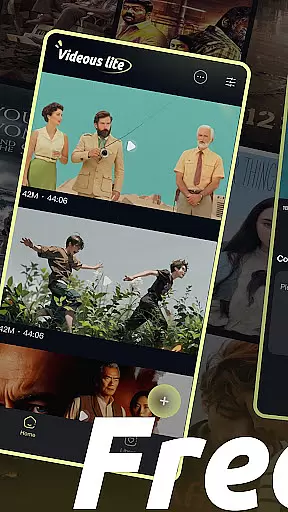
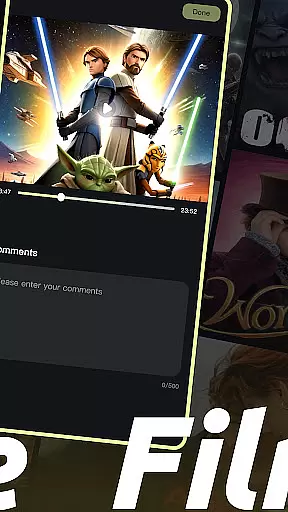
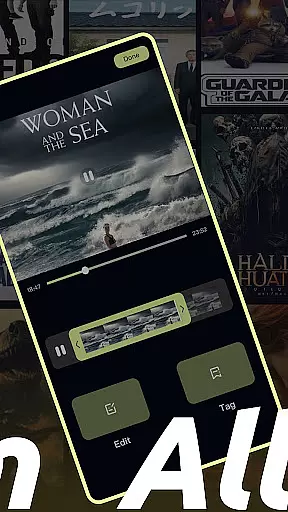
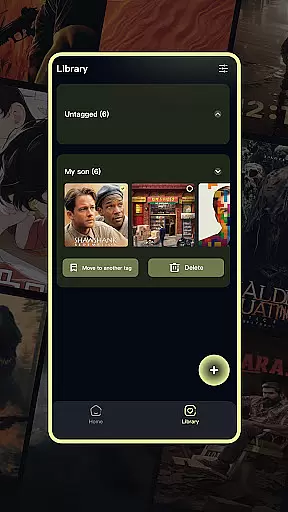
Videous lite is a streamlined video management and editing application tailored for both casual users and professional creators. Its user-friendly interface allows for efficient video processing, making it ideal for personal entertainment and creative projects alike. The app offers an intuitive video library layout, where videos are organized chronologically with clear metadata such as length and size, simplifying the management process.
One of Videous lite's standout features is its seamless integration of essential video editing tools. Users can effortlessly trim clips, customize tags for better organization, and expand their video collection by uploading local files. These practical functions ensure that users can quickly transform raw footage into polished content while maintaining a well-structured library.
Whether you're looking to edit vacation footage or manage a large repository of professional videos, Videous lite provides the tools needed to streamline workflows and enhance creativity. Its combination of simplicity and functionality makes it a valuable asset for anyone seeking efficient video solutions.
Videous lite distinguishes itself through a variety of robust features designed to enhance the video editing and management experience. Upon opening the app, users are greeted with a clean and organized home page that displays their video library in chronological order. Each video entry includes metadata such as duration and file size, allowing for quick identification and easier management. The settings menu, accessible via the top-right corner, enables users to personalize their experience, while additional administrative options like viewing comments and deleting videos are available through the more button in the top-left corner.
The app excels in providing straightforward yet powerful video editing capabilities. Users can utilize the drag-and-drop progress bar to make precise edits, ensuring their final clips meet exact specifications. Additionally, the tag customization feature allows for efficient categorization and retrieval of videos, streamlining the organization process. For those looking to expand their library, the + button on the homepage facilitates quick uploads of local video files.
Beyond editing, Videous lite offers comprehensive video management tools. The Library Page presents a detailed list of all video tags, enabling users to filter and locate specific content with ease. Bulk actions such as selecting, moving, and deleting videos help maintain a tidy and organized library. These features collectively ensure that Videous lite not only simplifies video processing but also enhances productivity for both casual and professional users.
In the realm of digital content, variety and freshness are paramount to maintaining user engagement. Videous lite-Made Easy excels in this area by offering a diverse array of video management and editing features that cater to both personal entertainment and professional creation needs. The application's intuitive interface allows users to effortlessly navigate through an organized video library, where videos are systematically arranged and easily accessible.
One of the standout aspects of Videous lite is its seamless integration of practical functions that ensure the content remains fresh and relevant. Users can quickly upload local videos, expanding their libraries with new material regularly. This constant influx of content keeps the app's offerings vibrant and engaging, encouraging users to return frequently to explore new possibilities within their growing collections.
Moreover, the editing capabilities provided by Videous lite empower users to refine their videos continuously. With features such as drag-and-drop editing and customizable tags, creators can produce polished clips that reflect their unique vision. This ongoing process of creation and refinement not only enhances the diversity of content but also ensures that users' libraries remain dynamic and up-to-date.
User engagement duration and retention are critical metrics for evaluating the success of any digital platform. Videous lite-Made Easy addresses these factors effectively by providing tools that encourage prolonged interaction and repeated use. Its user-friendly design invites users to spend more time exploring and managing their video libraries, thus increasing overall engagement duration.
The app's comprehensive suite of features plays a significant role in retaining users over time. By offering functionalities like chronological video organization, customizable settings, and efficient administration options, Videous lite ensures that users have everything they need at their fingertips. These conveniences make it easier for individuals to maintain an organized and accessible video collection, which in turn fosters a sense of accomplishment and satisfaction.
Additionally, Videous lite's robust video editing tools contribute significantly to user retention. The ability to create ideal clips through precise editing and tagging not only enhances the quality of the content but also provides a creative outlet for users. This combination of practicality and creativity helps to establish a loyal user base that returns regularly to utilize the app's full potential, ensuring sustained engagement and retention.
User-friendly interface
Efficient video editing
Intuitive organization
Quick upload options
Comprehensive management
Limited advanced tools
Basic customization
Few transition effects
No 4K support
Occasional bugs

A wonderful collection of the most beautiful sounds of animals and birds
 4.4
4.4
Stream Online TV - Watch Live IPTV Playlist & Channel with Built-In Player
4.50
Watch everything you want.
2.90
Unleash Your AI Imagination
4.60
Binaural Brainwave Doses for Every Imaginable Mood
3.60
Premium version to enjoy your favorite anime
4.60
Official KennysGifs Stickers
4.20
Earn Real Rewards Playing Fun Mobile Games & Easy Cash Out - PayPal & Gift Cards
4.40
An app made just for kids
4.20
Stories that spark in seconds.
4.80
Original short dramas with diverse genres for a rich viewing experience!
4.80
Scan sets, track your builds, and enjoy intuitive digital instructions.
4.70
Tarot & Oracle Card Readings
4.50
Heroclix search units with multi filter , team builder, collection manager.
4.40
Himnario LLDM - Fast and Easy to read , updated Hymnal 2019 Edition Official
4.20
Disney Stickers: Zootopia 2
4.3
Music visualizer and party effects for your Nanoleaf devices
4.4
Stream over 80 hours of exclusive mashups and remixes by DJ Rehab.
4.4
The classic game of rock, paper, scissors
4.4


User Reviews