
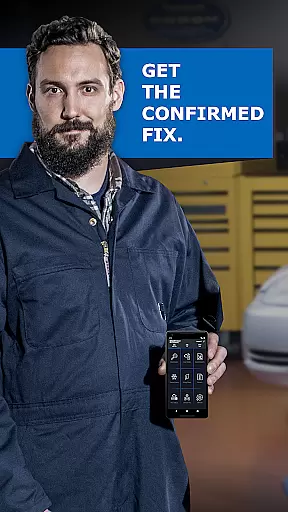
BlueDriver OBD2 Scan Tool is a professional automotive diagnostic application that transforms your smartphone or tablet into an advanced scan tool. Designed for both professional mechanics and DIY enthusiasts, it works in tandem with the BlueDriver Bluetooth Sensor to provide comprehensive vehicle diagnostics.
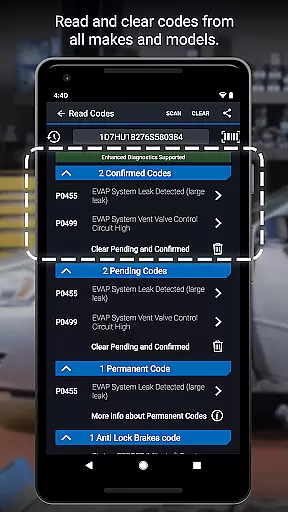
The app allows users to read and clear diagnostic trouble codes, generate detailed Repair Reports, and access advanced features like Mode 6 test results and live data graphing. With support for multiple vehicle systems including engine, ABS, airbag, and transmission, BlueDriver ensures accurate diagnostics without the need for physical cables.
Whether performing routine maintenance checks or addressing specific issues like check engine lights, this app provides clear, actionable insights. Its database of real-world fixes and compatibility with a wide range of vehicle brands makes it an essential tool for modern vehicle owners who want to understand and maintain their cars effectively.
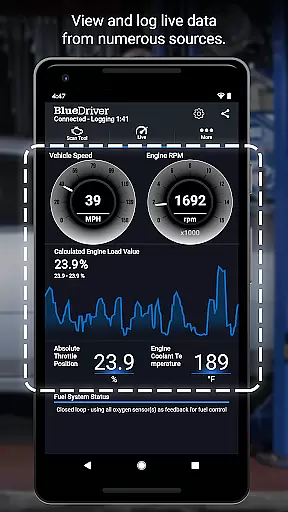
BlueDriver stands out through its extensive feature set tailored for automotive diagnostics. The app supports wireless scanning via Bluetooth, eliminating the need for cumbersome cables while providing real-time data visualization through interactive graphs.
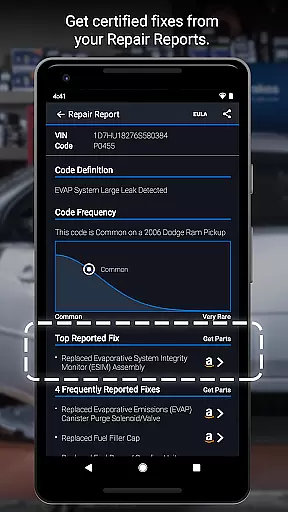
One of its key innovations is the ability to generate professional-grade Repair Reports based on specific vehicle details and trouble codes. These reports can be saved and shared with mechanics or kept for personal records. Additionally, users can access advanced diagnostic modes such as Mode 6 testing and enhanced system coverage for various manufacturers including GM, Ford, Toyota, and European brands.
The app's intuitive interface presents technical information in plain language, making complex diagnostics accessible to non-professionals. Features like smog readiness checks, freeze frame data capture, and multi-PID monitoring demonstrate its comprehensive approach to vehicle maintenance. The inclusion of metric and imperial settings further enhances its global usability.
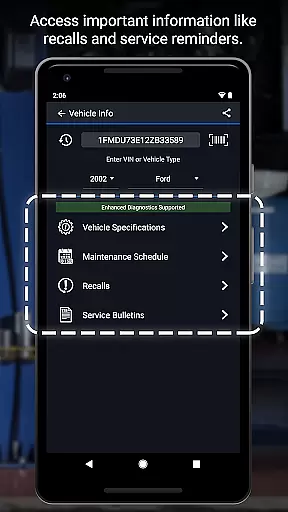
Accessing detailed vehicle information is crucial for effective diagnostics and repairs. BlueDriver OBD2 Scan Tool provides comprehensive data specific to your vehicle's make, model, and year. This includes reading and clearing trouble codes for systems like ABS, airbag, transmission, and more.
The app generates professional-grade Repair Reports tailored to your exact vehicle specifications. These reports not only include trouble codes but also offer likely fixes explained in plain language. With this level of detail, users can understand the root cause of issues without needing extensive automotive knowledge.
Additionally, BlueDriver offers advanced features such as Mode 6 on-board monitoring test results and freeze frame data. These tools allow users to view live data with multi-PID interactive graphing, providing real-time insights into their vehicle's performance. The wireless Bluetooth connectivity ensures that all diagnostic processes are seamless and hassle-free.
By leveraging a database of millions of real-world fixes, BlueDriver empowers users to make informed repair decisions. Whether you're a professional mechanic or a DIY enthusiast, having access to such precise and actionable vehicle information enhances both efficiency and accuracy in automotive maintenance.
Price transparency is essential when selecting an automotive diagnostic tool. BlueDriver OBD2 Scan Tool stands out by offering its app free to install, allowing users to explore its features without any initial financial commitment. The primary cost comes from purchasing the BlueDriver Bluetooth Sensor separately, which unlocks the full diagnostic functionality.
Unlike many competitors, BlueDriver does not require a subscription fee. This approach ensures that users are aware of the upfront costs and won't encounter hidden charges later on. Additionally, the app provides valuable previews of Repair Reports using just a VIN and trouble code, enabling potential customers to assess its benefits before buying the sensor.
Furthermore, BlueDriver's pricing structure supports global usage, making it accessible to a wide audience. Users appreciate the clear breakdown of costs associated with different functionalities, ensuring they know exactly what they're paying for. This openness builds trust and confidence among consumers who seek reliable yet affordable diagnostic solutions.
Overall, BlueDriver delivers significant value through its transparent pricing model. By clearly outlining expenses and offering substantial free features, it enables users to manage their budgets effectively while benefiting from advanced vehicle diagnostics capabilities.
User-friendly interface
Comprehensive diagnostic tools
Wireless Bluetooth connectivity
Detailed Repair Reports
No subscription fees required
Sensor sold separately
Limited free functionality
Device compatibility issues
Occasional connection problems
Advanced features require premium sensor

* This app needs an adapter cable and a certain OBD2 adapter to work *
 4.20
4.20
Play what you want through Android Auto
4.90
AlfaOBD software for Fiat Group cars native diagnostic
3.70
Read and delete OBD codes with any ELM327 OBD scanner. Coding functions included
3.40
By enthusiasts, for enthusiasts
4.00
Mobile Phone Parking - So easy to park
3.70
Your Path to Driving Licensing Success Begins Here! Develop your driving skills.
4.40
7-Day Returns on All Cars
4.80
Get price alerts, vehicle history details and more for cars near you!
4.50
Practice the drills within MotoJitsu Master Riding Program Volume 1 & 2!
4.80
Car Values, Research and More
4.80
Lexus app currently supports 2010 or newer vehicles (2018 or newer for Hawaii).
4.80
The ExtraMile App allows you to pay for fuel from the comfort of your car!
4.70
MySubaru: Download. Connect. Love.
4.70
Your go-to app for car, truck & SUV parts, DIY tools, and expert repair help.
4.70
OBD1 ECMs application. Data log or tune directly from your phone or tablet!
4.60
Instant diesel savings. No credit checks or fees. Nationwide growing network.
4.40
Monitor your behind-the-wheel behavior to become a safer driver and save.
4.10
PayByPhone: A quick and easy way to pay for parking.
3.80


User Reviews