


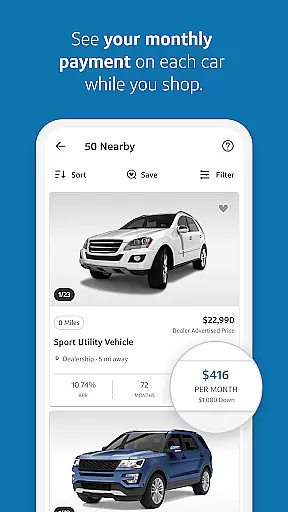

Capital One Auto Navigator is a comprehensive car shopping app designed to simplify the process of buying a new or used car. The app provides users with access to millions of vehicles for sale across the nation, allowing them to search and filter based on specific preferences such as make, model, year, price, and more.
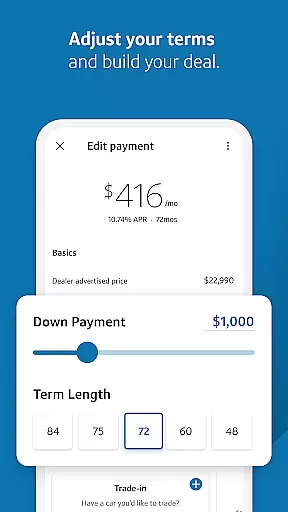
One standout feature is the ability to pre-qualify for an auto loan quickly without affecting your credit score. This allows users to see real monthly payments while browsing cars, ensuring they stay within their budget. Additionally, users can customize financing options by adjusting down payments and loan terms, making it easier to find a deal that fits their financial situation.
The app also saves time at the dealership by enabling users to show their pre-qualification status directly from their phone, streamlining the final steps of the car-buying process. Whether you're a first-time buyer or looking for a family vehicle, Capital One Auto Navigator offers tools to help you make informed decisions.
Capital One Auto Navigator stands out with its robust set of features tailored to enhance the car-buying experience. First and foremost, the app offers an extensive inventory of cars, including both new and used vehicles, which users can browse through easily. The advanced search functionality lets you filter results by various criteria such as make, model, year, body style, price range, mileage, and fuel economy, helping you narrow down choices efficiently.
Another key feature is the quick pre-qualification process for auto loans. Users can get pre-qualified in minutes without impacting their credit score, providing transparency about loan rates and monthly payments upfront. This empowers buyers to shop confidently, knowing exactly what they can afford. Furthermore, the app allows users to customize their financing by adjusting parameters like down payment and term length, offering side-by-side comparisons of different payment plans.
For convenience, the app includes direct communication options with dealerships, allowing users to call and inquire about vehicle availability straight from the app. Saved searches and favorite listings enable easy comparison between potential purchases. Overall, these features collectively aim to create a seamless, informed, and stress-free car-buying journey.
When it comes to purchasing a new or used car, having access to detailed vehicle information is crucial for making an informed decision. Capital One Auto Navigator provides comprehensive details on millions of cars nationwide, ensuring you have all the necessary data at your fingertips.
The app allows users to filter their search by various parameters such as make, model, year, body style, price, mileage, and fuel economy. This level of detail helps buyers narrow down their options quickly and efficiently, ensuring they find a vehicle that meets both their needs and budget constraints.
Each listing includes essential specifications and performance data, giving users insights into the vehicle's capabilities and history. Whether you're looking for your first car or a family vehicle, this feature ensures you can make a well-informed choice without any guesswork involved.
By offering such extensive and precise vehicle information, Capital One Auto Navigator empowers users to shop with confidence, knowing they have all the facts needed to select the perfect ride for their lifestyle and financial situation.
Price transparency is a key factor in the car-buying process, and Capital One Auto Navigator excels in providing clear and upfront pricing information. This transparency helps users understand the true cost of their potential purchase, avoiding hidden fees and unexpected expenses.
Through the app, users can pre-qualify for an auto loan in minutes, which reveals their real interest rate and monthly payment without impacting their credit score. This feature allows buyers to see how different vehicles fit within their budget before making any commitments, ensuring a stress-free shopping experience.
Additionally, the app lets users adjust variables like down payment and term length to customize their financing options. By comparing side-by-side monthly payments, buyers can easily identify the best deal tailored to their financial situation.
Capital One Auto Navigator's commitment to price transparency not only simplifies the car-buying process but also builds trust with its users, making it an invaluable tool for anyone looking to purchase a vehicle with confidence and ease.
User-friendly interface
Extensive vehicle inventory
Quick loan pre-qualification
Transparent pricing options
Customizable financing terms
Limited to Capital One customers
Occasional app glitches
Dependent on dealer cooperation
Requires personal financial data
Not available internationally

ODB2 based monitoring application for the Chevy Bolt (2017-2021)
 4.00
4.00
OBD2 car scanner and diagnostics: read Check Engine, DTC, economy....
4.30
Attention! This is the theme for the Car Launcher app
4.5
Realtime Charts is a plugin for the Torque Pro App (OBD 2 & Car)
4.20
Oil change service & coupons for car maintenance at Valvoline Instant Oil Change
4.70
Control maps, media and messaging, with the Google Assistant while you drive
4.10
Get more out of your AAWireless adapter with this companion app | aawireless.io
4.80
Find Fast EV Chargers | Charge Your Vehicle at 1,100+ Fast Car Charging Stations
4.60
Browse millions of cars, track vehicle listings or sell your car today
4.70
The Texaco App allows you to pay for fuel from the comfort of your car!
4.80
Lexus app currently supports 2010 or newer vehicles (2018 or newer for Hawaii).
4.80
Buy and sell your boat
4.70
MySubaru: Download. Connect. Love.
4.70
Quick and easy car diagnostics to get you the right fix.
4.70
Instant diesel savings. No credit checks or fees. Nationwide growing network.
4.40
Car Sounds Engine Sounds app welcomes Auto Lovers to feel Car Simulator Sound
4.20
By enthusiasts, for enthusiasts
4.00
PayByPhone: A quick and easy way to pay for parking.
3.80
Wonder how much horsepower and torque your car/truck makes? Look no further.
3.40


User Reviews