
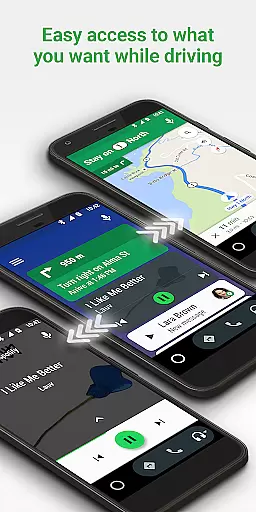
Android Auto is a driving companion app designed to keep you focused and connected while on the road. It offers a simplified interface with large buttons and voice actions, making it easier to use your favorite apps safely while driving. The app integrates with Google Maps, Waze, and the Google Assistant to provide real-time navigation, traffic alerts, and hands-free control.
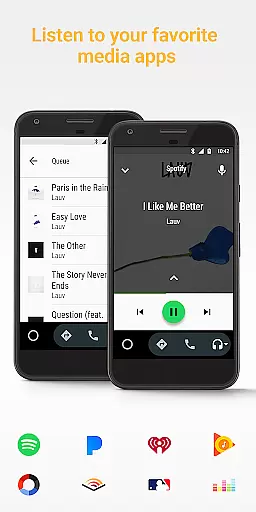
With Android Auto, you can manage your infotainment system like never before. You can access your contacts, make calls, send messages, and enjoy entertainment from popular media apps such as Spotify, Pandora, and Google Play Music. The app also supports a growing number of compatible apps, ensuring that you have access to the latest features and services.
This app is particularly useful for drivers who want to stay connected without compromising safety. By using voice commands and minimizing distractions, Android Auto helps you focus on the road while still accessing important information and entertainment options.
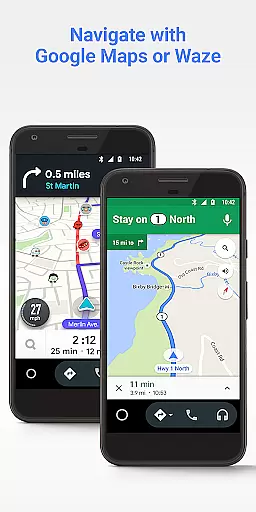
Android Auto boasts a range of features designed to enhance your driving experience. One of its standout features is the integration with Google Maps and Waze, providing real-time GPS navigation and traffic alerts. This ensures you always have the most efficient route and are aware of any potential hazards ahead.
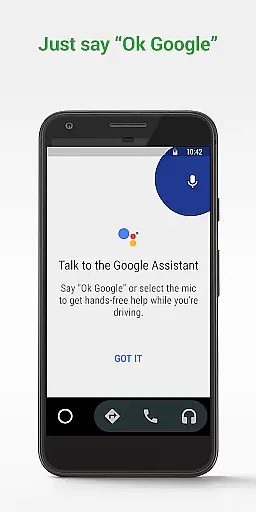
The app also leverages the power of the Google Assistant, allowing you to perform various tasks hands-free. You can check your calendar, set reminders, get news updates, and even control your infotainment system with simple voice commands. This minimizes distractions and keeps your attention on driving.
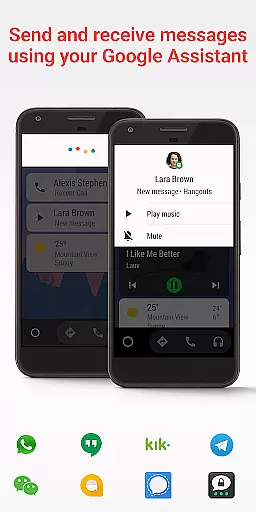
Another key feature is the support for a wide array of messaging and media apps. Whether you need to send a text via WhatsApp or listen to music on Spotify, Android Auto has got you covered. The app's compatibility with over 400 car models and its growing list of supported apps make it a versatile tool for modern drivers.
Android Auto provides essential details about your vehicle's status and performance. The application integrates with your car's systems to display important information such as fuel level, tire pressure, and engine temperature directly on your phone or car's infotainment screen.
Through seamless connectivity, Android Auto ensures that drivers have access to real-time vehicle diagnostics. This feature allows users to monitor their vehicle's health and receive alerts for maintenance needs, helping prevent potential issues before they become serious problems.
The app also supports advanced features like GPS navigation and traffic alerts through Google Maps or Waze. These tools not only guide you to your destination but also provide updates on your route, estimated time of arrival, and any hazards along the way, ensuring a safer and more informed driving experience.
By offering comprehensive vehicle information and diagnostic capabilities, Android Auto empowers drivers to stay informed about their car's condition. This proactive approach to vehicle management enhances safety and convenience, making every journey smoother and more reliable.
While Android Auto itself is free to use, understanding the costs associated with its usage can enhance the driving experience. The app requires an active data connection, which may incur charges based on your mobile plan. Users should be aware of their data usage to avoid unexpected fees while using Android Auto's connected features.
Android Auto supports various media apps like Spotify, Pandora, and Google Play Music, some of which offer premium subscriptions. The app provides clear information about these services, allowing users to choose whether to subscribe to enjoy ad-free music, offline listening, and higher quality audio during their drives.
In addition to entertainment options, Android Auto facilitates communication by integrating with messaging apps such as WhatsApp, Hangouts, and Skype. While the app itself does not charge for this integration, users should consider any costs related to their messaging service plans to ensure transparent pricing.
Overall, Android Auto promotes price transparency by clearly outlining the potential costs involved in utilizing its connected services. This openness enables users to make informed decisions about their data usage and subscription preferences, enhancing their overall driving experience without hidden expenses.
User-friendly interface
Voice command support
Real-time navigation
Wide app compatibility
Enhanced safety features
Limited to Android devices
Requires active data
Dependent on car model
USB connection needed
Some features may lag

Ferrari inspired analog & digital watch face with quick access and premium style
 4.3
4.3
DIY Vehicle Wheel Alignment
4.4
AlfaOBD software for Fiat Group cars native diagnostic
3.70
Get more out of your AAWireless adapter with this companion app | aawireless.io
4.80
Lexus app currently supports 2010 or newer vehicles (2018 or newer for Hawaii).
4.80
Automotive Electrical Wiring Diagrams
4.40
MySubaru: Download. Connect. Love.
4.70
Find Your Local Store or Shop Online for the Car, Truck, or SUV Parts You Need
4.70
Browse millions of cars, track vehicle listings or sell your car today
4.70
7-Day Returns on All Cars
4.80
Oil change service & coupons for car maintenance at Valvoline Instant Oil Change
4.70
Listings of Tesla's with FSD - Included package
4.60
Instantly redesign your car with AI. From sporty to futuristic, try it all.
4.50
Find, search, and browse 40,000+ used cars, SUVs, and trucks.
4.50
On the CarShield app, you can view contracts, make payments, & request roadside.
4.40
Your Path to Driving Licensing Success Begins Here! Develop your driving skills.
4.40
Monitor your behind-the-wheel behavior to become a safer driver and save.
4.10
PayByPhone: A quick and easy way to pay for parking.
3.80
The Smarter Way Forward
3.30


User Reviews