
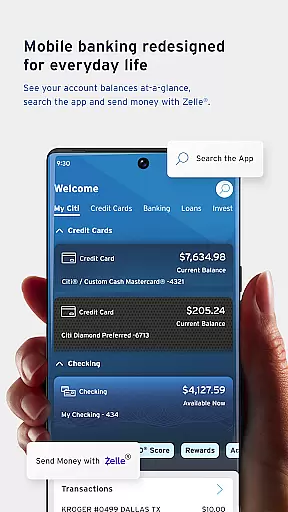
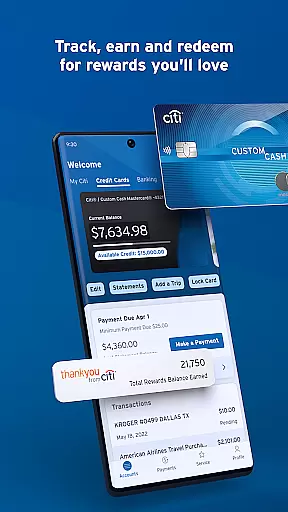
Citi Mobile is a comprehensive financial management app designed to simplify banking activities. The app allows users to open checking or savings accounts directly from their mobile device, eliminating the need to visit a physical branch. With features like Citi Mobile Snapshot, customers can quickly review key account information without signing in each time.
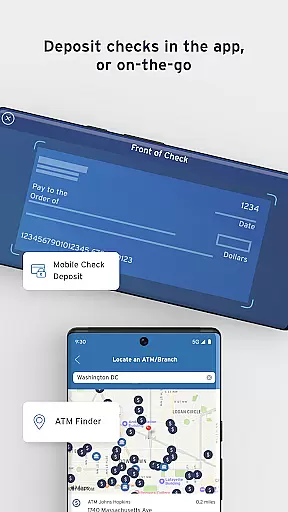
One of the standout capabilities is Zelle integration, enabling fee-free payments and easy splitting of bills with trusted contacts. Additionally, users can deposit checks, locate ATMs, view statements, and make same-day or scheduled payments effortlessly. These functionalities streamline daily banking tasks while providing a secure and intuitive user experience.
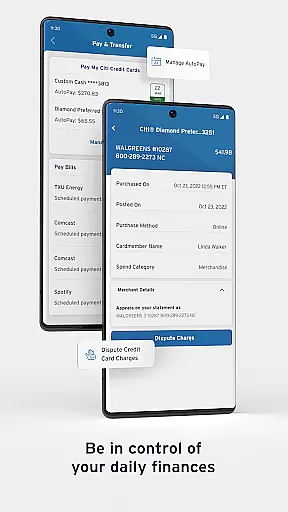
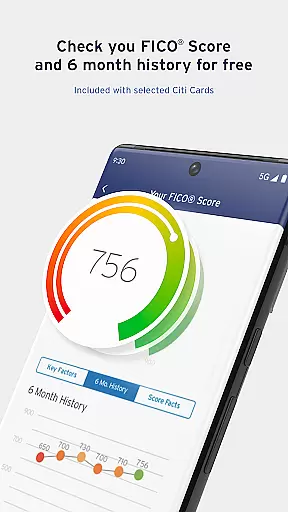
The app also offers advanced financial tools such as account aggregation, spending insights, and FICO Score access for credit card holders. Users can manage bills, track disputed transactions, and customize alerts. Security features include Citi Quick Lock, PIN reset, and fingerprint authentication, ensuring robust protection for sensitive financial data.
Citi Mobile provides an array of innovative features that enhance the banking experience. Fast Navigation ensures users can access favorite features quickly through an intuitive menu and smart shortcuts. Card Replacement services allow users to request new cards if their original ones are lost, stolen, or damaged, adding convenience and security.
For those managing multiple financial accounts, Aggregation links virtually all bank accounts, credit cards, and investments for a holistic view. Spending Insights help track habits and trends across accounts, aiding better financial decisions. Bill Management consolidates bills and recurring payments into one place, simplifying organization. Additionally, users can set automatic payments and manage payees efficiently.
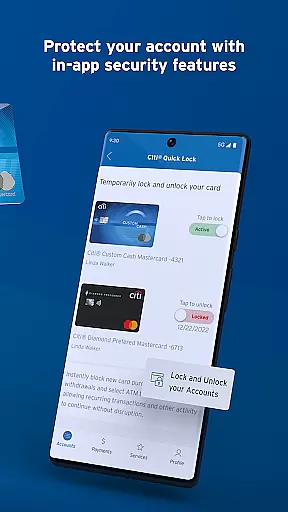
Security remains paramount with features like Citi Quick Lock, which lets users lock misplaced cards instantly. PIN Reset enables changing debit card PINs directly from the mobile device. Fingerprint Authentication offers a fast yet secure method to access accounts. These features collectively ensure a seamless blend of convenience, control, and safety for users' financial activities.
Account and fund security is a critical aspect of any financial application, ensuring that users' personal and financial information remains protected. Citi Mobile takes this responsibility seriously by offering features like Citiu00ae Quick Lock, which allows users to lock or unlock their misplaced or lost cards instantly. This immediate action can prevent unauthorized transactions, providing peace of mind to users.
In addition to card security, the app enables fingerprint authentication, adding an extra layer of protection for accessing accounts. By supporting biometric login methods, Citi Mobile ensures that only the authorized user can access sensitive account details. This feature not only enhances security but also simplifies the login process, making it faster and more convenient for users.
Citi Mobile also provides options for users to reset their debit card PIN directly from their mobile device. This self-service functionality empowers users to regain access to their accounts quickly without compromising security. Overall, these comprehensive security measures demonstrate Citi's commitment to safeguarding user data while maintaining ease of access.
The transaction experience in a finance app encompasses all interactions related to managing and moving funds. Citi Mobile excels in this area by offering fast navigation and smart shortcuts that allow users to access their favorite features effortlessly. Whether it's depositing checks through the mobile check deposit feature or finding fee-free ATMs nearby, the app streamlines everyday banking tasks with intuitive design and efficient processes.
Moreover, Citi Mobile integrates Zelleu00ae, enabling users to make fee-free payments and split bills easily with trusted contacts. The ability to schedule payments and manage payees adds another layer of convenience, allowing users to plan their finances effectively. These seamless transaction capabilities ensure that users can handle their banking needs anytime, anywhere, without unnecessary complications.
For those who require detailed insights into their spending habits, Citi Mobile offers aggregation features that link various accounts, providing a holistic view of oneu2019s financial situation. Users can track spending trends and manage bills in one place, enhancing their overall transaction experience. With such robust tools at their disposal, customers can maintain better control over their financial activities.
User-friendly interface
Comprehensive account management
Advanced security options
Free FICO Score access
Integrated bill payment system
Limited feature availability
Occasional bugs reported
Requires stable internet
Some functions need enrollment
Complex setup for new users

Companies owe you money.
 4.80
4.80
Pay rent on your schedule.
4.70
The DailyPay app lets you access earned wages before your next payday.
4.70
No credit check, no interest, no worries.
4.70
NFC mobile payment app Use your phone as a contactless bank card
4.00
Real-time tracking: Stocks, Indices, Futures, Commodities, ETF, & Funds prices.
4.60
SuperQi, Your all-in-one Super App.
1.30
Our Chase Mobile App makes it easy for you to bank on the go 24/7.
4.60
The PayPal app is the secure way to send and receive money, shop and pay in 4.
4.20
Managing your money just got easier. Get the new Mobile app.
4.70
Money App - Earn Cash back, Fast Cash Advance, Personal Loan Offers, Banking
4.70
Loan Calculator, Mortgage Calculator, Compound Interest Calculator
4.70
Pay, bank & build credit.
4.70
Over 180 currencies conversion rates with live exchange rates and offline mode.
4.60
The all-in-one app to save, earn, travel, and put more money in your pocket
4.50
Car Insurance Made For You.
4.50
BTC, Crypto, Stocks & Options.
4.20
Make your paycheck work harder for you with Perpay.
4.10
Venmo is the fun and easy way to pay and get paid.
4.10


User Reviews