
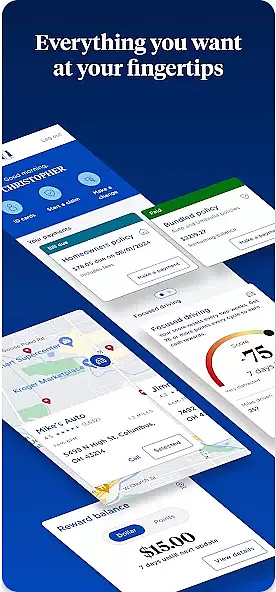

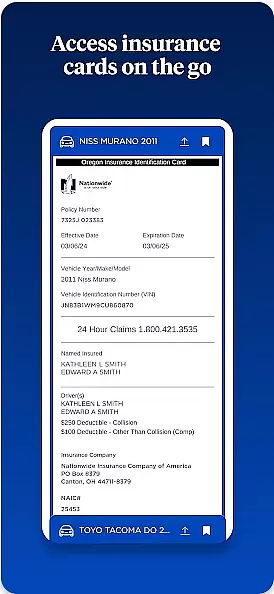
Nationwide Mobile is a finance-focused application designed to provide users with convenient access to their financial accounts and services on the go. The app allows customers of Nationwide, a well-known financial institution, to manage their banking and investment needs from their mobile devices. With this app, users can check account balances, transfer funds between accounts, pay bills, deposit checks remotely, and receive important notifications about their finances.
One standout feature of Nationwide Mobile is its intuitive user interface that simplifies navigating through various financial tools. Whether you're at home or traveling, this app ensures that your financial management is just a tap away. Additionally, it offers security features such as biometric login and two-factor authentication to protect sensitive information. This makes Nationwide Mobile not only a powerful tool for personal finance management but also a secure one.
Nationwide Mobile stands out due to its comprehensive set of features tailored for modern banking needs. Users can easily view all their account details including savings, checking, loans, and investment portfolios in one place. The app provides real-time transaction alerts which help users stay updated on their spending habits and detect any unauthorized activity quickly.
Another notable feature is the ability to deposit checks using your phone's camera, eliminating the need to visit a physical branch. Furthermore, the bill payment functionality supports scheduling recurring payments, ensuring timely bill settlements without manual intervention every time. Security measures like fingerprint recognition and facial ID add an extra layer of protection, making sure that only authorized individuals have access to the account information.
The app also includes budgeting tools that allow users to categorize expenses and set spending limits. These insights enable better financial planning and decision-making. Overall, Nationwide Mobile combines convenience, security, and advanced financial tools to offer a robust solution for managing personal finances effectively.
In the realm of mobile banking, security stands as a paramount concern for users. Nationwide Mobile addresses this by implementing top-tier encryption protocols to safeguard user data. Every transaction and personal information entry is protected against unauthorized access.
The app incorporates multi-factor authentication, adding an extra layer of security. This ensures that only the account owner can access sensitive financial details, even if login credentials are compromised. Biometric login options further enhance ease and security.
Users benefit from real-time fraud monitoring within the app. Suspicious activities trigger immediate alerts, allowing users to act swiftly in protecting their accounts. This proactive approach provides peace of mind, knowing their financial assets are monitored 24/7.
A seamless transaction experience is crucial for any financial application. Nationwide Mobile excels by offering intuitive navigation through its transaction features. Users can effortlessly transfer funds, pay bills, and manage their accounts with minimal taps.
The app provides instant transaction notifications. These alerts keep users informed about their financial activities, ensuring complete control over their accounts. The notifications include all necessary details such as amount, recipient, and time of transaction.
Moreover, Nationwide Mobile maintains a comprehensive transaction history. This feature allows users to review past activities, track expenses, and manage their finances effectively. Such transparency empowers users to make informed financial decisions confidently.
User-friendly interface
Comprehensive account management
Advanced security features
Real-time transaction alerts
Remote check deposit capability
Limited international support
Occasional syncing issues
No cryptocurrency integration
Higher fees for certain transactions
Customer service response delays

Manage your account, make a payment, and redeem your rewards on the go.
 4.50
4.50
Currency Converter, Exchange Rates, Widgets
4.90
The DailyPay app lets you access earned wages before your next payday.
4.70
Money transfer made easy. Send money to friends and family with great rates.
4.70
All your crypto & stocks in one secure and trusted app.
4.40
Get 250$ Cash Advance to solve emergencies instantly in loan app called LendMe
4.70
BTC, Crypto, Stocks & Options.
4.20
No credit checked needed.
4.80
Make Real Cash by Playing Games! Fetch Playful Rewards, Win & Triumph
4.50
Easy budgeting planning on a calendar!
4.80
Join 12M+ users. Instant cash advances, personal loans, build credit, save money
4.80
Wells Fargo Mobile allows you to access your investment and bank accounts.
4.80
Pay rent on your schedule.
4.70
Loan Calculator, Mortgage Calculator, Compound Interest Calculator
4.70
Over 180 currencies conversion rates with live exchange rates and offline mode.
4.60
Manage and cancel subscriptions, lower bills, track expenses, create budgets.
4.60
Put crypto to work & earn rewards. Stake crypto like Ethereum, Solana & Cardano
4.40
Get, Earn, and Save Money
4.30
Venmo is the fun and easy way to pay and get paid.
4.10


User Reviews