
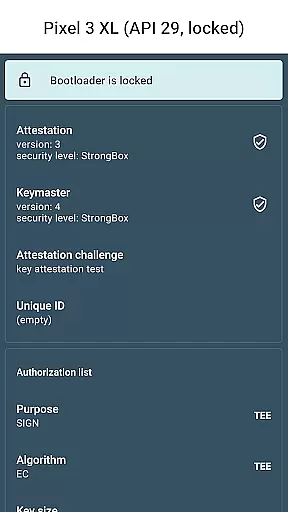
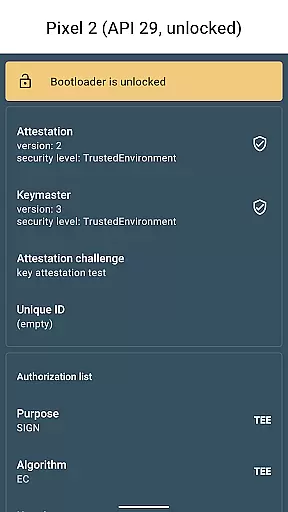
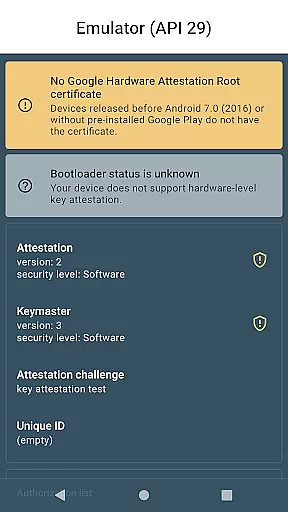
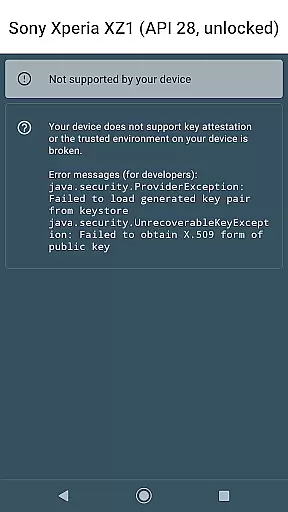
Key Attestation Demo is a specialized application designed for developers and power users who require advanced security features. This app allows users to verify the authenticity of cryptographic keys on Android devices, ensuring that the keys are stored in a secure hardware environment.
The app provides detailed documentation and source code references, making it an essential tool for those working with Android's security infrastructure. By leveraging Key Attestation, developers can enhance the security of their applications and protect sensitive data from unauthorized access.
One of the main features of Key Attestation Demo is its ability to provide comprehensive details about the key attestation process. Users can access step-by-step guides and technical documentation directly within the app, which simplifies the implementation of secure key storage solutions.
In addition to its educational resources, the app includes practical tools for testing and validating key attestations. These tools help developers ensure that their applications meet the highest security standards by verifying that cryptographic keys are indeed protected by hardware-backed keystores.
Functionality completeness refers to the extent to which an application provides features that meet user needs and expectations. For Key Attestation Demo, this involves offering developers and power users the tools necessary to understand and implement key attestation processes effectively.
The app provides comprehensive documentation links and access to source code, enabling users to delve into the intricacies of Android's key attestation mechanisms. This is crucial for those looking to enhance the security of their applications through verified cryptographic keys.
By including references to official Android developer resources and making the source code available on GitHub, the app ensures that users have all the information and examples needed to integrate key attestation features successfully.
This level of detail and openness not only educates users but also empowers them to build more secure applications, ultimately contributing to a safer digital environment.
Usability in an application pertains to how easily and efficiently users can achieve their intended tasks. In the case of Key Attestation Demo, usability is demonstrated through its straightforward presentation of complex security concepts.
The app offers clear and concise documentation links, allowing developers and power users to quickly access authoritative resources on key attestation. This direct approach streamlines the learning process and facilitates immediate practical application.
Operational smoothness is further enhanced by providing a seamless transition from theory to practice via direct access to the app's source code. Users can explore real-world implementations, thus bridging the gap between understanding and execution.
Such an approach not only simplifies the user experience but also encourages experimentation and innovation, fostering a community of informed and capable developers focused on advancing security practices.
User-friendly interface for developers
Comprehensive documentation included
Direct links to source code
Enhances application security
Supports hardware-backed keystore verification
Not suitable for general users
Limited to Android platform
Requires technical knowledge
No graphical user interface
Complex setup process

Wireless reverse charging using phone now is possible
 4.30
4.30
The Free Catholic Latin American Bible in complete Spanish
4.60
charging your phone by other phone easly
4.00
Recite Quran Majeed القران with special 16 line real Kuran page in hand
4.30
Demo version of the mcpro24fps manual video camera. Try and buy a full version!
4.00
CloudEye 365 is a easy-handling APP
3.60
A Pydroid Quick Install repository provider.
4.00
Endoscope camera an app to connect with endoscope cam or any device
3.30
Phone Software Update Quick Checker helps you to keep your phone apps up to date
4.50
Expo is a free & open source platform to build apps using JavaScript and React.
4.70
Enjoy Minecraft Mod Scary Neighbor Granny for Minecraft PE.
4.30
An impressive collection of tools, characters, weapons, skins and more!
4.30
View your cameras anywhere and anytime
4.20
Android secret code for smart phone, mobile codes, with secret codes app
4.20
Unlock the hidden menus of your phone with our mobile secret codes app.
4.20
Sad ringtones full of feeling, sad music ringtones
3.90
Connect your phone to any endoscope camera, USB camera, or borescope with ease.
3.70
Collection of high-quality, trendy skins and outfits!
4.0
Read Quran pak offline & listen online mp3 Quran in Al Quran Majeed app
4.2


User Reviews