
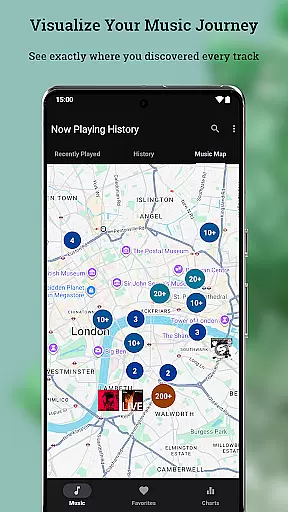
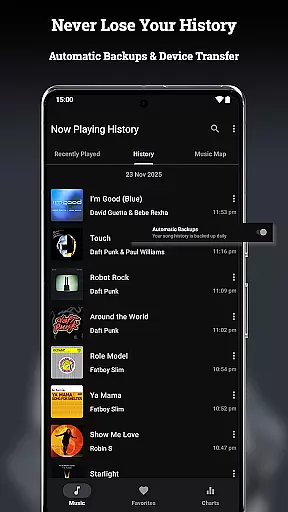
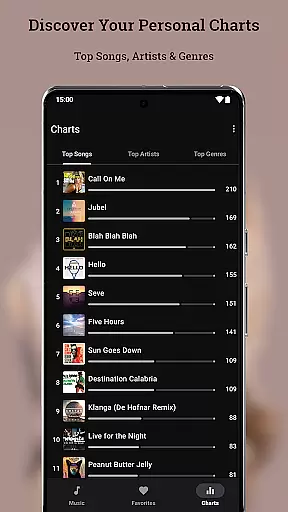
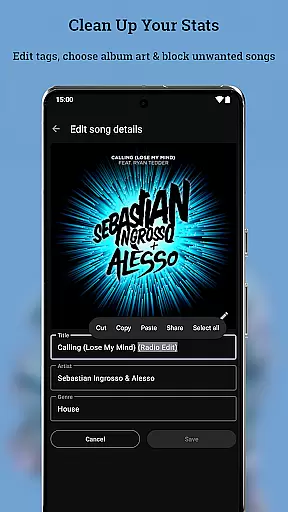
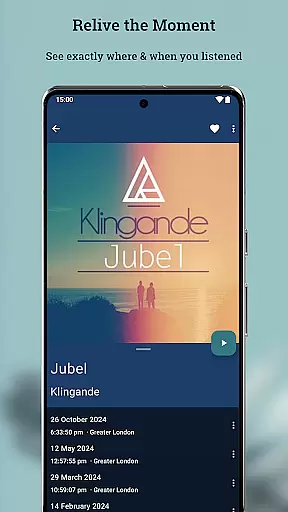
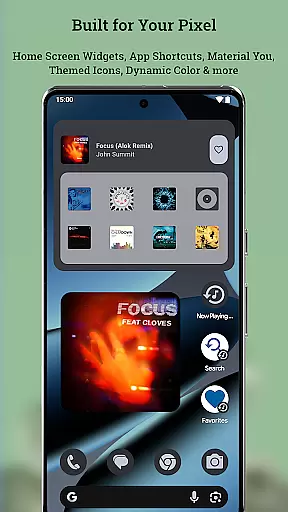
Now Playing History for Pixel is an essential app designed to enhance your Google Pixel's "Now Playing" feature. This app automatically captures and saves every song your phone identifies, creating a permanent archive of your life's soundtrack with detailed album art. It ensures that you never lose your music history, even when switching devices.
The app offers advanced features such as a Music Map to relive memories by seeing where you heard specific songs, personal charts to discover your top artists and songs, and an editor for metadata and album art. With its privacy-first approach, all data is stored on your device, giving you full control over your listening history.
Perfect for music enthusiasts, Now Playing History transforms your Pixel's "Now Playing" into a powerful personal music diary, preserving your musical journey in a searchable and meaningful way.
Now Playing History for Pixel boasts a variety of robust features tailored for music lovers. The Backup, Restore & Transfer functionality ensures that your music history is always safe, allowing seamless transitions between devices without losing any data.
One standout feature is the Music Map, which visually represents where you've encountered certain songs, adding a geographical dimension to your music memories. Additionally, the Personal Charts provide insights into your listening habits, showcasing your top songs, artists, and genres. These charts are interactive, letting you explore categories in detail.
The app also includes a Metadata & Album Art Editor, enabling corrections and customizations directly within the app. With fast performance, minimal battery usage, and a commitment to user privacy, Now Playing History delivers a comprehensive and secure music logging experience.
Now Playing History for Pixel offers a unique approach to building a personal music library. Unlike traditional music apps, it automatically captures every song detected by your Google Pixel's Now Playing feature, creating an ever-growing archive of your listening history.
The app ensures copyright authenticity through its integration with Google's detection system. Each logged track is verified against Google's database, providing accurate metadata and high-quality album art. This guarantees that your music library contains only legitimate, properly attributed content.
While the app doesn't provide direct access to audio files, it creates a comprehensive catalog of your music encounters. The built-in album art selector allows you to choose from multiple authentic artwork options, ensuring your library maintains professional-grade visual quality.
This innovative approach to music library creation lets you organically build a collection based on real-world music encounters, rather than digital purchases or streams, making each entry meaningful and contextually relevant.
Although Now Playing History doesn't directly handle audio files, it provides exceptional quality in its core functionality. The app captures detailed metadata for each detected song, including precise timestamps and location data, creating a rich context around each musical encounter.
The application maintains high standards in its album art presentation. It sources multiple high-resolution cover art options for each track, allowing users to select the most visually appealing version. These images are stored locally in their original quality, ensuring crisp, detailed visuals throughout your music history.
For audio enthusiasts concerned about accuracy, the Metadata & Album Art Editor enables precise corrections. You can fine-tune song titles, artist names, and genre classifications, ensuring your music history maintains professional-grade accuracy in its documentation.
The app's commitment to quality extends to its technical performance. With zero crashes, minimal battery usage, and instant loading times, your music history experience remains consistently smooth and reliable, regardless of your library's size.
User-friendly interface
Comprehensive music tracking
Privacy-focused design
Advanced customization options
Seamless device transfer
No pre-existing history import
Dependent on Google's detection
Limited to Pixel devices
Optional features require permissions
Not optimized for tablets

Your song collections with lyrics and chords on Android smartphones and tablets.
 4.80
4.80
Network/Cloud Streaming, Visualization, Graphic Equalizer and Sound Effects.
4.20
Recording studio w/ 10k beats, pro vocal FX and a network of 20M rappers & fans!
4.60
Music, News & Sports Radio Tuner App. Tune in Live FM & AM Radio Stations.
4.80
Smart piano keyboard, Classical to Pop, Real-time multiplayer connection!
4.20
Turn your Android phone into a professional audio analyser with up to 120 bands.
4.00
Master Salsa Rhythm quickly and with a lot of fun!
4.30
Responsive piano with great sounds, graphics, and songs
4.80
Be a true music maker: create beats, mix and make music like a real DJ!
4.30
Tune in to the greatest hits on UK Radio | The home of Capital, Smooth & Heart.
4.90 4.70
4.70
Performance-Synthesizer & Multi-Track-Sequencer, polyphonic + multi timbral!
4.70
Ultimate Sonos Controller
4.70
SqueezePlayer turns your Android phone or tablet into a SqueezeBox on its own!
4.60
Reverse your voice & songs instantly! Fun singing challenge with cool effects.
4.60
Time Trainer: accurate metronome w tools to help you develop your internal time!
4.20
The original SP-1200 experience on your iPad
4.20
Simple mp3 and mp4 player with advanced features.
3.40
Simply convert wav to mp3. Clear. Reliable. Safe.
4.3


User Reviews