
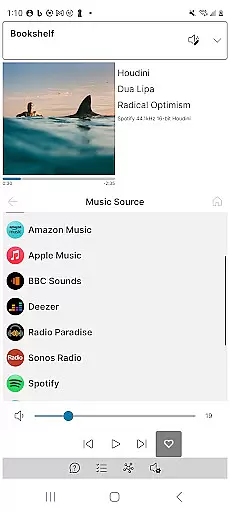
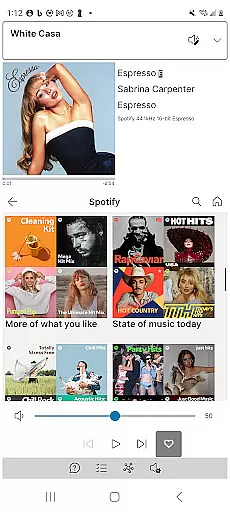
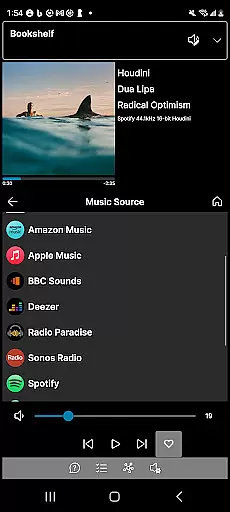
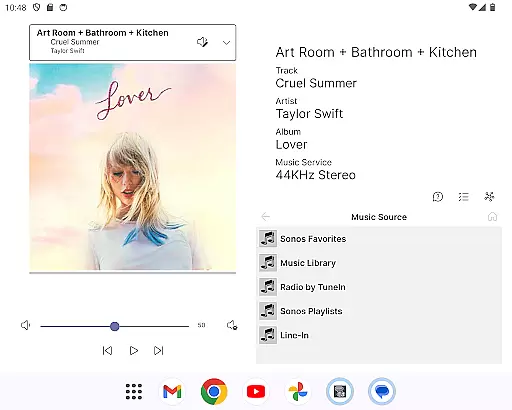
Phonos Ultimate is a powerful and reliable app designed specifically for controlling your whole-home Sonos music system. With its intuitive interface, the app offers all essential features needed to manage your Sonos devices efficiently. It supports over a hundred music services, local libraries, line-in, and custom station URLs, ensuring comprehensive control over your music sources.
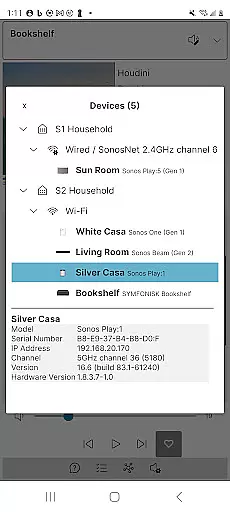
Beyond basic functionality, Phonos Ultimate provides unique capabilities such as viewing device connections, editing EQ settings, and displaying track streaming data like sample rate and bit depth. The app prioritizes performance and reliability by avoiding the Sonos cloud API, making it faster and more dependable. Whether you're managing playlists, adjusting volumes, or exploring advanced features, Phonos Ultimate ensures an optimal user experience across various devices and orientations.
Phonos Ultimate stands out with its extensive feature set tailored for Sonos users. The app allows you to see all your devices, rooms, groups, and music sources in one place, simplifying navigation and control. You can easily manage your music queue, save it as a Sonos Playlist, and perform standard playback actions like Play/Pause/Next/Previous/Shuffle/Repeat/Like/Unlike. Volume adjustments are available for both groups and individual devices, enhancing your audio management.
In addition to expected features, Phonos Ultimate offers unique functionalities. The Unique Devices View provides insights into how your devices are interconnected, while the ability to display track streaming data adds a layer of detail not commonly found in other apps. Supporting S1, S2, and multiple systems simultaneously, Phonos Ultimate caters to diverse setups without compromising speed or reliability. Its independence from the Sonos cloud API ensures uninterrupted service, making it a robust choice for serious Sonos enthusiasts.
Phonos Ultimate offers an extensive music library that supports over a hundred music services, similar to what Sonos provides. This vast selection ensures users have access to a wide range of music genres and artists.
In addition to streaming services, the app allows for the integration of local libraries, line-in connections, and custom station URLs. This feature not only expands the music library but also guarantees that all content is legally accessible, respecting copyright laws.
The ability to save queues as playlists and directly play or shuffle them enhances user experience by providing quick access to favorite tracks without any legal concerns.
Furthermore, Phonos Ultimate's support for adding direct streaming URLs as custom radio stations enriches the music library while ensuring all streams are legitimate and copyright-compliant.
One of the standout features of Phonos Ultimate is its capability to display track streaming data, including sample rate and bit depth, which requires the S2 system. This transparency allows audiophiles to enjoy high-quality audio with detailed sound information.
The app does not rely on the Sonos cloud API, prioritizing speed and reliability. As a result, users can expect uninterrupted, high-fidelity audio playback across all their devices.
With EQ settings editing available, listeners can customize their audio experience to match personal preferences or room acoustics, further enhancing sound quality.
Additionally, Phonos Ultimate supports every Sonos device except Ace headphones, ensuring consistent and optimal audio performance throughout the home.
User-friendly interface
Comprehensive music control
Unique device insights
Reliable performance
No ads or unwanted updates
Not endorsed by Sonos
Limited setup capabilities
Requires official app for configuration
Advanced features need S2
Separate app for iOS

Over 100 million tracks available for high quality streaming and download
 4.60
4.60
Tune in to the greatest hits on UK Radio | The home of Capital, Smooth & Heart.
4.90
Pay Once, no monthly payment
4.60
Control your MIDI USB or Bluetooth devices in app and avoid some trampling
3.30
Visualize the guitar fretboard, master scales & play through changes like a pro!
4.50
Make songs with AI! Any genre, custom lyric, song generator for music creation!
4.80
Slow music down without changing pitch.
3.70
The iconic iOS metronome app is now on Android.
3.70
Offline Tunes, Unlimited Vibes
3.90
JBL PartyBox APP works with 110/310/710/120/320/520/Encore/Encore 2/Encore Ess 2
4.80
Listen to live FM radio stations, sports, music and news on global radios online
4.70
Record, Mix & Master with all n-Track effects, 64-bit audio and Stem Separation.
4.70
Unleash your creativity! Turn simple prompts into full fledged songs.
4.70
Guzheng Master supports many playing techniques as an acoustic Guzheng
4.50
Let your Android device with the sound effects you want
4.50
Equalizer, Bass Booster and Volume Booster (Eq & Bass) improve sound quality
4.30
No wifi music app. Mp3 offline. Tuner radio, young radio music. Music downloader
4.20
Offline and always ad-free - stream in the highest quality available.
4.10
The ultimate media player for Android devices
3.90


User Reviews