
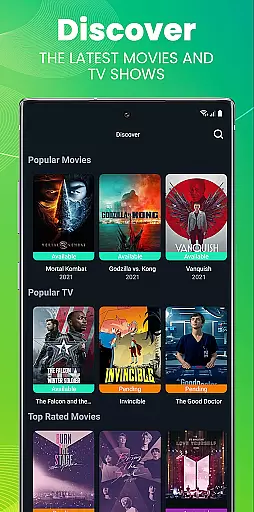
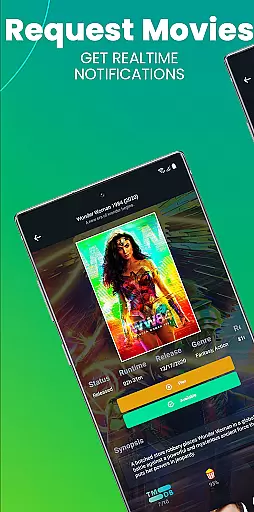
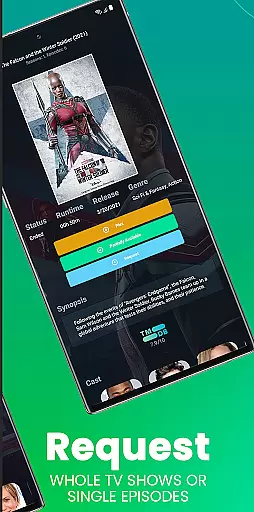
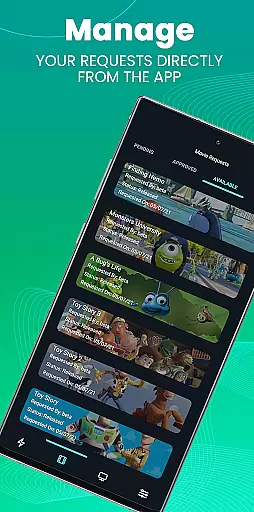
Ombi is a self-hosted entertainment management app that allows users to request content for Plex, Emby, or Jellyfin libraries. Designed for seamless integration, it connects multiple DVR tools to streamline the process of requesting TV shows and movies.
The app requires an existing Ombi server account (v4.0.13XX or later) and provides a user-friendly interface for managing media requests. By scanning a QR code in your Ombi profile, you can easily link the mobile app to your server, making it ideal for home entertainment enthusiasts who want control over their shared libraries.
Ombi's standout feature is its ability to integrate with popular media servers like Plex, Emby, and Jellyfin, enabling users to submit requests directly through the app. It supports automatic updates from various TV show and movie databases, ensuring accurate metadata and availability.
Another key aspect is its customizable permissions system, allowing administrators to manage user access levels effectively. With a focus on usability, Ombi offers a clean interface where users can track their requests and receive notifications when content becomes available, enhancing the overall experience for both admins and end-users.
Ombi offers a diverse range of content options by integrating with Plex, Emby, and Jellyfin, allowing users to request TV shows and movies seamlessly.
This self-hosted web application connects to multiple DVR tools, ensuring that users can access the latest content as soon as it becomes available.
By enabling shared users to request content independently, Ombi enhances user engagement and satisfaction through continuous updates and new additions.
The platform's ability to evolve over time ensures that the look, feel, and functionality remain fresh, providing an ever-improving entertainment experience for its users.
Ombi significantly boosts user engagement by offering an intuitive interface where users can easily request their favorite TV shows and movies.
With its QR code login feature, users can quickly access their accounts, streamlining the user experience and encouraging longer session durations.
The app's integration with popular media servers ensures that users have a seamless experience, which helps in retaining them on the platform.
Continuous updates and improvements not only keep the content fresh but also maintain user interest over time, leading to higher retention rates.
User-friendly interface
Seamless media server integration
Customizable permission settings
Real-time request tracking
Active community support
Requires existing Ombi server
Limited offline functionality
Dependent on third-party services
Setup may be complex for beginners
Interface still evolving

Heroclix search units with multi filter , team builder, collection manager.
 4.40
4.40
EVP Recorder / Voice Recorder for ghost hunting, to communicate with ghosts.
4.2
Fun brain twisting challenge with trending Whirlpool Filter.
4.70
Best of icon for christmas
4.30
Control your AWTRIX 3 easily
4.4
Binaural Brainwave Doses for Every Imaginable Mood
3.60
Your Avatar, Endless Fun
4.60
Everything FOX in one place. Watch FOX News, NFL, MLB, TV shows and more.
4.50
Earn Real Rewards Playing Fun Mobile Games & Easy Cash Out - PayPal & Gift Cards
4.40
Catalog & tracker of your DVD, Blu-ray & Digital Movie and TV Collection Library
4.80
Wodfix Air aggregates popular online content for you.
4.80
The JBL Portable app works with JBL portable Bluetooth speakers.
4.60
Unleash Your AI Imagination
4.60
Premium version to enjoy your favorite anime
4.60
Just play games to earn gift cards. Keep playing, keep earning.
4.50
Rain and lightning effects for your Philips Hue lights
4.30
Music visualizer and party effects for Hue
3.90
Alice Box is an Instrumental Trans Communication app.
3.80
Music visualizer and party effects for your Nanoleaf devices
4.0


User Reviews