
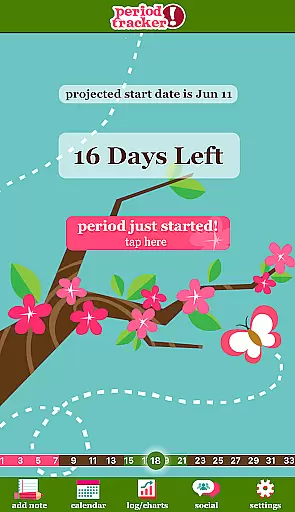
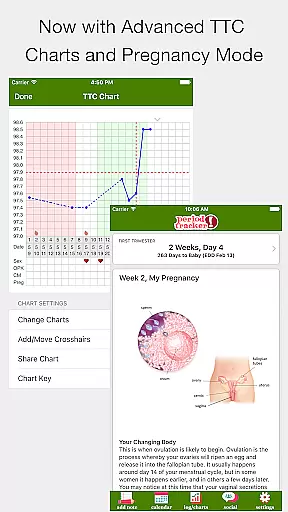
Period Tracker Deluxe is a comprehensive health and fitness application designed specifically for menstrual cycle tracking. This app allows users to effortlessly log their period start dates, providing accurate predictions of future cycles based on the average of the past three months' data. The core functionality extends beyond basic period tracking, offering detailed insights into ovulation windows, fertile days, and mood tracking.
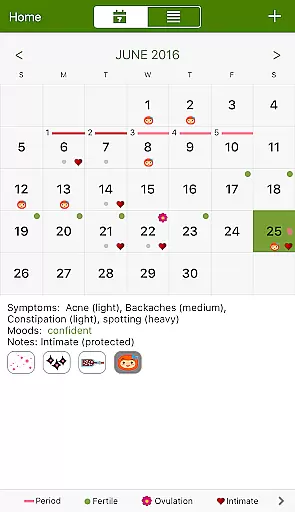
What sets Period Tracker Deluxe apart is its user-friendly interface that presents all essential information in an intuitive calendar view. Users can easily monitor their current menstrual phase, predict upcoming periods, and identify peak fertility days. The app also features discreet home screen widgets that display vital information without compromising privacy. Whether you're trying to conceive or simply want to stay informed about your reproductive health, this app provides valuable data to help you make informed decisions.
The application's value extends to its customizable features that adapt to individual needs. Users can personalize their experience through various skins, track additional health metrics like cervical mucus and intimate relations, and even switch to pregnancy mode when needed. These features make Period Tracker Deluxe particularly useful for women who want to maintain detailed records of their menstrual health while enjoying a visually appealing and discreet mobile application.
Period Tracker Deluxe distinguishes itself through its extensive feature set tailored for comprehensive menstrual health management. The app's primary feature is its intelligent period prediction algorithm, which analyzes historical data to forecast future cycles with increasing accuracy. This predictive capability is complemented by advanced fertility tracking tools that display ovulation windows using visual indicators on both the calendar and home screen widgets.
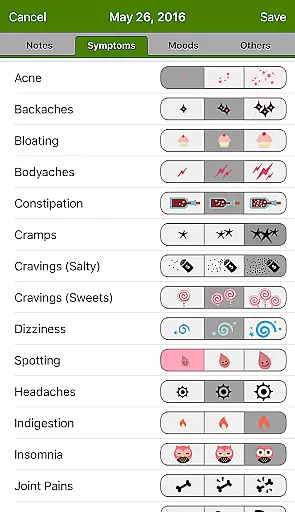
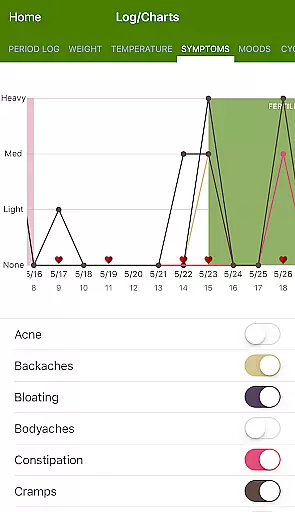
Among its notable features is the ability to maintain detailed daily logs of various health parameters. Users can record mood swings, physical symptoms, and intimate activities, creating a comprehensive health diary. The app's visualization tools include multiple chart types that help users identify patterns and trends in their menstrual cycles. Additionally, the pregnancy mode offers specialized tracking for expecting mothers, counting down to their due date with precision.
The application's customization options enhance user experience significantly. With various skin choices, discreet icon options, and home screen widgets, users can tailor the interface to their preferences. Advanced features like cervical mucus tracking and position logging cater to users seeking detailed fertility monitoring. These features collectively create a robust platform for managing menstrual health while maintaining discretion and personalization.
Personalized planning in health applications refers to the ability to tailor features and predictions based on individual user data. For Period Tracker Deluxe, this means analyzing past menstrual cycles to accurately forecast future period start dates, ovulation, and fertile days.
The app achieves personalized planning by allowing users to log their period start dates each month. It then calculates the average cycle length from the past three months to predict the next period date. This feature is crucial for users who want to anticipate their menstrual cycle phases with precision.
Users benefit from this functionality by gaining insights into their reproductive health. They can plan activities, vacations, or important events while being aware of their cycle patterns. Additionally, those trying to conceive can identify their most fertile days, enhancing their chances of success.
This personalized approach ensures that each user receives tailored information that evolves with their logged data, providing increasingly accurate predictions over time.
Progress visualization involves presenting user data in an easily digestible graphical format. In Period Tracker Deluxe, this feature allows users to view their menstrual data through charts and calendars, offering a clear picture of their cycle history and trends.
The app provides a month-view calendar where users can see their current and future period dates, ovulation days, and mood or symptom notes. This visual representation helps users quickly identify patterns or irregularities in their cycles.
By visualizing their progress, users can better understand how factors like stress, diet, or exercise impact their menstrual health. The app's charts make it easier to communicate this information with healthcare providers if needed.
Ultimately, progress visualization empowers users to take control of their reproductive health by transforming raw data into actionable insights, promoting informed decision-making and proactive health management.
User-friendly interface
Accurate cycle predictions
Comprehensive tracking options
Discreet home screen presence
Customizable appearance
Premium version costs
Manual data entry required
Learning curve for new users
Limited free features
Occasional prediction errors

sobriety counter app to help and motivate people to stop drinking alcohol.
 4.90
4.90
a fun app full of surprises :)
4.70
Pupillary distance PD with camera quick and easy, checking glasses frames on you
3.70
Step Counter, track steps when you walk or run
4.70
Track heart rate & HRV in 30s! Get live health insights and anomaly alerts
4.40
Download MadMuscles to start your positive body transformation!
4.30
Your Health Assistant
3.90
Understand your body’s most meaningful messages and transform your health.
3.90
Mood journal, habits, self-care tracker, self-love
4.90
The Crunch Mobile app - Find a gym, manage favorites, reserve & cancel classes.
4.60
Binaural Beats - Fully Customizable Waves - Pure Sound - No Loops
4.50
FODMAP, Gluten, Allergy, Vegan
4.50
Eat smarter with Eato, your personal calorie counter and nutrition tracker!
4.40
Blood Pressure Log, HRV & Heartbeat Tracker. Pulse Checker.
4.40
Grow with self-tests and personal routine.
4.30
Pack of 66 calming lullabies for smooth fall asleep and relaxation
4.10
Monitor, analyze, track, and convert blood sugar & help you control diabetes.
4.10
beat yesterday.
4.00
Using Recognise™ has been shown to reduce pain and improve performance
4.2


User Reviews