
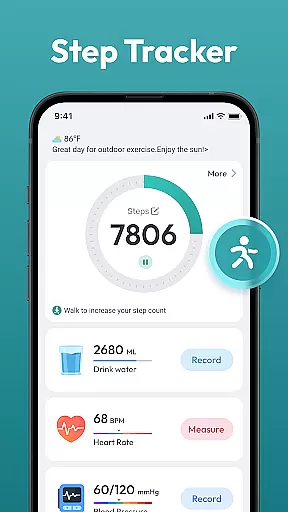
Step Counter - Pedometer App is a comprehensive health and fitness tool designed to help users track their daily physical activity. This app automatically counts steps and measures distance traveled, making it ideal for those looking to monitor their walking or running routines. Suitable for all ages, it supports various health goals such as weight loss and maintaining an active lifestyle.
The app offers robust features including daily, weekly, and monthly charts to visualize progress over time. It works seamlessly with most Android devices without the need for additional wearable technology. Users can also access training courses and plans tailored to individual fitness levels, ensuring a personalized experience that adapts to each user's needs.
Whether you are striving to reach a daily goal of 10,000 steps or simply wish to maintain better health, Step Counter - Pedometer App provides the tools necessary to stay motivated and informed. Its user-friendly interface ensures ease of use, allowing users to focus on their fitness journey rather than navigating complex systems.
Step Counter - Pedometer App boasts a variety of features that enhance its functionality and usability. One standout feature is automatic step counting, which accurately tracks your movements throughout the day without any manual input required. This ensures consistent and reliable data collection, providing users with precise insights into their activity levels.
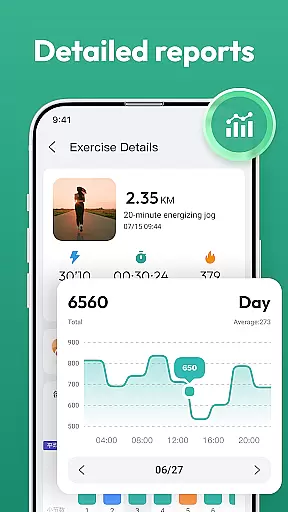
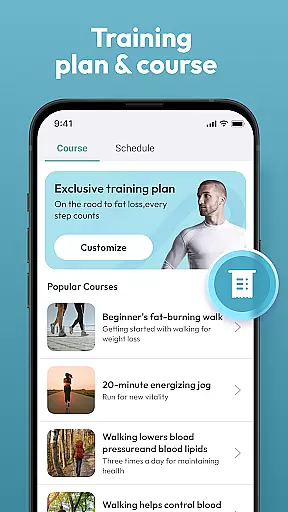
In addition to step tracking, the app records various health metrics and presents them through intuitive daily, weekly, and monthly charts. These visual aids help users understand trends in their physical activity and make informed decisions about their fitness routines. The app also includes training courses and plans designed by fitness experts, offering structured guidance to help users achieve specific health objectives.
Another significant advantage is compatibility with most Android devices, eliminating the need for separate wearables. This accessibility makes the app an excellent choice for individuals seeking a convenient way to monitor their health. Furthermore, the clean and straightforward interface enhances user experience, ensuring that even those new to fitness apps can navigate and utilize the app effectively.
Personalized planning in a fitness app refers to the ability to create tailored workout and health plans based on individual goals, capabilities, and progress. This feature is crucial for maintaining user motivation and ensuring that fitness objectives are met effectively.
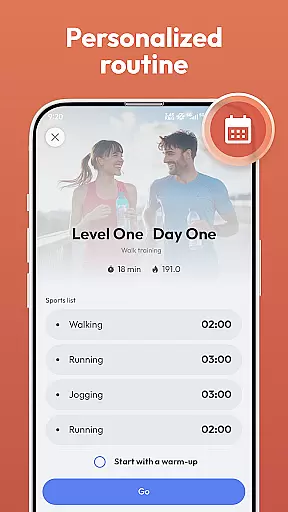
Step Counter - Pedometer App offers personalized planning through its training courses and plans. Users can choose a program that aligns with their fitness aspirations, such as losing weight or staying active. The app's automatic step counting and health data tracking enable it to adjust plans dynamically, matching the user's daily achievements and challenges.
Users benefit from this feature by receiving customized guidance that adapts to their lifestyle and fitness level. Whether aiming for a daily goal of 10,000 steps or monitoring distance covered, the app supports varied health data tracking without the need for additional wearable devices.
The true value of personalized planning in Step Counter - Pedometer App lies in empowering users to take control of their health journey. With compatibility across most Android devices and an array of features like daily, weekly, and monthly charts, users gain insights into their progress, helping them stay committed to their fitness goals.
Progress visualization is a key component of any fitness application, providing users with a clear representation of their achievements and milestones. This visual feedback is essential for motivation and allows users to understand their performance trends over time.
In Step Counter - Pedometer App, progress visualization is brought to life through detailed charts and records. The app tracks daily, weekly, and monthly activities, presenting the data in an easily digestible format. Users can visually monitor their step counts, distance traveled, and other health metrics without the need for external devices.
This feature significantly enhances user engagement by offering tangible evidence of progress. As users work towards their personal goals, such as reaching a step target or completing a training plan, they can see real-time updates and historical data that highlight their fitness journey.
By integrating progress visualization, Step Counter - Pedometer App not only makes tracking more interactive but also helps maintain long-term user interest. The combination of automatic tracking and comprehensive charts ensures that users remain informed and inspired to continue their path toward better health.
User-friendly design
Accurate step tracking
No extra hardware needed
Detailed progress charts
Customizable training plans
Limited to Android
No live coaching
Basic social features
Ads may appear
Occasional bugs

Build Healthy Habits!
 4.60
4.60
Using Recognise™ has been shown to reduce pain, and improve performance.
4.5
Show your support for the development of FitNotes - Gym Workout Log
4.90
FitCloudPro takes care of your health every minute.
3.70
Track sleep cycle, relax with white noise, sleep sounds & smart alarm clock
3.80
beat yesterday.
4.00
Manage your and your family's health information.
4.60
Jogging app for calorie counter and distance tracker. Running app to lose weight
4.20
Monitor blood sugar, gain insights, and manage diabetes with ease.
3.20
Beauty Care, Makeup & Skin Care Scanner | Pregnancy App For A Mom | Healthy Baby
5.00
Easy to use step counter, calorie counter helps lose weight, count steps offline
4.80
A brain game that moves you
4.70
Mind on steroids - relaxation, productivity, meditation and sleep!
4.60
The Official Blood Type Diet® App - know your categorized foods anytime.
4.50
Download MadMuscles to start your positive body transformation!
4.30
Interval timer for High Intensity Interval Training, Tabata and Circuit Training
4.20
Get alert about getting out of desired heart rate zone.
4.10
Pupillary distance PD with camera quick and easy, checking glasses frames on you
3.70
Text notifications, button control, heart monitor & more for your Amazfit.
2.40


User Reviews