
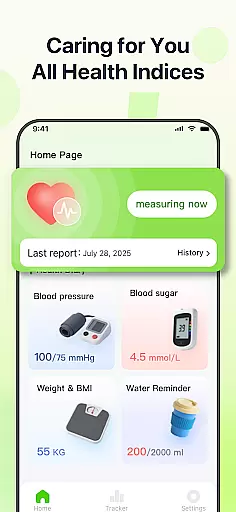
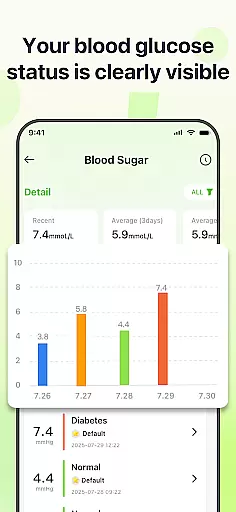
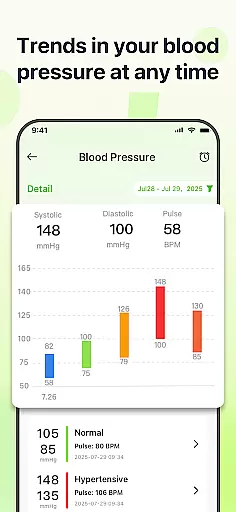
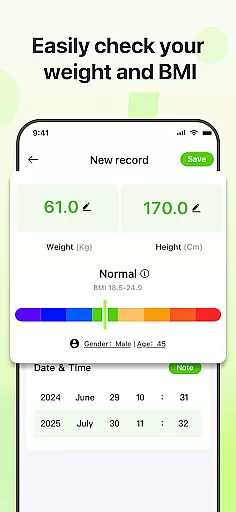
PulseSense is a comprehensive health tracking application designed to simplify wellness management. It allows users to effortlessly log key metrics such as blood pressure, glucose levels, and heart rate while providing intelligent reports tailored to personal data. With sleek trend visualizations spanning days to years, the app helps uncover patterns and track progress over time.
Designed for individuals managing chronic conditions like hypertension or diabetes, PulseSense also supports those building healthier routines or monitoring senior care. Its privacy-focused design ensures all data stays encrypted on the device without cloud storage or account requirements, making it a secure and dependable health companion.
PulseSense offers an array of advanced features that cater to both functionality and user experience. The app provides effortless logging of critical health metrics, including blood pressure, glucose levels, and heart rate, alongside customizable notes and tags for better context. Its intelligent reporting system generates personalized lifestyle recommendations based on logged data, empowering users with actionable insights rather than just raw numbers.
One standout feature is its sleek trend visualization, which spans days, weeks, months, and years, enabling users to identify long-term patterns in their health metrics. Additionally, the app includes reminders to reinforce healthy habits and consolidate all health data into one platform, eliminating the need for multiple tools. Privacy remains a core focus, with end-to-end encryption ensuring no data leaves the device.
Personalized planning in health applications refers to the ability to tailor health goals and routines based on individual user data. This feature is crucial as it allows users to receive customized recommendations that suit their unique health profiles.
PulseSense excels in personalized planning by analyzing logged metrics such as blood pressure, glucose levels, and heart rate. The app generates intelligent health reports and actionable lifestyle suggestions specifically designed for each user's needs.
Users benefit from this feature by gaining insights that are directly applicable to their personal health journeys. Instead of generic advice, PulseSense offers targeted strategies for managing conditions like hypertension or diabetes effectively.
The true value of personalized planning in PulseSense lies in its capacity to transform raw health data into meaningful guidance. By prioritizing customization, the app empowers users to make informed decisions about their wellness, enhancing both engagement and long-term health outcomes.
Progress visualization involves presenting health data in a visually intuitive manner, making it easier for users to understand trends and patterns over time. This functionality is essential for maintaining motivation and ensuring adherence to health goals.
In PulseSense, progress visualization is executed through sleek trend visuals that span days, weeks, months, and years. Users can easily track their health metrics with clear graphical representations that highlight changes and improvements.
This feature provides users with a tangible way to observe their health journey, reinforcing positive behaviors. Visual cues help in identifying correlations between different health parameters and lifestyle choices, leading to more informed health decisions.
By focusing on comprehensive and accessible progress visualization, PulseSense ensures that users remain engaged and committed to their health objectives. The ability to see real progress not only boosts morale but also encourages consistent use of the app for ongoing health management.
User-friendly interface
Advanced trend analysis
Personalized health insights
Strong privacy controls
Comprehensive metric tracking
No direct measurement tools
Limited medical guidance
Premium features may cost extra
Requires manual data entry
Not ideal for real-time alerts

Control your sleep in real-time wearing Garmin device
 3.60
3.60
Insanity blocks of intense physical activity, short breaks of 30 seconds.
4.0
a fun app full of surprises :)
4.70
The app helps you address digestive symptoms based on the Fast Tract Diet.
3.50
Histamine intolerance, low FODMAP diet and irritable bowel syndrome (IBS)
4.00
Binaural Beats - Fully Customizable Waves - Pure Sound - No Loops
4.50
Load the bar with this barbell & plate calculator. It's leg day, not brain day!
4.70
Step Counter, track steps when you walk or run
4.70
Manage your and your family's health information.
4.60
Beauty Care, Makeup & Skin Care Scanner | Pregnancy App For A Mom | Healthy Baby
5.00
Easy to use step counter, calorie counter helps lose weight, count steps offline
4.80
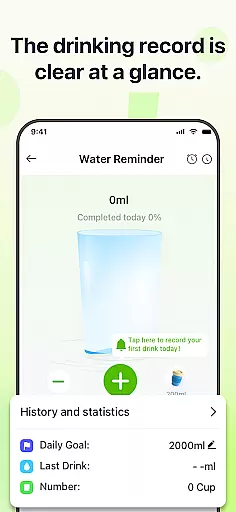
Drink water reminder app. Track water intake. Smart simple hydration tracker.
4.70
The OFFICIAL Couch to 5K® running training app! A 9 week walk-run workout plan.
4.50
50 HD sounds to help you relax during the day and sleep great at night!
4.40
Fast Body building & Weight Loss. Home Workouts with Daily Coach, No Equipment.
4.30
Interval timer for High Intensity Interval Training, Tabata and Circuit Training
4.20
“Overcoming pain based on EMDR” helps you to alleviate chronic pain and stress.
4.10
Your Health Has Met Its App (℠)
3.90
Your plan in your pocket 24/7
3.00


User Reviews