
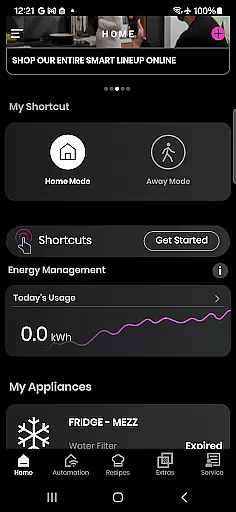
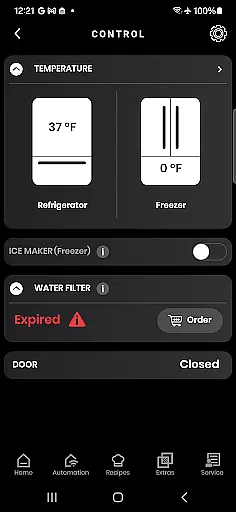
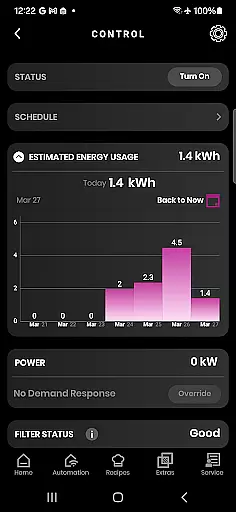
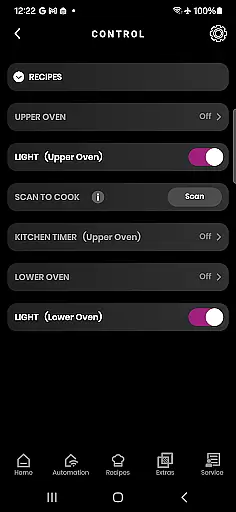
SmartHQ is a comprehensive smart home management application that allows users to effortlessly control and monitor their smart appliances from leading brands such as GE Appliances, Profile, Café, Monogram, Fisher & Paykel, and Haier. The app serves as a centralized platform for managing various smart devices, ensuring convenience and peace of mind.
The application offers remote control capabilities, voice integration with Amazon Alexa and Google Assistant, timely notifications, software updates, personalized shortcuts, energy and water usage monitoring, and an enhanced cooking experience through AI-generated recipes and smart oven monitoring. Additionally, it provides convenient product registration, expert help via the SmartHQ Assistant, proactive service alerts, diagnostics tools, and scheduling options for technician visits.
SmartHQ is particularly useful for homeowners who want to streamline their smart home experience by integrating multiple appliances into one intuitive interface. By providing real-time control and valuable insights, the app helps users optimize their appliance usage, save resources, and enjoy a more connected lifestyle.
SmartHQ stands out with its extensive feature set tailored for smart home management. One of its key features is remote control functionality, which enables users to monitor and manage their appliances from anywhere, ensuring both convenience and security. This feature is complemented by voice integration, allowing seamless interaction through Amazon Alexa and Google Assistant.
The app also excels in keeping users informed with timely notifications about appliance status, alerts, and updates. It supports software updates to ensure appliances run efficiently and gain access to new features. Personalization is another highlight, offering shortcuts for frequently used functions and downloadable modes for appliances. Users can monitor energy and water consumption, empowering them to make informed decisions.
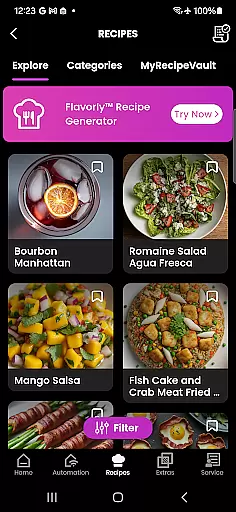
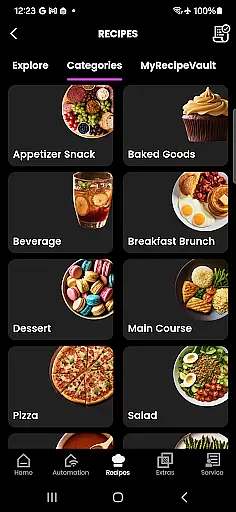
For cooking enthusiasts, SmartHQ enhances the culinary experience with AI-generated recipes via Flavorly and smart oven monitoring with built-in cameras. The app facilitates convenient product registration, even for non-Wi-Fi models, and provides expert assistance through the SmartHQ Assistant. Proactive service alerts, diagnostic tools, and scheduling options for technician visits further enhance the user experience, making SmartHQ a versatile and indispensable tool for modern smart homes.
SmartHQ offers an extensive range of features that cater to various aspects of a connected home lifestyle. The app supports smart appliances from renowned brands like GE Appliances, Profile, Cafu00e9, Monogram, Fisher & Paykel, and Haier, ensuring broad compatibility across different product lines.
Users can enjoy functionalities such as remote control, voice integration with Amazon Alexa and Google Assistant, timely notifications, and software updates. These features collectively enhance the convenience and efficiency of managing household appliances.
The app also provides personalized experiences by allowing users to create shortcuts for frequently used functions and download new modes for their appliances. Additionally, it includes tools for monitoring energy and water usage, offering insights that help users make informed decisions about resource consumption.
With its comprehensive feature set, SmartHQ ensures that users have access to a wide array of lifestyle categories, making it an all-in-one solution for modern smart homes.
SmartHQ stands out by providing authentic and credible content tailored to enhance user experience. The app integrates with trusted platforms like Amazon Alexa and Google Assistant, ensuring reliable voice command functionality. This integration not only adds convenience but also assures users of the app's commitment to quality and reliability.
Notifications and updates provided through SmartHQ are designed to keep users informed about their appliances' status and any necessary actions. These alerts are backed by expert systems that monitor appliance performance, ensuring accurate and timely information delivery.
For troubleshooting and support, SmartHQ offers the SmartHQ Assistant, which provides expert help and answers to common appliance questions. Users can also schedule technician visits directly through the app, further enhancing the credibility of the services offered.
By combining expert-backed features with authentic content, SmartHQ establishes itself as a trustworthy tool for managing smart home appliances effectively.
User-friendly interface
Comprehensive appliance support
Remote monitoring capability
Voice command integration
Energy usage insights
Limited to compatible devices
Requires stable internet
Premium feature costs
Occasional connectivity issues
Dependent on appliance model

Countdown to Christmas 2025 with festive games & activities in a virtual village
 4.80
4.80
Stay connected with your loved ones & vehicles | Share live GPS location updates
4.60
Bring the warm colors of fall directly to your wrist with Autumn Leaves!
4.1
Make money, get paid cash rewards & gift cards for every survey. Earn today!
4.60
My Diary - Daily Journal with lock: Diary journal app and secret diary with lock
4.80
Creativity and savings for kids, beginners and experts in arts and crafts
3.50
Colorful minimal digital watch face for Wear OS
4.60
Mixing Colors for Menswear
4.20
No more juggling multiple apps, now you can control everything in one place!
4.60
Get the news, events and savings that matter to you with AARP Now.
4.80
Your store’s deals, where you are.
4.80
Tap to the beat with interactive videos — warm up your reflexes & have fun
4.70
The App can control Roborock vacuum cleaners from anywhere with rich features.
4.60
Redecor your home with Home AI interior design, room planner and home designer.
4.50
Play fun games, complete quick surveys, and earn money. It's fun and easy!
4.40
Chat, meet genuine singles in your area. Real connections start with being real.
4.30
This is a simple and highly functional alarm clock "Smart Alarm" paid version.
4.20
Communicate with your vehicles and Powerwalls anytime, anywhere
3.60
BILT interactive 3D instructions help you get the job done right
3.50


User Reviews