
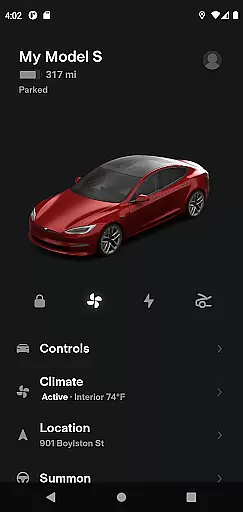
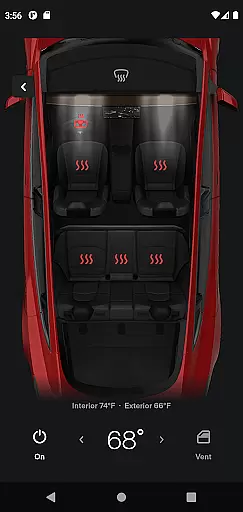
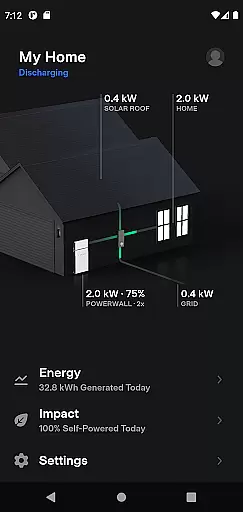
The Tesla app is a comprehensive lifestyle tool that connects owners with their vehicles and Powerwalls anytime, anywhere. This application allows users to remotely monitor charging progress, control the vehicle's temperature, lock or unlock the car, locate the vehicle, and even start navigation by sending an address from their favorite apps. Additionally, it provides features for managing Powerwall energy storage, making it an essential companion for Tesla owners who want to maintain seamless communication with their products.
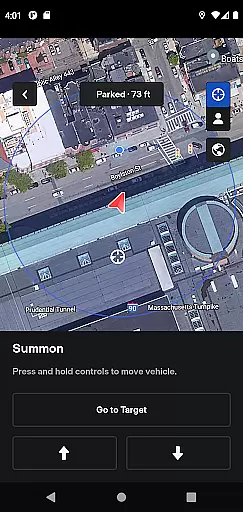
One of the standout capabilities of the Tesla app is its ability to summon the vehicle out of a garage or tight parking space for those with Autopark functionality. The app also enables users to update vehicle software remotely, ensuring they always have the latest features and security enhancements. Whether you're monitoring your solar energy production or controlling media playback in the car, this app offers a complete package for modern vehicle ownership.
The Tesla app boasts a wide range of innovative features designed to enhance user convenience and vehicle management. Users can check real-time charging progress and manage charging sessions directly from their phones. The app also allows pre-conditioning of the car's temperature before driving, which is particularly useful in extreme weather conditions. With remote locking and unlocking features, users can ensure their vehicle's security no matter where they are.
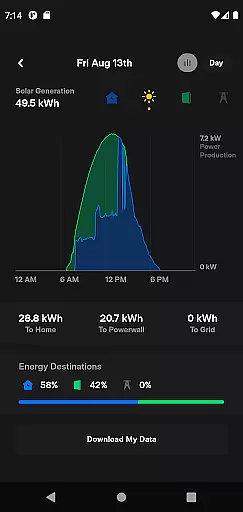
Another key feature is the ability to summon the vehicle using a smartphone, ideal for getting the car out of tight spaces without manual intervention. For Powerwall users, the app provides detailed insights into energy usage, solar production, and grid export data. These features collectively offer a seamless experience for Tesla owners, allowing them to maximize the potential of their vehicles and energy systems while maintaining full control over their devices.
The Tesla app offers a comprehensive suite of features that cater to various aspects of a user's lifestyle, making it an essential tool for Tesla owners. With functionalities ranging from vehicle control to energy management, the app ensures that users have everything they need at their fingertips.
One of the standout aspects is its ability to manage both Tesla vehicles and Powerwall systems. Users can remotely monitor and control charging, climate settings, and even summon their car from a parking spot. These features not only enhance convenience but also promote a sustainable lifestyle by optimizing energy usage.
In addition to vehicle management, the app provides detailed insights into energy storage and consumption. Users can track how much energy is stored from solar panels, used by their home, or exported to the grid. This level of detail empowers users to make informed decisions about their energy use, aligning with eco-friendly living standards.
Overall, the Tesla app covers a broad spectrum of lifestyle needs, ensuring that users can seamlessly integrate their Tesla products into everyday life while promoting sustainability and convenience.
Authenticity and credibility are paramount in the Tesla app, as it directly interfaces with high-value assets like vehicles and energy systems. The information provided through the app is sourced directly from Tesla's secure servers, ensuring that all data regarding vehicle status and energy usage is accurate and reliable.
Tesla, being a renowned leader in electric vehicles and renewable energy solutions, brings expert-level credibility to the app. Each feature, from battery management to solar energy tracking, is developed based on extensive research and technological innovation, guaranteeing that users receive the most advanced tools available.
Moreover, the app undergoes rigorous testing and regular updates to maintain its reliability and performance. This commitment to quality assurance means that users can trust the app to provide precise and timely information, enhancing their overall experience and confidence in managing their Tesla products.
By prioritizing content authenticity and leveraging Tesla's expertise, the app establishes itself as a credible and indispensable tool for modern, tech-savvy individuals looking to optimize their lifestyle with cutting-edge technology.
User-friendly interface
Remote vehicle control
Real-time charging updates
Comprehensive energy monitoring
Software update management
Limited to Tesla products
Requires internet connection
Dependent on vehicle model
No third-party integrations
Premium feature access costs

A watch face with transparency and fluid visuals inspired by liquid glass design
 4.2
4.2
Get your life organized with My Agenda!
4.30
A smart Siddur with halachic times
4.60
Zodiac & Horoscope Launcher: Daily Sign Predictions & Astrology
4.40
Celebrate the holidays with Advent Calendar: daily surprises and festive fun!
4.5
Wear your favorite memories, loved ones, pets or travel photos on your watch
4.1
No more juggling multiple apps, now you can control everything in one place!
4.60
Control your Tapo smart devices from anywhere.
4.60
Just play, earn rewards, fetch gift cards, and turn gaming into real payouts!
4.80
Stay connected with your loved ones & vehicles | Share live GPS location updates
4.60
A smart Siddur with halachic times
4.50
Play fun games, complete quick surveys, and earn money. It's fun and easy!
4.40
Fly your Solo like a boss.
4.10
Unique informative Dial with Live Moon Phase at a glance!
3.60
Creativity and savings for kids, beginners and experts in arts and crafts
3.50
An Eerie Musical Trigger Toy for Spirits to Play with!
3.50
View over 160,000 line dance stepsheets from the CopperKnob website.
3.30
Immerse yourself in the serenity of lavender fields and white butterflies
4.5
A uniquely designed isometric digital watch face made for Wear OS
4.3


User Reviews