
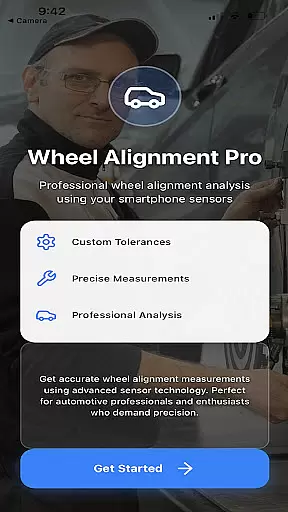
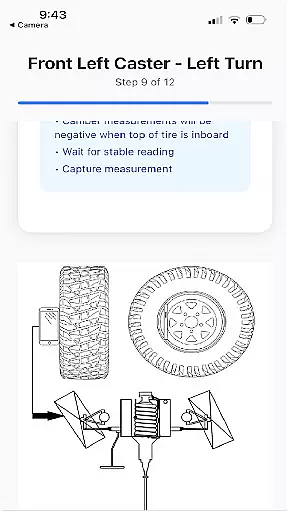
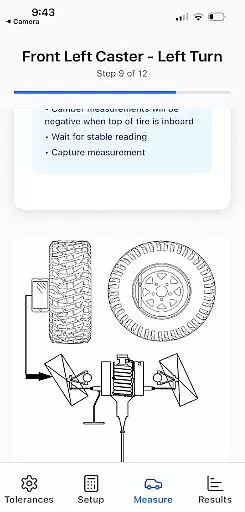
Alignment Pro is a specialized application designed for vehicle wheel alignment using your phone's internal sensors and a simple tape measurement. The app provides on-screen instructions to guide users through the process of collecting precise alignment data. It supports industry-standard specifications while also allowing manual updates to match the specific requirements of your vehicle, which can be easily sourced online.
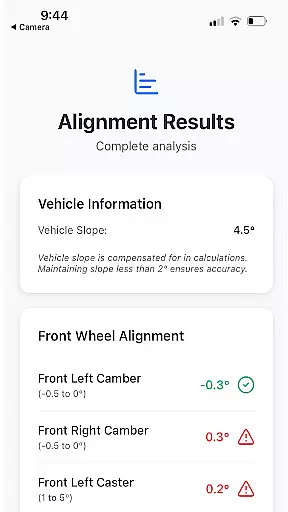
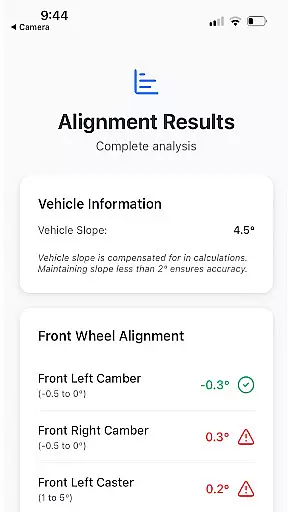
A key feature of Alignment Pro is its ability to compensate for uneven surfaces, ensuring accurate readings even on sloped driveways. Additionally, it offers a detailed alignment summary that highlights potential issues arising from out-of-tolerance conditions. This helps mechanics and car owners understand the implications of misalignment and explain these issues to customers effectively.
The app is particularly useful for automotive professionals and DIY enthusiasts who need reliable alignment tools without investing in expensive equipment. By leveraging smartphone technology, Alignment Pro makes professional-grade alignment accessible to everyone, saving both time and money while improving vehicle performance.
Alignment Pro stands out with its innovative use of smartphone sensors to perform tasks that traditionally require specialized equipment. The app's vehicle slope compensation feature ensures accuracy by accounting for uneven surfaces, making it versatile for various environments. Its intuitive interface provides step-by-step guidance, enabling users of all skill levels to perform alignments confidently.
Another notable feature is the detailed alignment summary report. This report not only displays the collected data but also explains the potential consequences of out-of-tolerance conditions. By identifying specific issues, such as uneven tire wear or steering problems, the app helps users understand the importance of proper alignment and its impact on vehicle safety and performance.
Furthermore, Alignment Pro allows users to customize alignment specifications for different vehicles easily. Whether you're working with standard industry benchmarks or specific manufacturer guidelines, the app adapts to your needs. This flexibility, combined with its accessibility, makes Alignment Pro an invaluable tool for anyone involved in vehicle maintenance, from professional mechanics to car enthusiasts.
Alignment Pro offers comprehensive details about your vehicle's alignment specifications. This feature is crucial for ensuring optimal vehicle performance and safety.
The app utilizes your phone's internal sensors and a simple tape measurement to collect precise wheel alignment data. It guides users through easy on-screen instructions, making the process accessible even for those with minimal technical knowledge.
Users can input industry-standard specifications or customize settings to match their specific vehicle's requirements. These specifications are easily found online, allowing for accurate adjustments tailored to individual needs.
This detailed approach not only helps in achieving precise alignment but also educates users about potential issues arising from out-of-tolerance conditions. By understanding these implications, users can better communicate with customers or make informed decisions regarding necessary adjustments.
One of Alignment Pro's key strengths is its commitment to price transparency. Understanding costs associated with vehicle maintenance is essential for budgeting and decision-making.
The app provides all its features without hidden fees or in-app purchases. Users can access complete functionality without worrying about unexpected expenses, which is particularly beneficial for small business owners and individual mechanics.
Furthermore, the app allows manual updates to your vehicleu2019s alignment specifications at no extra cost. This feature ensures that users always have the most accurate and up-to-date information without additional charges.
By offering clear and upfront information about its pricing model, Alignment Pro builds trust with its users. This transparency empowers users to manage their vehicle maintenance costs effectively while benefiting from high-quality alignment tools.
Accurate sensor readings
User-friendly interface
Customizable specifications
Detailed alignment reports
Cost-effective solution
Limited to phone sensors
Requires manual input
No real-time adjustments
Potential calibration issues
Dependent on surface quality

Theme for Car Launcher
 4.2
4.2
Monitor specific TOYOTA parameters by adding this plugin to Torque Pro.
2.00
Launcher for use in the car
4.40
myAudi offers users services and Audi connect services for Audi drivers
4.10
Boost profits and hit your goals faster with GigU's amazing tools for gigworkers
4.00
AI Powered - Automotive Mechanic Assistant
4.30
Lexus app currently supports 2010 or newer vehicles (2018 or newer for Hawaii).
4.80
7-Day Returns on All Cars
4.80
Quick and easy car diagnostics to get you the right fix.
4.70
Get more out of your AAWireless adapter with this companion app | aawireless.io
4.80
Take Control of Your Car
4.80
Ultimate OBD2 Car Scanner: Diagnostics, Service and Modification Tool
4.30
Taximeter; the professional's choice
4.30
Control maps, media and messaging, with the Google Assistant while you drive
4.10
By enthusiasts, for enthusiasts
4.00
Mobile Phone Parking - So easy to park
3.70
O'Reilly Pro will streamline your parts lookup and ordering process!
3.20
Theme for Car Launcher
4.1
Ferrari inspired analog & digital watch face with quick access and premium style
4.5


User Reviews