

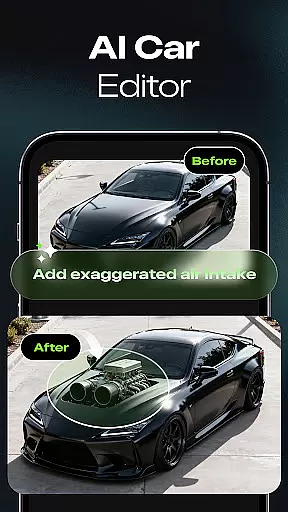

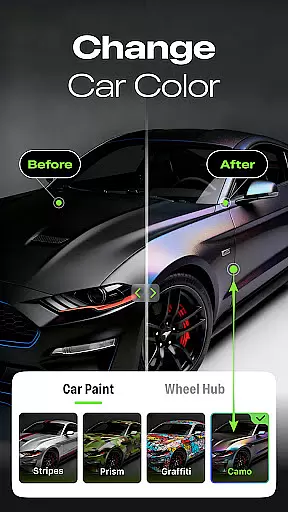
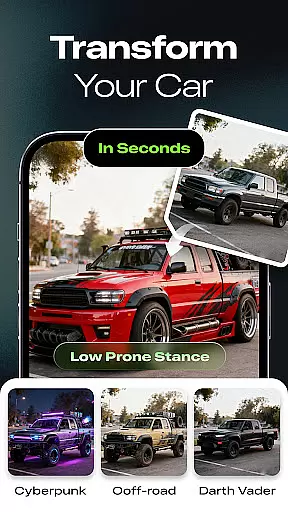
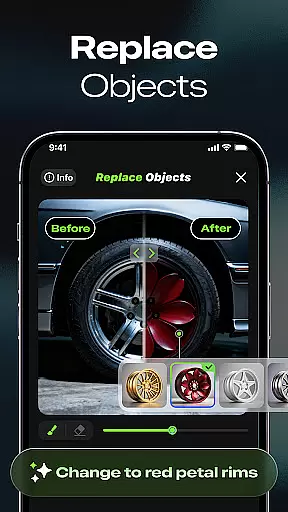
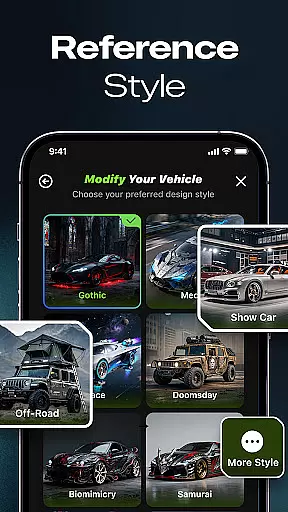
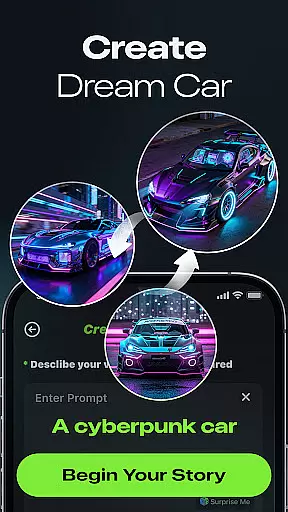
Car Editor & Al Car Designer is a cutting-edge mobile application tailored for automotive enthusiasts who wish to visualize their dream car modifications. The app leverages artificial intelligence to generate realistic and creative car customization concepts, making it possible for users to experiment with various styles and designs without any design skills required.
The core functionality includes an AI Car Design Generator that transforms uploaded car photos into stunning modification ideas ranging from sporty to retro themes. Additionally, the Smart Detail Editing feature allows users to make precise changes such as altering colors or adding accessories, while the One-Tap Style Transformation offers instant style makeovers including cyberpunk and off-road aesthetics.
This app is ideal for those planning real-life car upgrades or simply indulging in creative exploration. With its highly realistic results and user-friendly interface, Car Editor & Al Car Designer serves as a powerful tool for both hobbyists and professionals in the automotive industry.
Car Editor & Al Car Designer stands out with its innovative features designed to provide an unparalleled car customization experience. At the heart of the app is the AI Car Design Generator, which intelligently creates detailed modification concepts by analyzing uploaded car images. This feature supports a wide array of styles, ensuring that every user can find something that resonates with their vision.
Another remarkable aspect is the Smart Detail Editing tool, enabling users to mark specific areas for modification. Whether it's changing the color of the headlights or adding custom decals, the AI seamlessly integrates these alterations, maintaining the car's original integrity while enhancing its appearance.
Furthermore, the One-Tap Style Transformation feature provides instant access to numerous predefined styles, allowing users to quickly apply complex design changes. These capabilities not only save time but also inspire creativity, making this app an essential resource for anyone interested in automotive design.
Car Studio offers an innovative approach to accessing detailed vehicle information through its AI-powered customization features. This app allows users to upload photos of their cars and generate stunning modification concepts that highlight various specifications and design elements.
The AI Car Design Generator provides insights into different styles, from sporty and futuristic to luxury and retro, giving users a comprehensive understanding of potential vehicle aesthetics. By experimenting with these modifications, users can gain valuable information about possible upgrades and enhancements.
Smart Detail Editing further enhances the experience by enabling users to make specific changes to colors, lights, accessories, or textures. The AI seamlessly blends these alterations, offering a realistic preview of what the actual modifications might look like. This feature helps users visualize detailed vehicle information in a practical and engaging way.
With unlimited creative exploration, users can save, compare, and share their favorite designs. This not only aids in making informed decisions about real-life car modifications but also serves as a source of inspiration for automotive enthusiasts looking to understand more about vehicle details and customization possibilities.
One of the standout features of Car Studio is its clear approach to price transparency, particularly through its subscription model. Users are given a choice between free usage and subscription benefits, ensuring they know exactly what they are paying for.
Free users can initiate the generation of one image per task, which provides a basic level of service suitable for casual users. However, for those seeking more extensive features, the subscription plan offers multi-image generation capabilities, allowing up to four screenshots at a time. This tiered pricing structure ensures users can select a plan that best fits their needs.
Subscription benefits extend beyond just multi-image generation. Subscribers enjoy unlimited generation, removing the constraints associated with the high cost of the generation model. Additionally, subscribers can permanently remove ads, enhancing the user experience by providing an uninterrupted interface.
Other distinctive subscription benefits include access to paid styles and video generation features. These offerings ensure that users have a transparent understanding of the costs involved and the value provided, making Car Studio a reliable choice for those interested in detailed and flexible vehicle customization options.
User-friendly interface
Highly realistic results
Versatile style options
Smart editing tools
Inspiring creative exploration
Premium subscription required
Limited free features
Ads for free users
Internet connection needed
Occasional processing delays

Easily notify car owners in urgent situations, safe, fast, multilingual.
 4.3
4.3
App Mirroring for Tesla Car's Browser
2.80
AlfaOBD software for Fiat Group cars native diagnostic
3.70
Buy and sell your boat
4.70
Discover new and used cars in Syria easily! Browse ads and connect with sellers.
3.70
Blink Charging Mobile app makes finding an EV charger an intuitive experience.
3.80
Lexus app currently supports 2010 or newer vehicles (2018 or newer for Hawaii).
4.80
Car Sounds Engine Sounds app welcomes Auto Lovers to feel Car Simulator Sound
4.20
Find Fast EV Chargers | Charge Your Vehicle at 1,100+ Fast Car Charging Stations
4.60
Marathon ARCO Rewards members earn rewards & apply the rewards for fuel savings!
4.80
Your go-to app for car, truck & SUV parts, DIY tools, and expert repair help.
4.70
Trip computer+car diagnostic tool with widest variety of features and dashboard!
4.70
Easy connect & control your cars from afar. Remote Lock & unlock car and carplay
4.60
A smarter way to park and reserve your spot ahead of time.
4.40
Taximeter; the professional's choice
4.30
A full featured, real-time transit locator system
4.30
Realtime Charts is a plugin for the Torque Pro App (OBD 2 & Car)
4.20
Better fuel to help keep you on the road
3.20
Attention! This is the theme for the Car Launcher app
4.1


User Reviews