
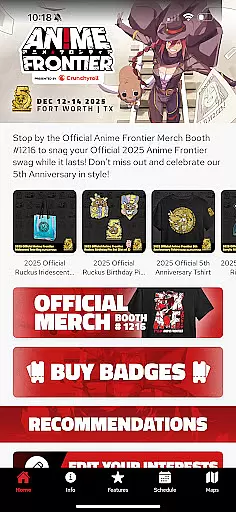
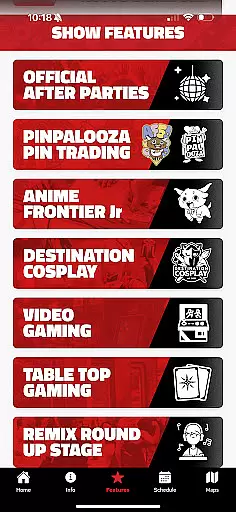
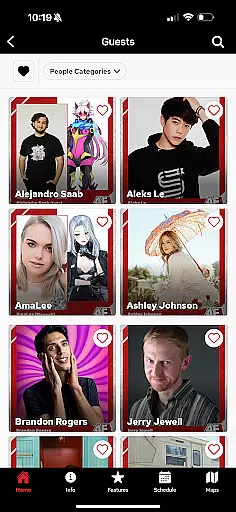
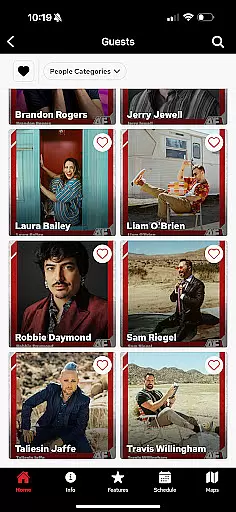
Anime Frontier 2025 is a comprehensive mobile companion designed specifically for anime convention attendees. This app serves as your ultimate guide to the event, providing real-time updates on guests, schedules, exhibitors, artists, and panels.
With Anime Frontier 2025, users can access detailed information about their favorite exhibitors including booth numbers and guest activities. The app's scheduling feature ensures you never miss important panels by allowing you to set reminders and create personalized itineraries. Additionally, attendees can stay informed with the latest convention news and navigate the venue easily using the built-in maps feature.
This application is particularly useful for frequent anime convention goers who want to maximize their experience by having all essential information in one place. By streamlining event planning and enhancing on-site navigation, Anime Frontier 2025 significantly improves the overall convention experience.
The Anime Frontier 2025 app offers an impressive array of features tailored for anime convention enthusiasts. Its most notable capability is the comprehensive event management system that lets users track their favorite exhibitors and guests with precise booth and table numbers.
A key innovation is the app's scheduling tool which revolutionizes how attendees plan their convention experience. Users can set up custom reminders for panels they wish to attend and build personal schedules. The real-time news feed provides instant updates about special guests and show features, keeping users always in the know.
Another standout feature is the interactive map functionality. This tool helps visitors efficiently navigate the convention center by providing detailed floor plans and point-of-interest markers. These features collectively ensure that users can optimize their time and make the most of their convention experience.
Task creation and detail customization are essential features for event attendees who want to maximize their experience. The Anime Frontier Mobile App excels in this area by allowing users to set up personalized schedules tailored to their interests. With a comprehensive list of panels, guests, and exhibitors, users can easily browse through the offerings and select the ones they wish to attend.
The app provides detailed information about each event, including timings, locations, and descriptions. This enables users to make informed decisions when adding events to their personal schedules. Additionally, the app allows for customization options such as setting reminders for upcoming panels or activities, ensuring that users never miss out on what matters most to them.
By offering these robust task creation and customization features, the Anime Frontier app enhances user engagement and satisfaction. Attendees can navigate the convention with ease, knowing exactly where they need to be and when. This level of personalization not only improves the overall event experience but also encourages users to explore more of what Anime Frontier has to offer.
Reminder settings play a crucial role in ensuring that attendees do not miss out on key events during conventions like Anime Frontier. The mobile app offers an intuitive reminder system that allows users to set alerts for specific panels, guest appearances, or exhibitor showcases. By doing so, it helps manage time effectively and ensures a seamless experience throughout the event.
Users can customize reminder notifications according to their preferences. Whether it's a push notification 10 minutes before a panel starts or a daily summary of the next dayu2019s schedule, the app caters to various needs. These reminders are designed to be timely and relevant, providing just enough notice for attendees to make their way to the desired location without feeling rushed.
Ultimately, the reminder feature adds significant value by keeping attendees organized and stress-free. It empowers users to fully immerse themselves in the convention atmosphere without worrying about missing important sessions. By integrating practical tools like reminder settings, the Anime Frontier app significantly enhances the overall attendee experience, making it an indispensable companion for any participant.
User-friendly interface
Real-time updates
Personalized scheduling
Detailed exhibitor info
Interactive maps
Limited to specific events
Requires constant updates
Occasional bugs
Heavy data usage
Steep learning curve

The calendar app in this 2026 year see all dates.
 4.20
4.20
Microsoft Build is an annual developer conference hosted by Microsoft
4.20
Beautiful invitation cards + easy RSVP tracking for any event. Design Invites.
4.80
The official app of the Carmel Christkindlmarkt!
4.2
Find EDM shows near you! See your favorite artists live, and discover new music.
4.90
RAISE-365 makes fundraising easy and fun!
3.20
Fast Scans. Happy Fans. For Every Hometown!
4.60
Design Invitations & Cards for Any Occasion
4.80
TodayTix is the easiest way to get tickets to the best shows in your city.
4.90
Fantasy of Lights Event App
5.00
Discover events & experiences in NYC, LA, Chicago, DC, Miami and more!
4.70
Text message invitations for birthday party, wedding, graduation, baby shower +
4.60
Events, Meetings, Photo Shoots
4.50
Microsoft Ignite is an event that showcases latest advancements in technology
4.00
Purchase line-skip passes, drinks, cover, and more at bars and clubs
3.50
Watch live football matches and streaming events on our Arabic TV app!
3.50
TV.Garden is a video player to play your own TV streams from around the world!
3.40
Buy event tickets easily with our user-friendly App. Stay updated on hot events
4.0
Thanksgiving Wishes, Thanksgiving Stickers & Animated GIF for Whatsapp Stickers
4.5


User Reviews