
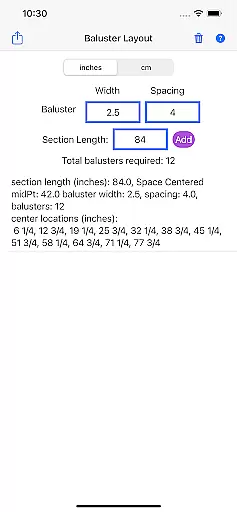
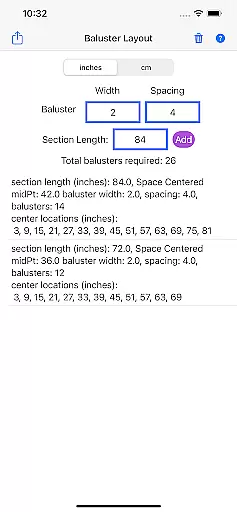
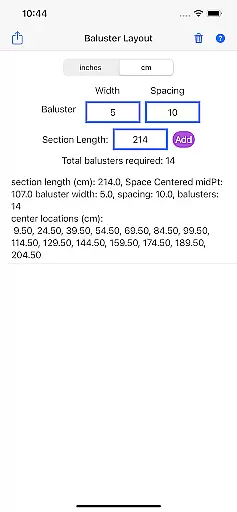
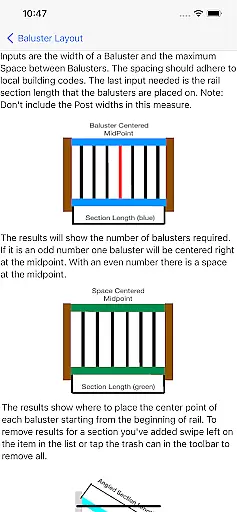
Baluster Layout is a specialized application designed for deck and stair builders who need precise calculations for baluster spacing. The app's core functionality revolves around ensuring compliance with building codes by calculating optimal baluster placement. Users can input railing length, baluster width, and desired spacing to receive detailed results tailored to their project.
One of the standout features of Baluster Layout is its ability to handle complex projects involving multiple railing sections, each with unique dimensions. This flexibility makes it suitable for both simple and intricate installations. Whether you're a professional builder or a DIY enthusiast, this app provides the accuracy needed to create safe and visually appealing structures while saving time and reducing errors.
Baluster Layout offers several key features that enhance the user experience. First, the app provides precision spacing calculations, ensuring that all balusters meet safety regulations and building code requirements. This eliminates the risk of human error in manual calculations and guarantees a compliant structure.
Another notable feature is the support for multiple rail sections. This allows users to manage projects with varying dimensions seamlessly. Additionally, the app supports both imperial and metric units, offering flexibility based on project specifications. Detailed results provide a comprehensive breakdown of baluster quantities and placements, making it easier for users to execute their plans accurately.
The combination of these features ensures that Baluster Layout stands out as an essential tool for anyone involved in baluster installation projects, delivering both convenience and reliability.
In the realm of home improvement and construction, having reliable measurements and calculations is crucial for ensuring that all components fit perfectly and meet safety standards. Baluster Layout offers a dependable solution for calculating baluster spacing with precision, providing assurance that your project will comply with building codes.
This app employs advanced algorithms to process the railing length, baluster width, and desired spacing, delivering accurate results every time. By inputting specific parameters, users can trust that their baluster placements are not only aesthetically pleasing but also structurally sound.
For deck or stair builders, this means peace of mind knowing that each baluster's position has been meticulously computed to prevent any future adjustments or potential hazards. The authenticity of these calculations ensures that whether you're working on a simple deck railing or a complex stairway system, your project adheres to necessary regulations.
Ultimately, Baluster Layout stands as a beacon of reliability in property enhancement tasks, allowing both professionals and DIY enthusiasts to execute their designs with confidence and accuracy.
Beyond just calculating baluster spacing, Baluster Layout extends its utility by offering comprehensive home management features tailored for efficient project handling. This includes managing multiple rail sections, each with unique dimensions, which is essential for intricate projects requiring meticulous attention to detail.
The app provides flexibility in unit selection, allowing users to work in either inches or centimeters based on their projectu2019s specifications. This adaptability ensures that no matter where you are or what measurement system you use, Baluster Layout seamlessly integrates into your workflow.
Additionally, detailed results provided by the app offer a breakdown of the number of balusters needed for each section and their exact placement. Such granularity not only saves time but also enhances the overall quality of the installation process, making it easier to track progress and maintain consistency across different sections.
By incorporating these sophisticated home management capabilities, Baluster Layout empowers users to tackle complex installations efficiently while maintaining high standards of safety and aesthetics.
Accurate calculations
Time-saving design
Code compliance ensured
User-friendly interface
Flexible unit options
Limited to balusters
No 3D visualization
Basic UI design
Paid features only
Requires manual input

For all of your Airthings devices
 4.30
4.30
Technology powering many in-home services for residents across the United States
3.80
An awesome mobile app for Home Security Surveillance - uses ZoneMinder
3.20
Draw your floor plan smartly. Make house design blueprint with home planner app
3.60
Fully control your Philips TV with this all-in-one remote control app.
4.20
IP camera view and playback, for your WiFi cam or home security cctv system.
3.70
The Merkury Smart app makes it easy to control your smart devices.
4.50
Find your next home, house, apartment, condo, casa, flat, rental, studio, or bed
4.70
An easier way to make payments and maintenance requests from anywhere.
3.50
Houses for Sale & Homes for Rent: Buy Homes, Rent Apartments & Sell Real Estate
4.80
Turn old phones into security cameras, baby monitors, pet cams, and more.
4.70
Convert your Phone to HiSense Smart TV Remote Control
4.70
Innovative and budget-friendly housing options
4.60
Control your Daikin, Amana & Goodman heating & cooling systems from anywhere
4.40
Security App with HD Video, 2-way Audio, and event detection for Home monitoring
4.40
Turn your phone into a wifi cam with smart features and umlimited reach.
4.20
AI floor creator to design your dream house, plan rooms & style your home
4.00
Use Home by ShowingTime to easily manage showings, tours, feedback and more
3.60
PRO Version of GLB AR Viewer
4.2


User Reviews