
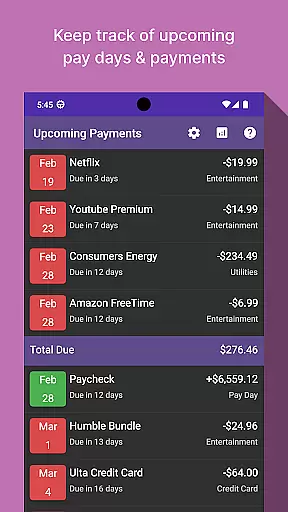
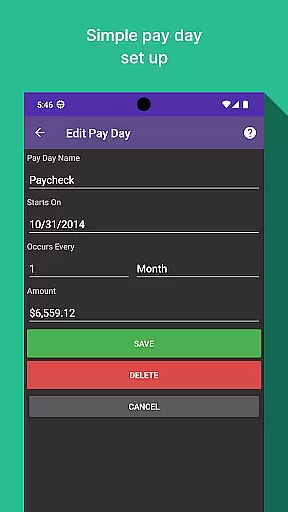
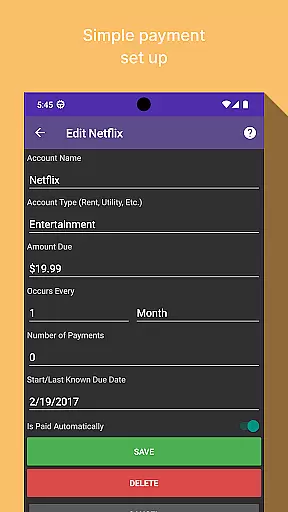
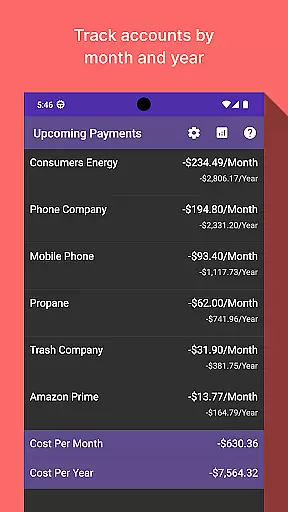
Bill Manager is a comprehensive financial management application designed to help users stay on top of their bill payments. The app's core functionality revolves around tracking upcoming bills, providing detailed payment information, and keeping users informed about their financial obligations between pay periods.
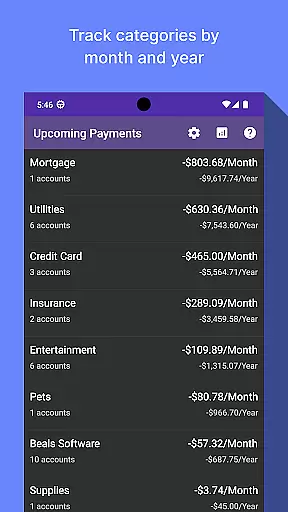
One standout feature is the analytics view, which offers insightful breakdowns of expenses by category and account. This allows users to better understand their spending patterns on a monthly and yearly basis. Whether you're managing personal finances or monitoring shared household expenses, Bill Manager provides the tools needed to maintain better financial control.
The app proves particularly useful for individuals who struggle with remembering due dates or need help organizing their financial responsibilities. By presenting clear payment schedules alongside payday information, it helps prevent missed payments and potential late fees, ultimately contributing to improved financial health.
Bill Manager distinguishes itself through several key features that enhance the bill tracking experience. First and foremost, its smart notification system alerts users about upcoming payments based on their current date and next payday information. This ensures no bill slips through the cracks.
The app's analytics dashboard stands out as another major advantage. Users can visualize their spending habits through detailed reports categorized by month and year. These insights extend beyond simple bill tracking - they empower users to make informed financial decisions and identify areas for potential savings.
Additional notable features include customizable account settings, multiple currency support, and secure data storage. The combination of these practical tools makes Bill Manager a versatile solution for various financial management needs, from basic bill tracking to more complex expense analysis.
Account and fund security is a critical aspect of any financial application, ensuring that users' sensitive information is protected. Bill Manager employs advanced encryption protocols to safeguard your data against unauthorized access. This means that all your bill details, payment schedules, and personal information are encrypted both in transit and at rest.
In addition to encryption, the app implements multi-factor authentication to further secure your account. By requiring more than just a password to access your account, it significantly reduces the risk of unauthorized access. This added layer of security ensures that only you can make changes to your billing information or view your financial details.
Users benefit from peace of mind knowing their financial data is handled with utmost care. With regular security updates and proactive monitoring, Bill Manager stays ahead of potential threats, providing a secure environment for managing your bills. This commitment to security allows users to focus on what truly mattersu2014managing their finances effectively without worrying about data breaches.
A seamless transaction experience is essential for any finance app, allowing users to manage their bills efficiently and with minimal hassle. Bill Manager offers an intuitive interface where users can easily track upcoming bills, view due dates, and understand payment amounts relative to their next payday. This clarity helps prevent missed payments and potential late fees.
The app also provides real-time notifications about upcoming bills and payment deadlines. These timely alerts ensure that users never miss a payment, helping them maintain good financial standing. Additionally, the analytics view gives insights into spending patterns by categorizing expenses and presenting them in an easy-to-understand format.
By offering detailed views of monthly and yearly expenditures across different categories and accounts, Bill Manager empowers users to make informed financial decisions. The ability to visualize spending trends not only aids in budgeting but also encourages better financial habits. Overall, this comprehensive approach enhances the overall transaction experience, making bill management straightforward and stress-free.
User-friendly interface
Comprehensive analytics
Smart notifications
Secure data storage
Customizable settings
Limited free features
No automatic payments
Premium subscription cost
Occasional bugs
Learning curve

Play for fun, earn for real. Collect rent by owning virtual land & get cashback
 4.60
4.60
Secure, simple money transfer app. Send money to Mexico and worldwide fast.
4.80
Early payday cash advance up to $150 a day with a max of $1,000 per pay period
4.70
Money transfer made easy. Send money to friends and family with great rates.
4.70
Easily invest, save, and plan—all in one app.
4.60
Car Insurance Made For You.
4.50
Currency Converter (200+ currencies) with live exchange rates and offline mode.
4.70
Powerful Money Manager, Expense & Savings Tracker, Budget Planner - Pro Version
4.70
Make Real Cash by Playing Games! Fetch Playful Rewards, Win & Triumph
4.50
Join 12M+ users. Instant cash advances, personal loans, build credit, save money
4.80
Send money and bitcoin easily. Invest, bank and do more with your money
4.70
Manage your prepaid cards and add to Google or Samsung Wallet.
4.60
Banking, Budgeting & Investing
4.60
Access State Farm accounts, policies, ID cards and more
4.60
Get up to 500, get paid early, earn interest and find work with no hidden fees.
4.40
Read and extract public data on NFC Contactless banking card (VISA, MasterCard
4.30
BTC, Crypto, Stocks & Options.
4.20
Expenses, Bills, Budget and Accounts - All seamlessly integrated in one app!
3.80
Bank better with our new app
3.80


User Reviews