
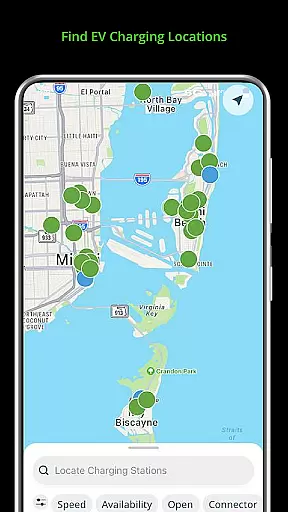
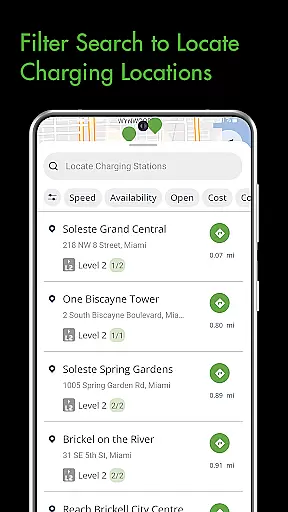
Blink Charging Mobile App is a comprehensive solution for electric vehicle (EV) owners, designed to simplify and enhance the charging experience. The app allows users to locate EV charging stations effortlessly by searching via zip code, city, business name, or physical address.
One of its standout features is the ability to manage charge sessions in real-time. Users can monitor session details such as energy delivered, charging speed, and estimated costs. Additionally, the app supports setup and management of the HQ 200 home charging station, providing a seamless blend of convenience and control.
The Blink Network's expansion means users can now access an even broader network of chargers, including SemaConnect stations. This integration offers existing SemaConnect users the ability to utilize the app for managing sessions and payments, making it a versatile tool for all EV drivers.
The Blink Charging Mobile App boasts a variety of robust features tailored to meet the needs of EV owners. One key feature is the comprehensive search functionality that helps users find public EV charging stations with ease. Whether searching by zip code, city, or business name, locating a charger is straightforward and efficient.
Another significant feature is the real-time monitoring of charge sessions. Users can view detailed information about their charging sessions, including occupancy time, energy delivered, and current charging speed. The app also provides status notifications for various stages of the charging process, ensuring users are always informed.
Additionally, the app supports the setup and management of the HQ 200 home charging station. This feature allows users to configure station settings, track charging history, and manage charge sessions from the comfort of their home. With the expanded network, users can now access and manage sessions at both Blink and SemaConnect charging stations, enhancing the overall utility and convenience of the app.
Understanding your electric vehicle's charging needs is crucial for efficient energy management. The Blink Charging mobile app provides comprehensive details about your EV charger, including real-time data on energy delivered and current vehicle charging speed.
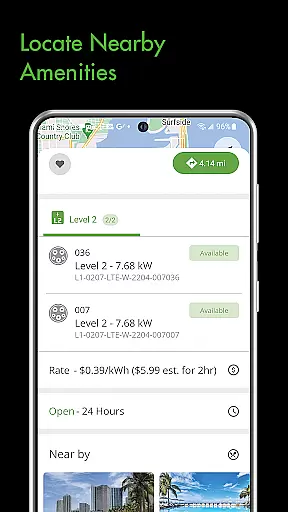
The application goes beyond basic charging by offering in-depth information about each charging session. Users can access specifics such as occupancy time, estimated charge session cost, and complete charging station information, ensuring they have all the necessary details at their fingertips.
This level of detail empowers EV owners to make informed decisions about their charging habits. By having access to precise data, users can optimize their charging schedules, reduce costs, and extend the lifespan of their vehicle's battery.
The app's ability to display such detailed vehicle information represents a significant advancement in EV charging technology. This feature not only enhances user experience but also contributes to more sustainable and economical electric vehicle ownership.
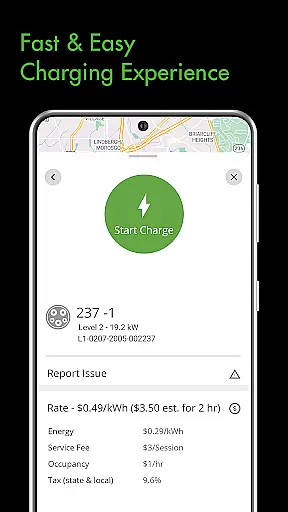
One of the most significant challenges EV owners face is understanding the true cost of charging their vehicles. The Blink Charging mobile app addresses this issue by providing clear and transparent pricing information for every charging session.
Users can view estimated charge session costs before initiating a charge, allowing them to make informed decisions about where and when to charge their vehicles. The app displays comprehensive details about charging expenses, including energy rates and service fees.
This transparency extends to home charging solutions as well. Owners of the HQ 200 home charging station can track their charging history and associated costs, helping them manage their electricity expenses more effectively.
By offering such detailed price transparency, the Blink Charging app builds trust with its users while promoting more economical charging practices. This feature particularly benefits frequent travelers who rely on public charging stations and need to budget their charging expenses accurately.
User-friendly interface
Real-time session monitoring
Expanded network access
Comprehensive search options
Home charging management
Limited to EV owners
Network dependent
Occasional bugs
Subscription fees
Device compatibility

Take Control of Your Car
 4.80
4.80
OBD diagnostics, Live Data, DPF regeneration for BMW
4.00
Play what you want through Android Auto
4.90
Autolist - The Largest Selection of Local Used Cars and Trucks
4.50
The Texaco App allows you to pay for fuel from the comfort of your car!
4.80
Get your personalized financing options and shop for used cars today!
4.20
AI Powered - Automotive Mechanic Assistant
4.30
Secure mobile payments & fuel savings at Phillips 66®, Conoco® and 76® stations
4.40
MySubaru: Download. Connect. Love.
4.70
7-Day Returns on All Cars
4.80
DMV practice test 2025: Driver License permit test & written test for all states
4.70
DMV Test Pro offers all the updated FREE DMV tests online.
4.60
Find Fast EV Chargers | Charge Your Vehicle at 1,100+ Fast Car Charging Stations
4.60
Find, search, and browse 40,000+ used cars, SUVs, and trucks.
4.50
Get price alerts, vehicle history details and more for cars near you!
4.50
Ultimate OBD2 Car Scanner: Diagnostics, Service and Modification Tool
4.30
Realtime Charts is a plugin for the Torque Pro App (OBD 2 & Car)
4.20
By enthusiasts, for enthusiasts
4.00
DIY Vehicle Wheel Alignment
4.0


User Reviews