

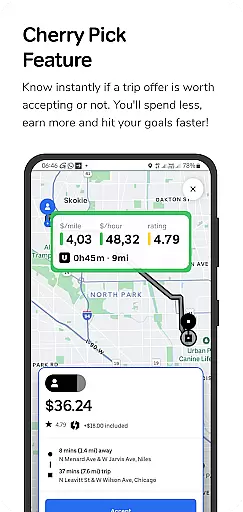
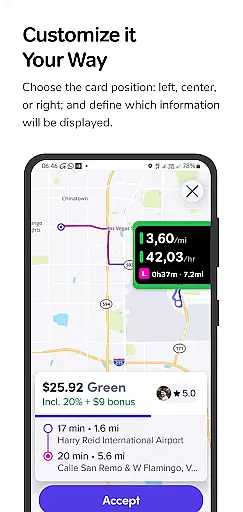
GigU is the ultimate smart assistant for rideshare drivers in the US, designed to optimize earnings on platforms like Uber and Lyft. The app's standout feature is Cherry Pick, which instantly evaluates trip offers, helping drivers make informed decisions that maximize income while minimizing time and expense.
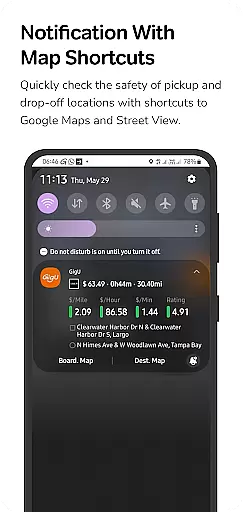
With live smart indicators, a colored grading system, and voice notifications, GigU provides real-time insights into potential earnings per mile, hour, and minute. These features ensure drivers can quickly assess the profitability of each ride without needing to interact with their phones. Additionally, quick maps shortcuts enhance safety by allowing users to review pickup and drop-off locations via Google Maps.
Whether you're a full-time rideshare driver or managing it as a side gig, GigU empowers you to hit your financial goals faster while prioritizing both security and privacy.
GigU boasts an array of innovative features tailored to streamline the rideshare experience. Its Live Smart Indicators display crucial metrics such as earnings per mile, hour, and minute, giving drivers instant clarity on how profitable a trip could be. This data-driven approach ensures smarter decision-making with every ride offer.
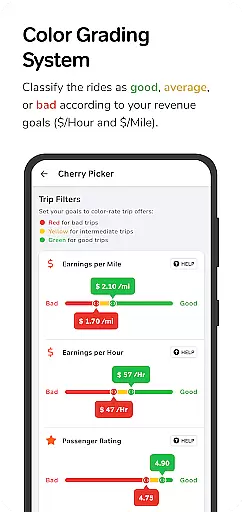
The Colored Grading System categorizes trips based on user-defined settings, presenting ratings through an intuitive color scheme that simplifies quick assessments. Combined with Voice Notifications, which audibly inform drivers about a ride’s value, GigU minimizes distractions while driving. Furthermore, the Quick Maps Shortcut Notification enhances safety by providing direct access to Google Maps and Street View for verifying pickup and drop-off points.
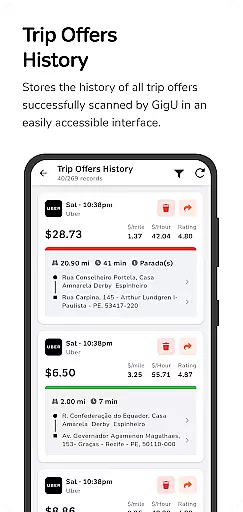
For those who want a comprehensive overview, GigU also maintains a Trip Offers History log, documenting all scanned ride offers for future reference. These robust features collectively create a seamless, efficient, and secure ridesharing experience.
In the ridesharing industry, having access to detailed vehicle and trip information is crucial for drivers seeking to maximize their earnings. GigU provides comprehensive data on each ride offer, including key metrics such as earnings per mile, hour, and minute.
The app's colored grading system evaluates trips based on user-defined settings, presenting the information in an easy-to-understand format that ensures quick decision-making. This feature helps drivers instantly assess the profitability of a trip, allowing them to optimize their time and resources effectively.
Additionally, GigU offers a history of all scanned ride offers, giving users the ability to review past opportunities and track their performance over time. This level of detail supports better planning and strategy development for increasing overall earnings.
Price transparency is essential for rideshare drivers who need to understand the true value of each trip they undertake. GigU's Cherry Pick feature provides instant clarity on whether a trip offer is financially worthwhile, helping drivers avoid less profitable journeys.
With live smart indicators, GigU displays vital trip information at a glance, ensuring drivers can make informed decisions quickly. The voice notification system further enhances this by delivering audible alerts about a ride's profitability without needing to look at the phone.
This transparent approach empowers drivers to manage their expenses better while boosting their income potential. By prioritizing trips with higher returns, users can hit their earning goals faster and with greater efficiency.
Instant trip evaluations
User-friendly interface
Enhanced earning potential
Privacy-focused design
Comprehensive analytics
Limited to rideshare drivers
Requires accessibility permissions
Premium features may cost extra
Dependent on third-party apps
Occasional notification delays

* This app needs an adapter cable and a certain OBD2 adapter to work *
 4.20
4.20
Launcher for use in the car
4.40
AlfaOBD software for Fiat Group cars native diagnostic
3.70
myAudi offers users services and Audi connect services for Audi drivers
4.10
Control maps, media and messaging, with the Google Assistant while you drive
4.10
Simplify your drive
3.90
Car Values, Research and More
4.80
View your car’s service records and find out when maintenance is due.
4.70
7-Day Returns on All Cars
4.80
Take Control of Your Car
4.80
Practice the drills within MotoJitsu Master Riding Program Volume 1 & 2!
4.80
The ExtraMile App allows you to pay for fuel from the comfort of your car!
4.70
Your go-to app for car, truck & SUV parts, DIY tools, and expert repair help.
4.70
Browse millions of cars, track vehicle listings or sell your car today
4.70
Get price alerts, vehicle history details and more for cars near you!
4.50
Digital Car Key/Launcher, Screen Mirror, Android Dashboard, Remote Wireless Link
4.40
A smarter way to park and reserve your spot ahead of time.
4.40
Taximeter; the professional's choice
4.30
Theme for Car Launcher
4.0


User Reviews