
iReal Pro is a comprehensive music practice tool designed for musicians of all skill levels. This app simulates a realistic band accompaniment, allowing users to practice with high-quality piano, guitar, bass, and drum sounds. It also offers an extensive library of chord charts that can be edited, printed, and shared, making it an essential resource for both practice and performance.
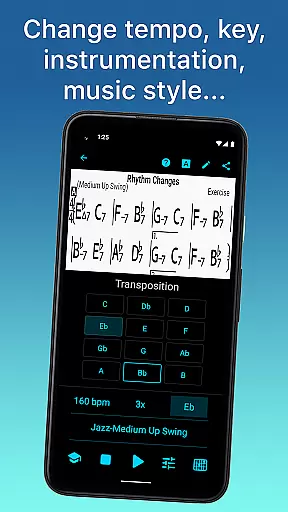
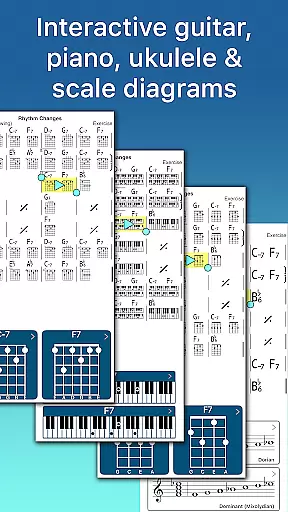
One of the standout features of iReal Pro is its versatility. Users can choose from 51 included accompaniment styles, ranging from Swing and Ballad to Latin and Reggae, with additional styles available via in-app purchases. The app supports transposition to any key, includes exercises for common chord progressions, and provides chord diagrams for guitar, piano, and ukulele. These features make it suitable for a wide range of musical genres and instruments.
Whether you're a student, teacher, or professional musician, iReal Pro enhances your practice sessions by providing a customizable and realistic band experience. Used by top music schools like Berklee College of Music, this app ensures that every aspiring musician has a reliable backup band at their fingertips.
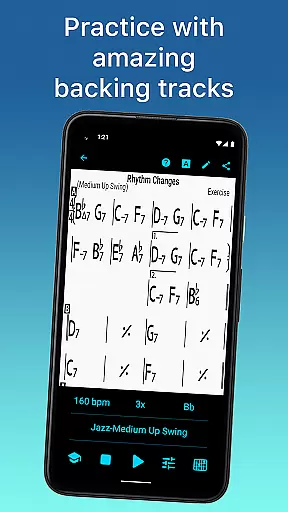
iReal Pro stands out with its robust set of features tailored for musicians. One of the main highlights is the ability to simulate a real-sounding band with accompaniments for piano, guitar, bass, and drums. Users can personalize these accompaniments with various sounds and choose from multiple musical styles such as Jazz, Rock, and Bossa Nova, ensuring a customized practice experience.
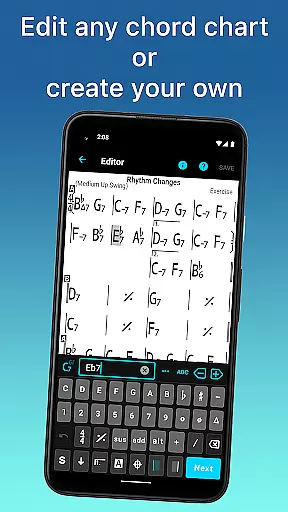
The app also excels in its chart creation and editing capabilities. Musicians can create, edit, and collect chord charts, which can be transposed to any key or exported as PDFs and MusicXML files. Additionally, iReal Pro offers tools for improving skills, including chord diagrams, scale recommendations, and practice exercises. These features help users master their art by focusing on specific sections of a song and gradually increasing the difficulty level.
Sharing and collaboration are made easy with iReal Pro. Users can share charts and playlists with others via email or through the app's forums. The ability to record practice sessions and export audio as WAV, AAC, and MIDI files further enhances the user experience. With these powerful features, iReal Pro provides a complete solution for musicians looking to improve their craft.
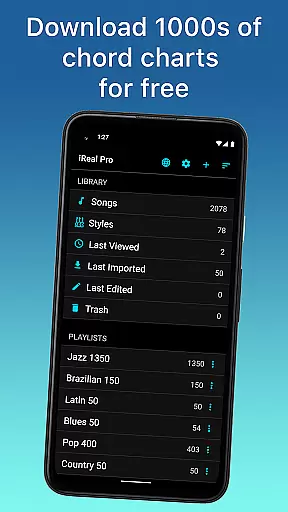
Having a comprehensive music library is essential for any musician looking to practice and improve their skills. iReal Pro offers access to thousands of songs that can be downloaded directly from the forums, providing users with an extensive repertoire to choose from.
The app ensures copyright authenticity by allowing users to create, edit, and collect chord charts of their favorite songs. This feature not only supports musicians in their practice sessions but also respects the intellectual property rights of songwriters and composers.
Users can take advantage of the Player function, which plays any edited or created song, thus offering flexibility and personalization to suit individual practice needs. With this vast library at hand, musicians have the resources they need to develop their artistry.
Moreover, iReal Pro's sharing capabilities allow for collaboration within the music community, ensuring that all content remains both diverse and respectful of copyright laws. By prioritizing these aspects, iReal Pro becomes an indispensable tool for musicians worldwide.
Audio quality is paramount when it comes to musical accompaniment, and iReal Pro excels in delivering realistic sound experiences. The app provides a variety of sounds including piano, Fender Rhodes, acoustic and electric guitars, basses, drums, vibraphone, organ, and more, each designed to simulate a real-sounding band.
Musicians can personalize their practice sessions by choosing from 51 different accompaniment styles such as Swing, Ballad, Gypsy Jazz, and many others. These styles are further customizable with various instruments, ensuring that the audio output matches the user's preferences and requirements.
In addition to offering high-quality audio playback, iReal Pro allows users to record themselves playing or singing along with the accompaniment. This feature helps musicians assess their performance and make necessary adjustments to improve their technique.
With advanced export options like WAV, AAC, and MIDI formats available, users can produce professional-grade recordings of their practice sessions. Such versatility in audio quality options makes iReal Pro an invaluable asset for musicians seeking to refine their craft.
User-friendly interface
Extensive style options
High-quality sound library
Customizable practice settings
Comprehensive sharing options
Some styles require in-app purchases
Advanced features may overwhelm beginners
Occasional bugs reported
Exporting options could be more streamlined
Limited free content

Make music anywhere. Turn your device into an instrument.
 4.5
4.5
The Cubase remote control app
3.60
10-Band Audio Equalizer, Sound / Bass Booster for Spotify Users & Music Players
4.40
Enhance the sound quality of your devices, listen to what you want
4.50
Next generation modular control surface
4.10
The alternative folder based music player.
4.20
A sleek, no-frills player designed for true music lovers.
4.20
Simple mp3 and mp4 player with advanced features.
3.40
Get alarms that fit your lifestyle and wake up to the sounds you love.
4.80
24,000 free audio books and no ads!
4.90
Music, News & Sports Radio Tuner App. Tune in Live FM & AM Radio Stations.
4.80
Offline Music Player&MP3 Player with themes, equalizer, lyrics, music play mode
4.60
Guzheng Master supports many playing techniques as an acoustic Guzheng
4.50
DJ Music Mixer - DJ Remix: remix songs, make beat music & record mix of DJ.
4.40
Learn and play 2M+ music tabs & chords on guitar, ukulele, bass, and more
4.30
Permanently backup Now Playing. Maps, filters & listening stats.
4.00
Turn your Android phone into a professional audio analyser with up to 120 bands.
4.00
The only true audiophile music player with Hi-Fi audio rendering and DSP engine
3.90
Background pads for your band
3.80


User Reviews