
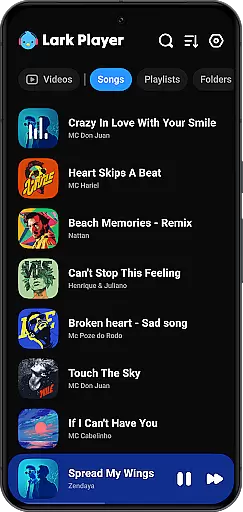
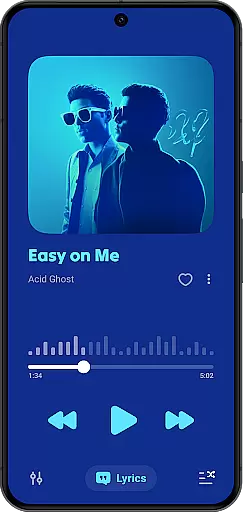
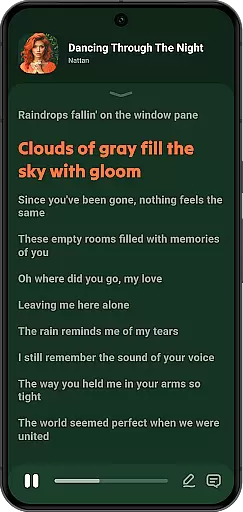
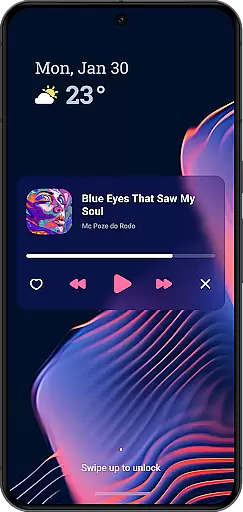
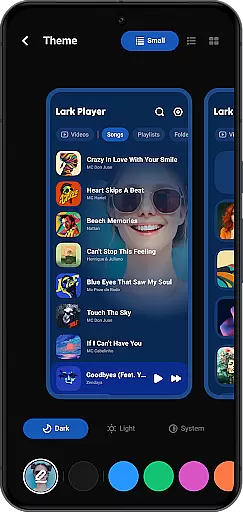
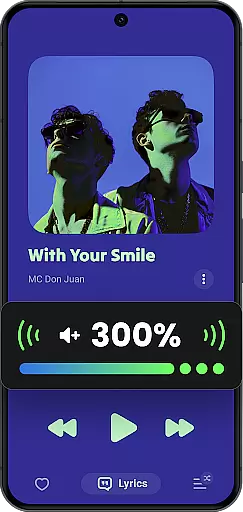
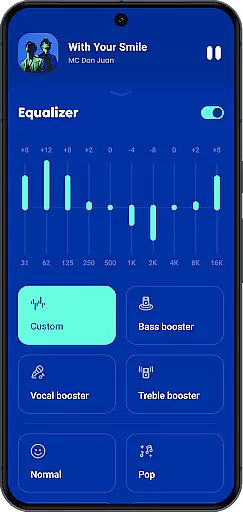
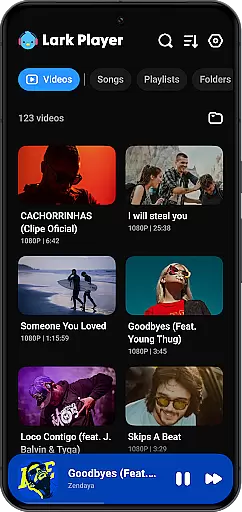
Lark Player is a versatile offline music and video player for Android, offering support for all major audio and video formats. This free app features a powerful equalizer, customizable sound effects, and an intuitive user interface that makes managing your media effortless.
With dedicated preset modes for various music genres and advanced file management capabilities, Lark Player allows users to create playlists, browse music by multiple categories, and even match lyrics with songs. The floating window feature enables multitasking, while the sleep timer and background play options add to the convenience.
Whether you're commuting or relaxing at home, Lark Player provides a high-quality audio experience with bass enhancement, reverb settings, and more. Its day/night theme options and customizable features make it suitable for any user looking for a robust offline media player.
Lark Player stands out with its comprehensive format support, including MP3, MIDI, WAV, FLAC, AC3, AAC, M4A, ACC for audio, and MP4, 3GP, WEBM, MOV, MKV for video files. The app's powerful equalizer offers various sound effects with bass enhancement, reverb setting, and sound field adjustments, ensuring an immersive listening experience.
One of the key highlights is the ability to manage files directly within the app. Users can delete files, create playlists, and organize music by song, artist, album, or genre. The app also supports displaying synchronized lyrics, allowing users to sing along to their favorite tracks.
The floating video and music player feature enables seamless multitasking. Users can adjust the size and position of the floating window, making it possible to watch videos or listen to music while performing other tasks. Additional features like sleep timer, notification bar controls, and sharing options via Bluetooth or social media further enhance the user experience.
When it comes to digital music players, the size and authenticity of the music library are crucial factors for users. Lark Player offers an extensive offline music library that supports all major audio formats including MP3, MIDI, WAV, FLAC, AC3, AAC, M4A, and more. This vast compatibility ensures that users can enjoy a wide variety of music genres without worrying about format restrictions.
The application emphasizes copyright authenticity by allowing users to play music files they own legally. By focusing on playing locally stored files, Lark Player respects copyright laws and ensures that the music available in its library is legal and authentic. Users can confidently manage their personal music collections with features like creating playlists and organizing songs by various categories such as artist, album, or genre.
Moreover, Lark Player enhances the listening experience with powerful equalizers and preset modes tailored for different music styles. Whether you're into Classical, Pop, Rock, or Hip-hop, there's a dedicated mode to optimize your sound experience. This attention to detail not only enriches the user's interaction with their music but also highlights the app's commitment to providing a high-quality and lawful music environment.
Audio quality is paramount when selecting a music player, and Lark Player excels in delivering top-notch sound experiences. The app includes a powerful equalizer with bass enhancement, reverb settings, and sound field adjustments. These features allow users to customize their audio output according to their preferences, ensuring an immersive listening session every time they use the player.
In addition to customizable sound effects, Lark Player supports high-quality audio formats, which means users can enjoy their favorite tracks in the best possible fidelity. Whether you're listening through high-end headphones or standard earbuds, the clarity and depth of the music remain uncompromised, offering a rich auditory experience.
Furthermore, Lark Player provides practical functionalities such as setting sleep timers and playing music in the background. These options enhance user convenience without sacrificing audio performance. With its ability to deliver pristine sound quality across various devices and scenarios, Lark Player stands out as a versatile choice for audiophiles who demand excellence from their music applications.
User-friendly interface
Extensive format support
Powerful equalizer
Lyrics synchronization
Floating player
No music download
Ads present
Occasional bugs
Limited sharing
Notification issues

Make music anywhere. Turn your device into an instrument.
 4.5
4.5
Walkout Song DJ is the most intuitive app to manage your sports music.
4.70
A High-Precision Audio Spectrum Analysis App
4.20
AI Music Maker: Generate And Compose AI Tunes & AI Songs & AI Music & AI Melody!
4.60
Music, News & Sports Radio Tuner App. Tune in Live FM & AM Radio Stations.
4.80
Slow music down without changing pitch.
3.70
Turn your Android phone into a professional audio analyser with up to 120 bands.
4.00
Master Salsa Rhythm quickly and with a lot of fun!
4.30
Play your music offline without limits
4.80
More downloads than any other metronome. Includes drum machine & tempo trainer.
4.80
Help you quickly get started with Shokz headphones
4.40
Equalizer, Bass Booster and Volume Booster (Eq & Bass) improve sound quality
4.30
Powerful 10-Band equalizer pro with sound booster improves Android audio quality
4.30
Time Trainer: accurate metronome w tools to help you develop your internal time!
4.20
Smart piano keyboard, Classical to Pop, Real-time multiplayer connection!
4.20
Turn your phone into a musical instrument from the future!
3.90
USB audio recording and playback finally possible on Android 3.1 or higher!
3.90
The Skullcandy App Experience
3.20
Music Streaming suite for Ampache, Nextcloud Music and compatible backends.
4.4


User Reviews