

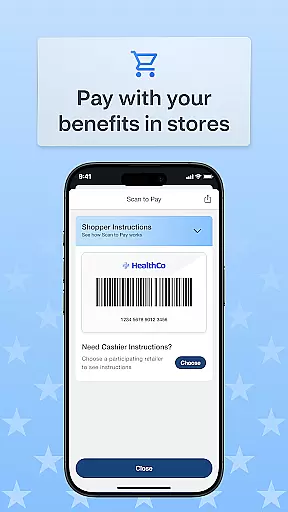
OTC Health Solutions is a mobile application designed to provide users with easy access and management of their Over-the-Counter (OTC) health benefits. The app enables secure and straightforward access to health and OTC benefits, which can be utilized at CVS stores or online platforms.
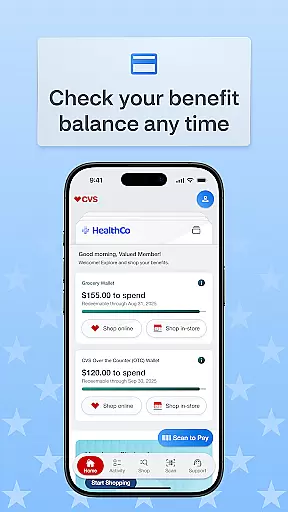
With real-time updates on fund balances and activities, users can efficiently manage their transactions and benefit usage. The app also offers features such as transaction history tracking and order status monitoring, ensuring that users are always informed about their benefits.
Whether shopping in-store or online, OTC Health Solutions provides the flexibility to use benefits through various CVS shopping options, including in-store purchases, online orders, and home delivery services. This makes it convenient for users to shop according to their preferences while maximizing their health benefits.
One of the standout features of OTC Health Solutions is its ability to provide real-time balance updates on funds and activities. This ensures that users are always aware of their current benefit status, allowing them to make informed decisions about their health purchases.
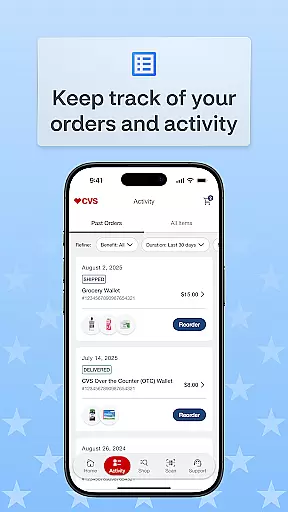
The app also includes a comprehensive transaction history feature, enabling users to view past transactions and track the status of their orders. This transparency helps users manage their benefits more effectively and plan their health-related expenses accordingly.
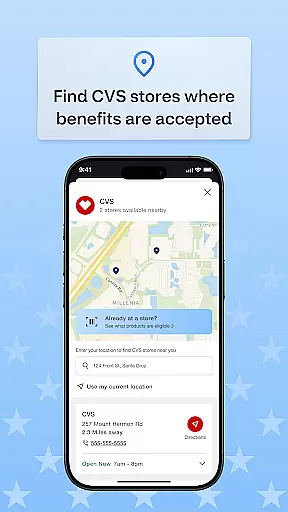
Additionally, OTC Health Solutions offers a store locator function, making it easy for users to find nearby CVS stores where they can use their benefits. With options for in-store shopping, online purchases, and home delivery, the app caters to various shopping preferences, providing a seamless and user-friendly experience.
Personalized planning in the OTC Health Solutions app allows users to tailor their health and over-the-counter benefits according to their specific needs. This feature is crucial for those who want to optimize their healthcare spending and usage.
The app provides real-time balance updates on funds and activity, ensuring that users are always aware of their current status. This helps in making informed decisions about when and where to use their benefits, whether at nearby CVS stores or online.
Users can view transaction history for benefits used and track order status, which adds a layer of transparency and control over their healthcare expenses. This functionality ensures that users can manage their benefits effectively without any surprises.
By offering personalized planning, the app empowers users to take control of their healthcare benefits, leading to better financial management and peace of mind.
Progress visualization in the OTC Health Solutions app offers users a clear and concise way to track their healthcare and over-the-counter benefits usage. This feature is essential for maintaining an overview of one's health expenditures and understanding patterns over time.
With the ability to view transaction history for benefits used, users can easily monitor how their benefits are being utilized. This tracking system provides insights into spending habits and helps identify areas where adjustments may be needed.
The app also allows users to track order status, providing a visual representation of their current orders and deliveries. This ensures that users are always informed about the progress of their purchases, enhancing the overall user experience.
By incorporating progress visualization, the app not only simplifies benefit management but also encourages proactive healthcare management, ultimately leading to improved health outcomes.
User-friendly interface
Real-time balance updates
Comprehensive transaction history
Convenient CVS store locator
Multiple shopping options
Limited to CVS stores
Requires internet connection
No integration with other retailers
Potential privacy concerns
Dependent on benefit provider

Text notifications, button control, heart monitor & more for your Amazfit.
 2.40
2.40
“Overcoming pain based on EMDR” helps you to alleviate chronic pain and stress.
4.10
Power-lifting, weightlifting and Wendler 531 app to track your workout program.
4.90
Measure real-time wrist & ambient temperature with your Galaxy Watch (Wear OS)
3.20
The OFFICIAL Couch to 5K® running training app! A 9 week walk-run workout plan.
4.50
Step Counter, track steps when you walk or run
4.70
Track heart rate & HRV in 30s! Get live health insights and anomaly alerts
4.40
Your portable blood pressure tracker. Record, monitor, and analyze BP anytime.
4.30
Mood journal, habits, self-care tracker, self-love
4.90
When the night comes, we prepare your eyes for deep, sweet dreams
4.70
Mind on steroids - relaxation, productivity, meditation and sleep!
4.60
Personal step counter for you, private and accurate
4.50
Blood Pressure Log, HRV & Heartbeat Tracker. Pulse Checker.
4.40
Get alert about getting out of desired heart rate zone.
4.10
Your personal BP tracking companion, focus on helping you achieve wellness goal.
4.10
Create powerful subliminal audio with custom affirmations and background music.
4.00
Dexcom G7 Continuous Glucose Monitoring
3.70
The Wear OS BeechBand app is designed to alleviate anxiety and other conditions
4.4
Optimization for TRT & Enhanced Athletes
4.5


User Reviews