
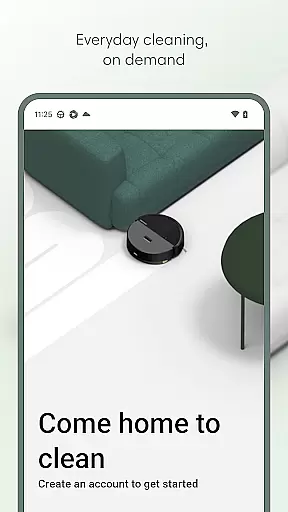
Roomba Home is a comprehensive cleaning management app designed for Roomba robot vacuum owners. The application allows users to control their cleaning routines with ease, offering features such as starting, stopping, and scheduling cleaning sessions remotely. With compatibility across multiple Roomba series, it provides an intuitive interface to manage various cleaning settings.
One of the standout capabilities of Roomba Home is its mapping feature, which enables users to create detailed maps of their home layout. This function supports up to five saved maps, allowing for customized cleaning zones and routines tailored to specific rooms or areas. Additionally, real-time tracking offers insights into the robot's cleaning path and progress.
The app also integrates smart home ecosystems, supporting voice commands through Alexa, Siri, or Google Assistant. This seamless connectivity enhances user convenience, making daily cleaning tasks effortless. Overall, Roomba Home elevates household cleaning efficiency by combining advanced technology with user-friendly controls.
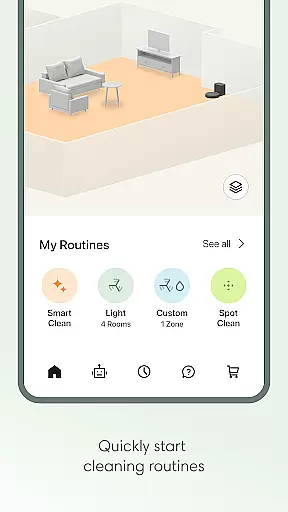
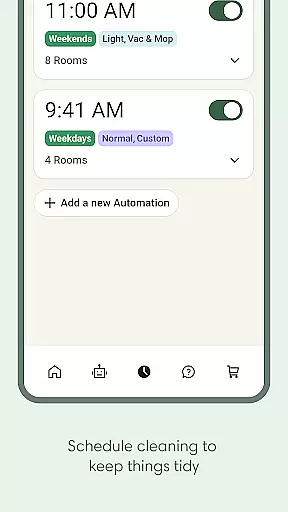
Roomba Home boasts a variety of features that enhance the user experience in managing their robotic cleaning devices. One key feature is the Routine Builder, which allows users to establish personalized cleaning schedules. By selecting specific rooms and adjusting settings like suction power and mopping intensity, users can tailor each cleaning session to their preferences.
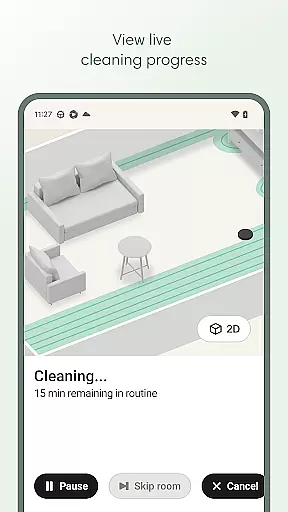
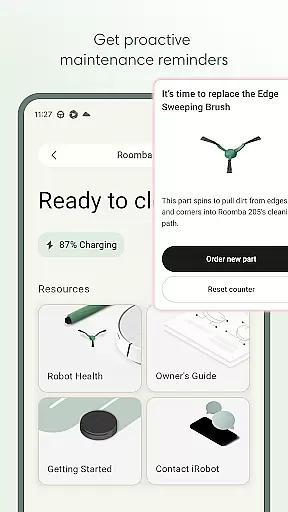
In addition to customizable cleaning routines, the app provides real-time monitoring of the robot’s activities. Users can view current cleaning paths and receive proactive maintenance alerts to ensure optimal performance. The Health Dashboard further supports this by tracking the status of both the robot and its accessories, offering timely suggestions for upkeep.
Voice control compatibility adds another layer of convenience, enabling hands-free operation via popular smart assistants. Moreover, the mapping functionality lets users label rooms and set virtual boundaries, enhancing precision in targeted cleaning efforts. These robust features collectively contribute to a smarter and more efficient home cleaning process.
The Roomba Home app offers comprehensive lifestyle category coverage by integrating multiple essential home management features into one intuitive platform. This includes advanced cleaning routines, scheduling options, and real-time robot controls that cater to various household needs.
Users can create personalized cleaning plans using the Routine Builder, which allows them to select specific rooms, adjust cleaning settings, and even enable advanced scrubbing modes. The app also supports up to five saved maps, enabling targeted cleaning of different areas in the home with customized settings for each room.
In addition to cleaning functionalities, the app provides proactive maintenance alerts and health monitoring for the robot and its accessories. This ensures optimal performance and extends the device's lifespan, contributing to a more sustainable smart home ecosystem.
With voice control compatibility through Alexa, Siri, and Google Assistant, the app further enhances convenience and accessibility. These integrations allow users to manage their cleaning tasks hands-free, making daily household operations smoother and more efficient.
The Roomba Home app demonstrates strong content authenticity and expert credibility through its detailed feature set and technical specifications. Developed by iRobot, a leader in home robotics, the app reflects years of expertise in smart home technology and cleaning solutions.
All information presented in the app is verified and corresponds directly to the capabilities of Roomba series robots. The app's cleaning recommendations and maintenance suggestions are based on actual usage data and product specifications, ensuring accurate and reliable guidance for users.
Furthermore, the app's compatibility details and technical requirements are clearly documented, including the specification that Roomba 100 series products require a 2.4 GHz Wi-Fi network. This transparency helps users make informed decisions about their smart home setup.
The inclusion of professional-grade features like real-time cleaning insights, advanced map customization, and integration with leading smart home platforms demonstrates the company's commitment to delivering trustworthy and expert-endorsed home management solutions.
User-friendly interface
Customizable cleaning schedules
Real-time activity tracking
Voice assistant integration
Advanced mapping capabilities
Limited to certain Roomba models
Requires 2.4 GHz Wi-Fi network
No offline functionality
Premium features may require subscription
Initial setup can be complex

Countdown to Christmas 2025 with festive games & activities in a virtual village
 4.80
4.80
What is my face shape? Find out your face shape from picture, see fitting frames
3.90
Take Hobby Lobby with you wherever you go!
3.40
Paranormal EVP, Ghost Box, Spirit box, ITC, Haunted, Spirit communication device
3.70
Unique "Isometric" style digital watch face for Wear OS
4.50
Crochet made easy: step-by-step tutorials, beginner patterns & projects
4.60
Your store’s deals, where you are.
4.80
Control your Tapo smart devices from anywhere.
4.60
Earn money for every survey and game you play, and get real rewards every time
4.50
Discover the "To Be a Christian" App: Your Guide to Deepening Faith!
5.00
Get roadside help, discounts, travel tools & more — AAA is with you everywhere.
4.80
Retro animated weather with hourly forecast Watch Face for Wear OS
4.60
The go to app for taking unlimited notes!
4.50
This minimalist yet classic board design brings a futuristic twist to your wrist
4.20
Spiritus Ghost Box is an Audio and Visual ITC tool for paranormal research.
4.00
Turn your watch into a key fob for your Tesla
2.90
Designed to delight, impress and energize your festive spirit every single day
4.5
A watch face with transparency and fluid visuals inspired by liquid glass design
4.1
Customize your Wear OS watch with festive Christmas figures and colors!
4.1


User Reviews