



Cheogram is a communication app that connects you to a global network, emphasizing cross-platform interaction. It supports SMS-enabled phone numbers and integrates with various messaging gateways.
With features like media-rich messaging, address book integration, and threaded conversations, Cheogram offers a comprehensive toolset for modern communication needs.
Ideal for users seeking seamless interaction across different messaging platforms, Cheogram enhances connectivity and simplifies complex communication tasks.
Cheogram stands out with its robust feature set tailored for versatile communication. The app supports multimedia messages, including animated content, ensuring dynamic interactions.
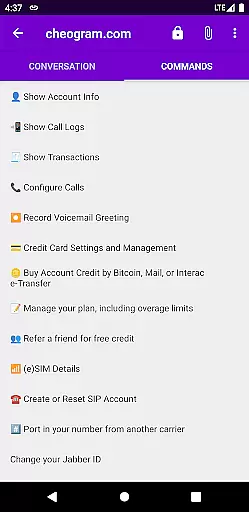
It provides practical tools such as contact tagging, command UI, and sticker packs, enhancing user engagement. Integration with native phone apps and address books streamlines the user experience.
By focusing on cross-network functionality and user-friendly design, Cheogram delivers an efficient and enjoyable messaging platform.
Real-time messaging speed and reliability are crucial for any communication app, ensuring that messages are delivered instantly and consistently. Cheogram excels in this area by providing a seamless experience where users can send both text and media messages without delay.
The app's architecture is designed to handle high volumes of messages efficiently, maintaining performance even during peak usage times. This ensures that users can rely on Cheogram for their daily communication needs without worrying about message delivery failures or delays.
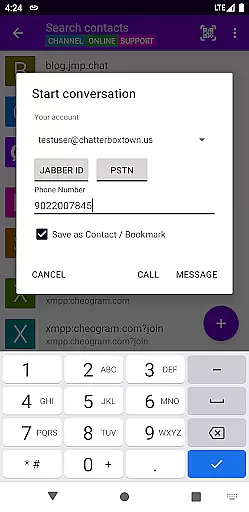
Moreover, the integration with gateways' add contact flows and native Android Phone app enhances the overall messaging experience. Users can easily connect with contacts across different networks, including SMS-enabled phone numbers, making Cheogram a versatile tool for global communication.
In summary, Cheogram's commitment to real-time messaging speed and reliability makes it an excellent choice for users seeking a dependable communication platform. With its robust features and efficient performance, Cheogram stands out in the crowded field of messaging apps.
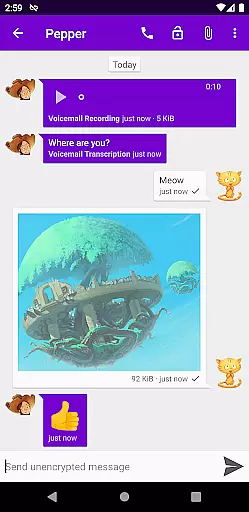
Media sharing support is another vital aspect of modern communication apps, allowing users to exchange various types of content seamlessly. Cheogram offers comprehensive media sharing capabilities, enabling users to send both media and text messages, including animated media, with ease.
The app's intuitive interface displays subject lines unobtrusively, ensuring that the focus remains on the shared content. Links to known contacts are shown with their names, enhancing the user experience by providing context and personalization.
Cheogram also supports sticker packs, adding a fun element to conversations and allowing users to express themselves more vividly. The lightweight threaded conversations feature further enriches the media sharing experience by organizing discussions into manageable threads.
Overall, Cheogram's robust media sharing support sets it apart from other communication apps. By combining advanced features with a user-friendly design, Cheogram provides a superior platform for sharing diverse content types, catering to the dynamic needs of today's digital communicators.
User-friendly interface
Robust multimedia support
Seamless cross-platform integration
Comprehensive contact management
Innovative communication tools
Limited native features
Requires external service
Occasional connectivity issues
Interface can be complex
Fewer customization options

 3.90
3.90
A web browser that respects your privacy.
4.30
Messenger, an MMS & SMS messages app with Blockers, Driving mode & Private box
4.60
Messages is Private SMS Messenger 2023 with text message, instant messaging.
4.00
Call Blocker app: Identify unknown callers, block spam calls, fraud & robocalls
4.30
Fast, Simple And Secure Application That Provides SMBv3 Server On Your Device
3.30
FolderSync enables easy sync of files between cloud storage and Android devices.
4.60
SMS Messenger is a lightning-fast messaging app.
4.20
Group Chat That’s Fun & Games
4.30
Stay in touch with the people who matter most.
4.60
Adblock & VPN Browser: Blocks banners, pop-ups and video ads, fast downloader!
4.60
Build your web browser around you with private search, and more.
4.60
The ultimate productivity solution for all your email communication needs.
4.40
Phone Dialer with Caller ID, Address Book & Contacts Manager.
4.30
Google's fast and secure browser
4.10
Messages: Fast, simple SMS app with scheduling and smart features.
4.00
Call Forwarding is easy and simple application to use.
3.80
Message and video call your family and friends in HD!
3.80
An app dedicated solely to marriage, not dating, and supported by a rigorous verification mechanism to ensure seriousness.
4.0


User Reviews