
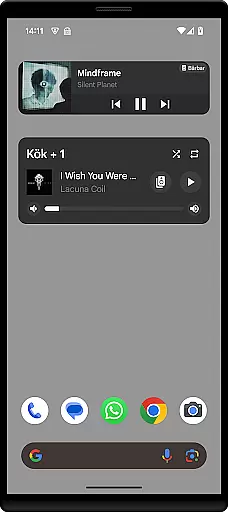
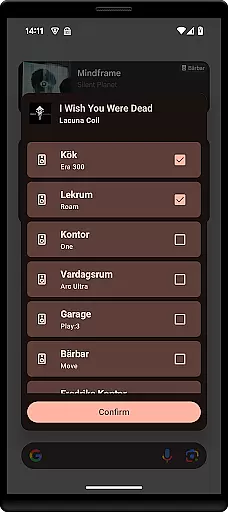
Sonos Widget is a powerful tool for managing your Sonos system directly from your smartphone's home-screen. This app offers two different widget styles - Compact and Enhanced, allowing users to choose their preferred interface. With essential features like volume control, grouping, playback options, and modes support (Shuffle, Repeat), it provides comprehensive control over your Sonos devices.
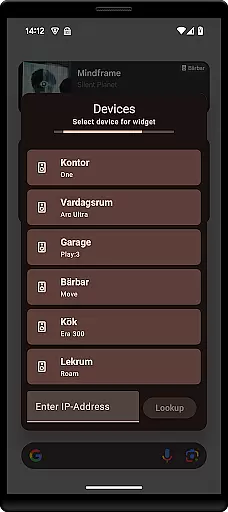
The app displays relevant metadata for your music tracks and allows quick access to key functions such as Play, Pause, Next, and Previous. The simple setup process lets you add the widget to your home-screen and connect to your Sonos system through on-screen instructions. Whether you're at home or on the go, Sonos Widget puts you in complete command of your audio experience.
Sonos Widget stands out with its dual-widget design, offering both Compact and Enhanced views to suit different user preferences. The Compact view provides essential controls in a minimalistic layout, while the Enhanced version displays more detailed information including track metadata and album art. Both widgets maintain consistent functionality across volume adjustment, grouping capabilities, and playback controls.
Advanced features include full playback management (Play, Pause, Next, Previous) and mode selections (Shuffle, Repeat). The app's intuitive interface makes it easy to switch between different rooms or group speakers together. Users can conveniently manage their entire Sonos ecosystem without needing to open the main Sonos application, providing quick access to frequently used functions right from their home-screen.
When it comes to managing your music experience, having access to a vast and diverse music library is essential. The Sonos Widget app offers users the ability to tap into an extensive collection of tracks, ensuring that there's something for every musical taste. This wide-ranging library not only enhances user satisfaction but also provides endless possibilities for music exploration.
Copyright compliance is another critical aspect of any music application. Users can rest assured that all tracks available through the Sonos Widget are fully licensed and legitimate. This commitment to copyright authenticity protects both the artists and the listeners, fostering a trustworthy environment where music can be enjoyed without concerns about legal issues.
The app's dedication to providing a rich and lawful music selection means that users can enjoy high-quality audio content with peace of mind. Whether you're in the mood for classical symphonies or the latest pop hits, the Sonos Widget ensures that your home-screen music management is both comprehensive and compliant.
Superior audio quality is a hallmark of an exceptional music listening experience. With the Sonos Widget app, users have access to various audio quality settings that cater to different preferences and network conditions. This flexibility allows listeners to customize their sound output, ensuring optimal performance regardless of their setup.
From standard quality for everyday listening to high-fidelity options for audiophiles, the app supports multiple formats to suit diverse needs. These audio quality options enhance the overall enjoyment by delivering clear, rich sounds that bring music to life right from the home screen.
Moreover, the ability to adjust audio settings directly from the widget means that users can easily switch between quality levels based on their current situation. Whether streaming over Wi-Fi or managing bandwidth during peak hours, the Sonos Widget empowers users to maintain control over their listening experience without sacrificing convenience or quality.
User-friendly interface
Comprehensive playback controls
Two widget display options
Quick access to essential features
Seamless speaker grouping
Limited to basic functions
No official Sonos endorsement
Requires separate Sonos app
Setup might be complex
Metadata display limitations

Turn your phone into a musical instrument from the future!
 3.90
3.90
The Skullcandy App Experience
3.20
Advanced 10-Band Audio Graphic Equalizer Sound Booster Pro
4.30
Unleash your creativity! Turn simple prompts into full fledged songs.
4.70
Music, News & Sports Radio Tuner App. Tune in Live FM & AM Radio Stations.
4.80
A complete sound package for the sound engineer or enthusiast
4.60
PowerAudio is a powerful offline music player.
4.20
Reverse your voice & songs instantly! Fun singing challenge with cool effects.
4.60
One-tap booster for max volume - enjoy powerful sound with this audio booster
4.50
Taal player that lets you sing any Indian & Western song with Tabla & Tanpura
4.60
Save hundreds of dollars for a physical strobe tuner and instead use this app.
4.50
Play KORG’s revolutionary touch-based instrument on a variety of devices.
4.40
Equalizer, Bass Booster and Volume Booster (Eq & Bass) improve sound quality
4.30
Bass Booster Pro takes auto-equalizing to the next level!
4.30
Network/Cloud Streaming, Visualization, Graphic Equalizer and Sound Effects.
4.20
Versatile MP3 recorder with auto-backup to Dropbox and Google Drive
4.10
Sheet music reader, piano & music note player. Play music score & learn to read.
3.90
The Cubase remote control app
3.60
Music Streaming suite for Ampache, Nextcloud Music and compatible backends.
4.3


User Reviews