
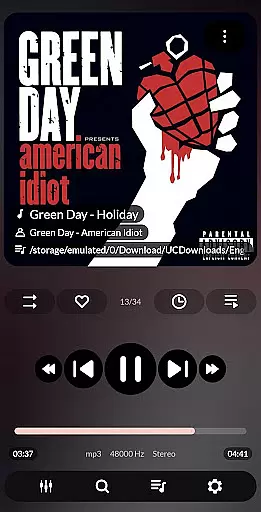


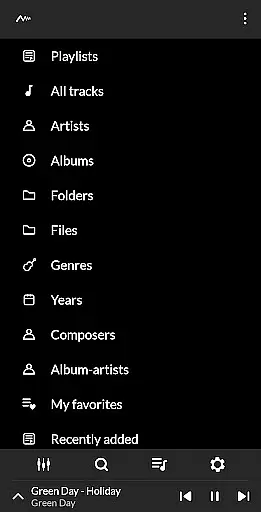
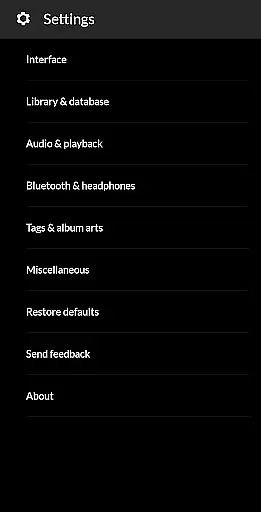
PowerAudio Plus Music Player is a feature-rich audio player designed to elevate your music listening experience. With an intuitive interface and support for all major audio formats, it ensures seamless playback of your favorite tracks. The app allows users to browse music by albums, artists, playlists, or favorites, offering multiple ways to organize and access songs.
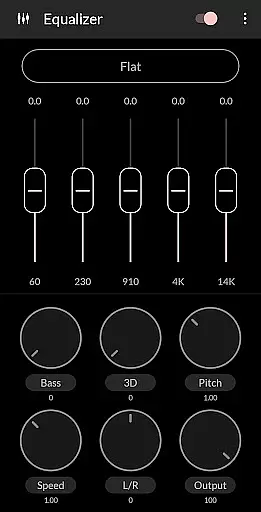
One standout feature is its powerful equalizer with BassBoost and Virtualizer, providing users the ability to customize audio output according to their preferences. Whether you're looking to create custom playlists, set phone ringtones, or share media files, PowerAudio Plus has you covered. Its advanced functionalities like sleep timer, auto-pause on headphone disconnect, and background play make it a versatile choice for audiophiles.
This app is ideal for users who want high-quality sound paired with practical features such as sorting options, codec details, and multi-select capabilities. By combining both aesthetic design and robust functionality, PowerAudio Plus Music Player delivers exceptional value for music enthusiasts.
PowerAudio Plus Music Player boasts an impressive array of features that cater to diverse user needs. First and foremost, it supports all major audio formats including MP3, WAV, AAC, and OGG, ensuring compatibility with virtually any music file. The app's equalizer comes equipped with various presets, allowing users to fine-tune their listening experience with options like BassBoost and Virtualizer.
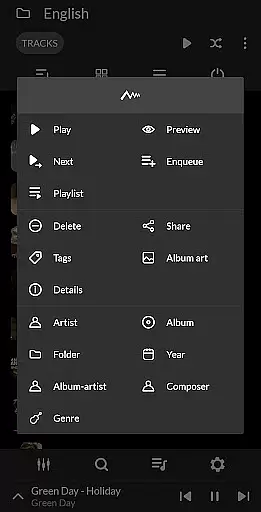
Organization is made easy through multiple browsing methods—albums, artists, playlists, and favorites—while additional tools such as multi-select and custom queues streamline music management. Advanced functionalities include the ability to detect headphones for auto-pause, create personalized playlists, and even set phone ringtones. Sharing media files and viewing codec details (bitrate, sample frequency, etc.) further enhance usability.
Other notable features include repeat/shuffle modes, sleep timer, and background playback. These thoughtful additions ensure uninterrupted enjoyment while addressing common pain points like storage management and format compatibility. Overall, PowerAudio Plus Music Player stands out as a comprehensive solution for managing and enjoying digital music libraries.
PowerAudio Plus Music Player offers an extensive music library that supports all major audio formats including mp3, m4a, wav, aac, amr, and ogg. This ensures that users can enjoy a wide variety of music without worrying about compatibility issues.
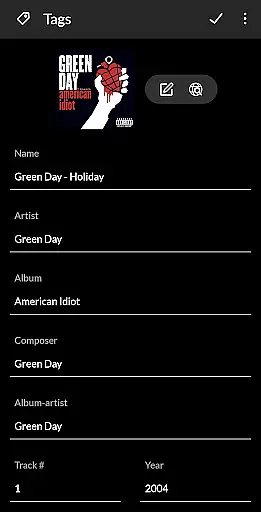
The application places a strong emphasis on copyright authenticity by providing features such as codec details which include information like bitrate, sample frequency, and channels. Users can be confident that the music they are enjoying is of high quality and legally obtained.
With the ability to browse songs by albums, artists, or playlists, PowerAudio Plus makes organizing and accessing your music collection effortless. The app also allows you to create your own playlists, adding a personal touch to how you arrange and experience your favorite tracks.
Moreover, the app's permission structure supports responsible media management. It requests access to read and write external storage for finding, modifying, and deleting songs and playlists, ensuring that users have control over their music files while respecting copyright laws.
Delivering top-notch audio quality is at the heart of PowerAudio Plus Music Player's offerings. The app features a powerful equalizer complete with BassBoost and Virtualizer, allowing users to customize their listening experience according to their preferences.
Users can choose from a variety of music presets designed to enhance different genres or create their custom preset for a personalized touch. This flexibility ensures that whether you're a fan of rock, classical, or electronic music, the sound output will meet your expectations.
In addition to its equalizer capabilities, PowerAudio Plus provides options like setting the phone ringtone and sharing media files. These features not only add convenience but also ensure that audio quality remains consistent across various uses of the app.
Furthermore, the app's focus on high-quality audio extends to its playback functionalities. Options such as repeat or shuffle tracks, multi-select, and a custom queue contribute to uninterrupted, high-fidelity music enjoyment tailored to individual tastes.
User-friendly interface
High-quality audio playback
Customizable equalizer settings
Supports multiple audio formats
Advanced playlist management
Requires many permissions
No built-in lyrics support
Limited visual themes
Occasional ads in free version
Heavy on system resources

Formerly known as Spotistats! View your top tracks, artists, albums and more!
 4.40
4.40
The Cubase remote control app
3.60
Most Advanced AI Song Generator and Music Creator. Rap, Pop, Rock, Gospel & more
4.70
The only true audiophile music player with Hi-Fi audio rendering and DSP engine
3.90
The ultimate media player for Android devices
3.90
The iconic iOS metronome app is now on Android.
3.70
Turn Every Moment into Music
3.60
Customize Your Favorite Songs and Videos with booster.
4.70
Be a true music maker: create beats, mix and make music like a real DJ!
4.30
Simple & Intuitive Metronome
4.70
Super Sound Editor, Song Maker & Mixer, Vocal Remover, Voice Recorder & Changer!
4.60
Learn the notes on the guitar fretboard fast with this easy and fun app
4.60
Guzheng Master supports many playing techniques as an acoustic Guzheng
4.50
Your HD audio recorder on the go for music, meetings, ambience, animal sounds…
4.30
Versatile MP3 recorder with auto-backup to Dropbox and Google Drive
4.10
Sheet music reader, piano & music note player. Play music score & learn to read.
3.90
Control your MIDI USB or Bluetooth devices in app and avoid some trampling
3.30
The Skullcandy App Experience
3.20
MilkDrop for Android TV
3.00


User Reviews