
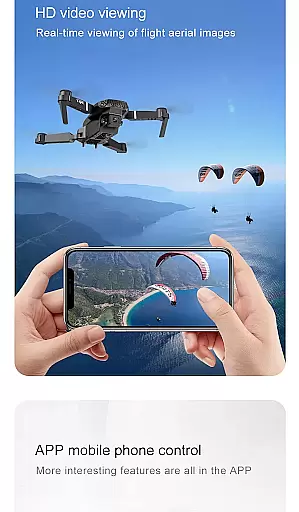
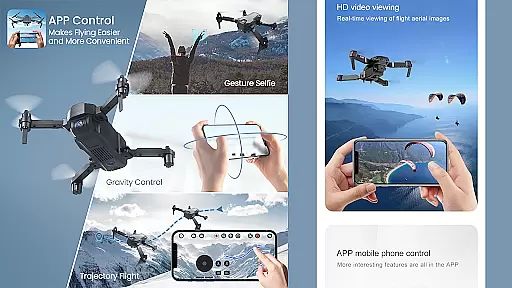
Drone Remote Controller is an innovative application that transforms your Android phone into a powerful drone remote control. This app allows users to seamlessly operate various drones using their smartphones, replicating the functionality of traditional RC controllers. With intuitive configuration and familiar controls, it offers both novice and experienced drone enthusiasts an accessible way to manage their aerial devices.
The app's standout feature is its universal compatibility with most modern drones, supporting essential functions such as flight planning, automated operations, and live FPV streaming. Whether you're looking to control your own drone or even manage a friend's device, this application provides a comprehensive solution for all your drone piloting needs.
Particularly useful for those interested in aerial photography, Drone Remote Controller enables users to capture images and record videos while maintaining precise control over their drones. Its ability to connect with WiFi camera devices enhances the overall experience, making it an ideal tool for both recreational and professional drone operators.
Drone Remote Controller stands out with its impressive array of features designed to enhance the drone flying experience. The application supports comprehensive flight planning capabilities on any device, allowing users to create detailed mission profiles with ease. Its automation features are particularly noteworthy, enabling automatic takeoff, flight execution, image capture, and landing sequences.
The app's live First Person View (FPV) streaming capability provides real-time video feed directly to your device, enhancing situational awareness during flights. Users can quickly disable auto-flight modes and regain manual control with a single tap, ensuring maximum safety and flexibility during operation. The application also supports uninterrupted mapping of large areas through continuous flight sessions.
Additional features include video recording functionality, FPS capture options, and complete camera control when connected to compatible WiFi camera devices. These capabilities make Drone Remote Controller an indispensable tool for both casual hobbyists and professional drone operators seeking enhanced control and functionality from their mobile devices.
Functionality completeness is a crucial aspect of any application, especially for a drone remote controller. The Drone Remote Controller app offers an extensive range of features that cover various aspects of drone operation.
With this app, users can easily make flight plans on any device, automate takeoff, flight, image capture, and landing. It also allows live streaming of the First Person View (FPV) and gives the ability to disable auto-flight and resume control with a single tap. These comprehensive functionalities ensure that users have full control over their drones at all times.
The app's compatibility with the latest drones and its provision for uninterrupted flights to map large areas add to its functional depth. Moreover, the inclusion of video and capture FPS options in the drone controller enhances the user experience by providing them with more control and better output quality.
By offering such a wide array of functions, the Drone Remote Controller app ensures that users can perform a multitude of tasks without needing additional tools or applications, making it a complete solution for drone enthusiasts.
Usability and operational smoothness are key factors that determine the overall user experience of an application. For the Drone Remote Controller app, these elements are meticulously crafted to provide seamless interaction between the user and their drone.
The app is simple and easy to configure and use, with a mode of use that mirrors traditional RC Drones. This familiar operational framework reduces the learning curve for users, allowing them to quickly adapt to using their smartphone as a drone controller.
Furthermore, the app facilitates the connection to a WiFi camera device, enabling users to receive the camera view, take pictures, record videos, and control the drone directly from their Android device. Such integration not only simplifies the process but also enriches the user's engagement with their drone.
By focusing on intuitive design and operational continuity, the Drone Remote Controller app delivers a smooth and enjoyable experience, ensuring users can focus on the excitement of drone flying without being hindered by complex controls.
User-friendly interface
Wide drone compatibility
Advanced automation features
Real-time FPV streaming
Comprehensive camera control
Limited old hardware support
Requires stable internet connection
Potential battery drain
Learning curve for beginners
Device compatibility issues

View your cameras anywhere and anytime
 4.20
4.20
If you are looking for melon playground mod that fun you deffinitely try our app
2.70
Wireless reverse charging using phone now is possible
4.30
The Free Catholic Latin American Bible in complete Spanish
4.60
Identify securely online
3.10
Popular mods fnaf mods for melon playground
4.50
TV USB connector app provides you a seamless cast option from your phone to tv.
4.70
Demo version of the mcpro24fps manual video camera. Try and buy a full version!
4.00
Mirror Link Car Display to share your screen with car dashboard wirelessly
4.4
Read Holy Quran Feel Like Real Quran & Listen Al Quran Mp3 Audio Online Offline.
4.70
Test DPC is a sample device policy controller for use with Android Enterprise.
4.20
Unlock the hidden menus of your phone with our mobile secret codes app.
4.20
Easily evaluate the performance of Scandit's barcode and ID scanning SDK
4.10
Sad ringtones full of feeling, sad music ringtones
3.90
a wireless controller that provides a seamless and gaming experience for players
3.80
Connect your phone to any endoscope camera, USB camera, or borescope with ease.
3.70
CloudEye 365 is a easy-handling APP
3.60
Endoscope camera an app to connect with endoscope cam or any device
3.30
Collection of high-quality, trendy skins and outfits!
4.4


User Reviews