
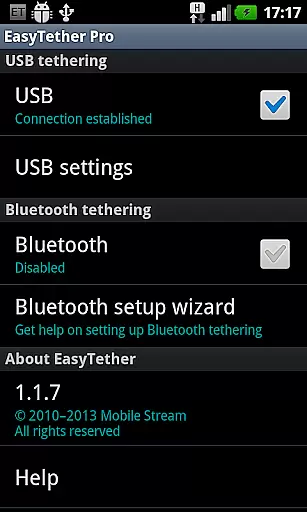
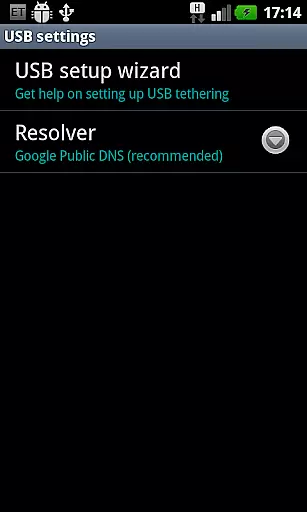
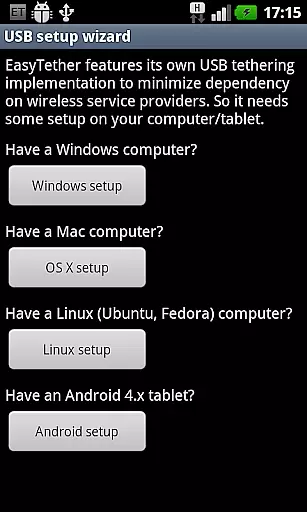
EasyTether Pro is a communication app designed to share your smartphone's internet connection with other devices, including computers and tablets. It offers versatile tethering options through USB or Bluetooth, supporting Windows, Mac OS X, Linux, and Android 4.x platforms.
The app stands out by not requiring root access or special tethering plans, making it accessible for users who need a quick and reliable way to get online. Whether you're working on a laptop or using a tablet, EasyTether Pro ensures seamless connectivity without the hassle of complex configurations.
With additional support for gaming consoles like PS3, Xbox, and Wii via Internet Connection Sharing, this app is perfect for users looking to maximize their internet accessibility across multiple devices.
EasyTether Pro boasts an array of features that cater to various tethering needs. The app supports both USB and Bluetooth tethering, providing flexibility depending on your device and situation. For USB connections, it is compatible with Windows, Mac OS X, and Linux systems, while Bluetooth tethering works seamlessly with Windows computers and Android tablets running version 4.0.3 or higher.
One of the standout features is its ability to function without root access or specific tethering plans, which broadens its usability. This makes it an excellent choice for users who want to avoid carrier restrictions or additional fees. Additionally, EasyTether Pro facilitates internet sharing with gaming consoles such as PS3, Xbox, and Wii through Internet Connection Sharing on Windows or Mac.
These capabilities ensure that users can maintain consistent and reliable internet access across different devices, enhancing productivity and entertainment options.
Real-time messaging speed and reliability are crucial for seamless communication, especially in applications like EasyTether Pro. This app ensures that your internet connection is shared efficiently between devices without noticeable delays.
EasyTether Pro employs advanced tethering technology to maintain a stable connection whether you're using USB or Bluetooth. The app supports multiple platforms including Windows, Mac OS X, Linux, and Android tablets, ensuring broad compatibility and reliable performance across different devices.
The application does not require root access or special tethering plans, making it accessible and easy to set up for users of all technical levels. By following the straightforward setup wizard, users can quickly establish a tethered connection, minimizing downtime and maximizing productivity.
With support for gaming consoles like PS3, Xbox, and Wii through Internet connection sharing on Windows or Mac, EasyTether Pro extends its reliable connectivity beyond just computers and tablets. This versatility makes it an invaluable tool for anyone needing consistent and fast internet access across various devices.
Media sharing support is an essential feature for apps focused on communication and connectivity, such as EasyTether Pro. This functionality allows users to share various types of media files seamlessly between tethered devices.
EasyTether Pro facilitates media sharing by providing a stable and high-speed internet connection via USB or Bluetooth tethering. Whether you're transferring large video files or streaming media content, the app ensures that data is transmitted smoothly and efficiently, maintaining the quality and integrity of the shared media.
In addition to supporting standard file formats, EasyTether Pro also enables users to connect gaming consoles like PS3, Xbox, and Wii. This extended support means that users can enjoy uninterrupted media streaming and downloads on their gaming devices, enhancing their overall entertainment experience.
By removing the need for root access or specialized tethering plans, EasyTether Pro simplifies the process of media sharing. Users can easily set up and manage their connections, allowing them to focus on enjoying their content rather than troubleshooting connectivity issues.
Wide platform compatibility
No root access required
Supports gaming consoles
Flexible tethering options
One-time fee only
Limited free version
Bluetooth speed may vary
Carrier restrictions possible
Setup wizard could be improved
Removal of old versions needed

BiP is a fast, secure, free messaging and HD video calling app!
 4.10
4.10
Save 10% automatically on your first international mobile top up.
4.60
Browse fast on Opera Mini, with Data Saving, News, Football Scores, and Download
4.60
This app enables the phone to receive and send FT8 traffic!
3.80
Manage and Fund Calling Accounts and Schedule and Join Video Sessions
3.60
A softphone app with seamless SIP calling and an intuitive VoIP dialer
3.50
Threema is the messenger with the most consistent focus on security and privacy.
4.00
Get through your inbox faster with the mail app designed to simplify your life.
4.40
Share the moment!
4.10
Messenger for SMS - texting message app, faster, simpler & safer, for you.
4.70
Talk & text free with a second phone number plus unlimited 5G data, no fees.
4.50
Create a secure hotspot on-the-go with Portable WiFi - Mobile hotspot.
4.40
Enjoy secure messaging & calling. Safe Messenger: group chats, calls, messages.
4.20
SMS Messenger is a lightning-fast messaging app.
4.20
Federated instant messaging for your mobile device (Jabber, XMPP, Snikket)
4.10
Telegram is a messaging app with a focus on speed and security.
4.00
Call Forwarding is easy and simple application to use.
3.80
A Browser with powerful ad blocker to help focus on what really matters.
3.00
Chat on the Jabber network (XMPP protocol); support for SMS and other gateways
2.10


User Reviews