
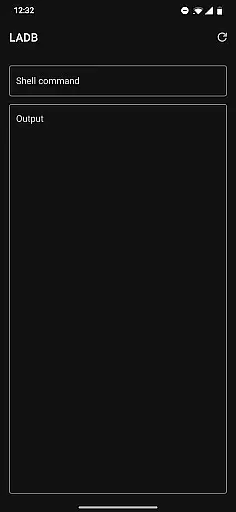
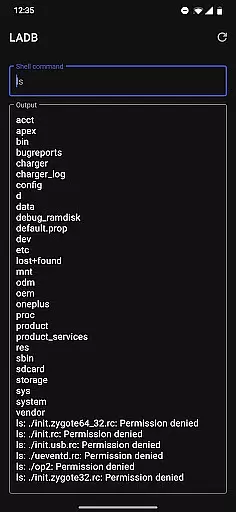
LADB is a specialized tool designed for Android developers and power users who need local ADB shell access without requiring a USB connection. The app bundles an ADB server within its libraries, enabling wireless debugging through Android's built-in Wireless ADB Debugging feature.
Key functionalities include the ability to establish a local ADB connection by pairing the device using a generated code and port number. This makes it particularly useful for debugging or executing commands directly on the device. LADB ensures that developers can streamline their workflow without relying on external hardware connections.
The app is especially valuable in scenarios where physical access to the device is limited or when performing remote troubleshooting. By eliminating the need for USB cables, LADB enhances convenience while maintaining the robustness of traditional ADB operations.
LADB offers several notable features tailored for advanced Android users. First, it integrates an ADB server directly into the app, allowing users to execute shell commands locally. This functionality is crucial for developers who frequently debug apps or modify system settings.
Another standout feature is its compatibility with Android’s Wireless ADB Debugging. Users can pair their devices manually or via assisted pairing, ensuring flexibility across different Android versions. Additionally, the app provides clear instructions for troubleshooting common issues, such as clearing app data or resetting wireless debugging connections.
While LADB does not support third-party tools like Shizuku, it maintains a reliable standalone performance. Its slightly modified GPLv3 license also ensures transparency while discouraging unofficial builds on platforms like Google Play Store.
LADB u2014 Local ADB Shell offers a unique solution by bundling an ADB server within the app itself. This allows users to execute ADB commands directly on their Android device without requiring a USB connection. The core functionality is made possible through Android's Wireless ADB Debugging feature, which facilitates local communication between the bundled server and the client.
The app ensures accuracy by providing detailed setup instructions for pairing the device. Users can follow the initial setup guide, which recommends using split-screen mode or a pop-out window with LADB and Settings open simultaneously. This guarantees that the pairing information remains valid during the entire process, ensuring a stable connection.
For troubleshooting, LADB provides clear steps to resolve most issues. By clearing app data, removing all Wireless Debugging connections from Settings, and rebooting the device, users can maintain the app's effectiveness. These measures highlight the app's commitment to delivering precise and reliable ADB functionalities.
Overall, LADB's core functions are designed to offer developers and power users an efficient way to interact with their devices. The ability to run ADB commands locally enhances workflow productivity and simplifies debugging processes, making it an essential tool for Android enthusiasts.
Despite its technical nature, LADB u2014 Local ADB Shell maintains an interface that emphasizes simplicity and intuitiveness. The app is structured to ensure that even users who may not be familiar with ADB commands can navigate and utilize its features effectively. Clear instructions and guidance are provided throughout the setup process, reducing the learning curve typically associated with developer tools.
One of the standout features is the Assisted Pairing mode, which streamlines the connection process. Although this mode can sometimes be finicky with newer Android versions, LADB offers a manual pairing tutorial to address such issues. This tutorial, available via a linked YouTube video, demonstrates how users can reliably pair their devices themselves, enhancing the overall user experience.
In cases where users encounter difficulties, the app provides accessible support options. Detailed troubleshooting steps and direct email support ensure that help is readily available. This approach underscores the app's dedication to offering an intuitive user interface that accommodates various skill levels.
By focusing on clarity and ease of use, LADB successfully bridges the gap between complex technical operations and user-friendly design. Its straightforward interface empowers users to harness the full potential of ADB functionalities without unnecessary complications.
Wireless ADB access
Integrated ADB server
Manual pairing option
Clear troubleshooting steps
No external data sharing
Incompatible with Shizuku
Requires manual setup
Occasional pairing issues
No multi-device support
Limited to Android

Just one-tap to easy translate in any language after calls within seconds.
 4.20
4.20
HD Camera captures every special moment.
4.60
Extremely fast, secure, and protects your privacy
4.80
HD Video player and downloader for all formats, fast & smooth 4K video playback.
4.60
Universal TV remote control all TVs, Roku, LG, Samsung, Fire, Vizio, Sony, TCL.
4.40
Carry a FTP server in your pocket and avoid USB cables for file transfer
4.20
An open-source APK explorer for Android!
4.10
Your personal health butler
3.60
fast and easy mp3 music downloader
4.80
Creation, Learning, Entertainment & More — The All-in-One AI Search Engine
4.70
Planner and Tracker for Stardew Valley
4.60
Mirror your screen to Chromecast and Android TV - Super fast and simple
4.60 4.50
4.50
Quickly switch to an encrypted DNS server on Android TV
4.50
With videos, electrical calculators, and built-in ebook, Ugly’s has your answer.
4.50
Use your phone as a webcam on your computer over WiFi or USB.
4.40
Clean up large files and similar photos, fast and easy to use
4.40
Quickly check the frequency of the Earth
4.30
A recovery soft,it features photo recovery, video recovery, file recovery.
3.40


User Reviews