
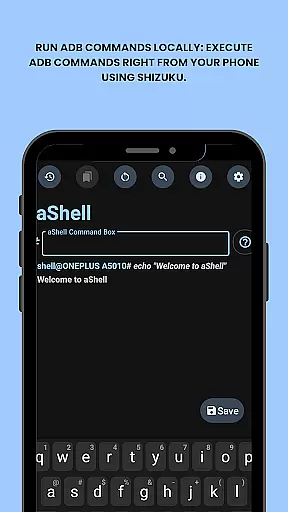
aShell is a specialized Android tool designed for users who require direct access to ADB commands on their devices without the need for a PC. It operates within a Shizuku-supported environment, making it particularly useful for developers and power users.
The app offers a streamlined interface to execute various ADB operations directly from an Android phone. Its key features include live command output, search functionality within results, and the ability to save outputs to files. Additionally, aShell supports dark and light modes and allows users to bookmark frequently used commands.
With its open-source nature, aShell provides transparency and flexibility for tech-savvy individuals looking to manage their device's internals efficiently. The app caters to those with basic ADB knowledge, enhancing productivity and control over Android systems.
aShell stands out with its unique set of features tailored for Android power users. One of its main capabilities is running ADB commands locally on the device through a Shizuku-supported environment, which eliminates the dependency on external computers.
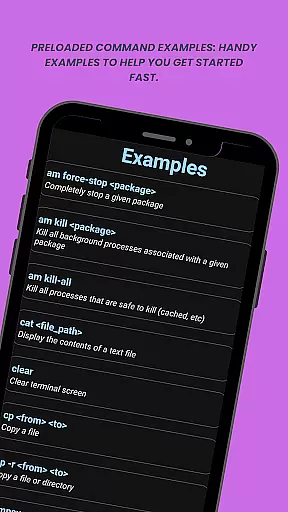
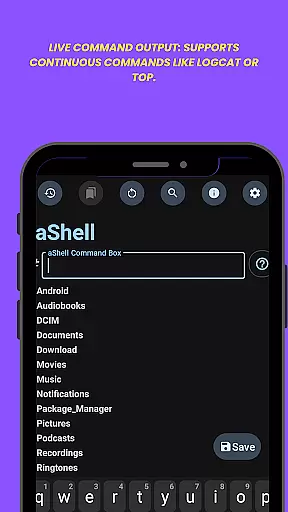
The app includes preloaded examples of common ADB commands, aiding users in quickly getting started. It also supports continuous commands like logcat or top, providing real-time feedback and monitoring. Users can easily search within command outputs and save these results as text files for future reference or sharing.
Additional functionalities include automatic adaptation to system themes (dark/light mode), bookmarking of frequently used commands, and complete source code availability for those interested in custom builds. These features collectively offer a comprehensive and flexible toolset for managing Android devices.
aShell is designed to execute ADB commands directly on Android devices, ensuring precision and reliability in its core functionality. This app eliminates the need for a PC by leveraging the Shizuku environment, which allows users to run ADB commands locally.
The tool supports continuous commands such as logcat or top, providing live command output that enhances real-time monitoring and debugging capabilities. With preloaded command examples, users can quickly get started, making it accessible even for those with basic ADB knowledge.
For advanced users, aShell offers features like search within output and saving outputs to .txt files, which streamline workflows and improve productivity. These functions ensure that users can efficiently manage and analyze command results, thus maximizing their control over device internals.
aShell provides an intuitive interface that adapts to user preferences and system settings, offering dark/light mode support that automatically adjusts to your device's theme. This feature ensures a comfortable viewing experience in any lighting condition, enhancing usability.
The app includes bookmarking for frequently used commands, allowing quick access and reducing the time needed to re-enter complex instructions. This thoughtful design choice simplifies navigation and promotes efficiency, particularly for developers and power users who rely on specific commands regularly.
Additionally, aShellu2019s straightforward layout and inclusion of helpful command examples make it easy for users to execute ADB operations without extensive technical expertise. By focusing on clarity and ease of use, aShell delivers a seamless experience that meets both novice and expert needs effectively.
Efficient ADB execution
User-friendly interface
Live command output
Customizable settings
Open-source transparency
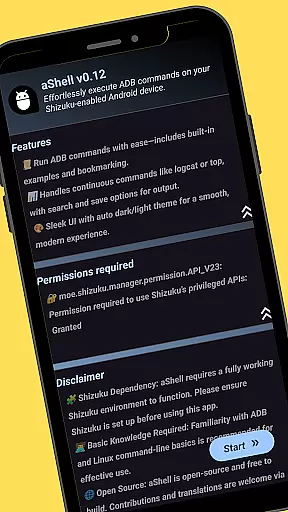
Requires Shizuku setup
Limited to tech-savvy users
No standalone functionality
Dependent on ADB knowledge
Potential compatibility issues

Connect instantly to a fast, encrypted VPN with one tap
 4.60
4.60
Extremely fast, secure, and protects your privacy
4.80
App to pay for FUTO Keyboard
4.60
Monitor car performance in real time and troubleshoot malfunctions.
4.80
Fast Video Downloader, Movie Downloader, Torrent Downloader & Adblock Browser
4.70
Play your X-Box games remotely in 1080p with any controller and zero latency
4.60
The ultimate tool for network analysis, wifi scanning and problem detection.
4.90
Automate everything from settings to photos, SMS to speech. ADC2 prize winner.
4.10
Your personal health butler
3.60
Navigate with Ease and Style
4.90
Unit and currency converter with easy and simple UI.
4.80
Small and simple app to Verify Root Access and BusyBox Install!
4.70 4.50
4.50 4.50
4.50
Forza Tuning Calculator App for Forza Horizon 5, Motorsport and Earlier Titles
4.40
Carry a FTP server in your pocket and avoid USB cables for file transfer
4.20
Quickly & easily calculate the spacing of handrail balusters
4.20
MS-DOS in your pocket. Play old DOS games anywhere you are ;)
4.10
This app unlocks the Pro features of the Central for DayZ app
3.60


User Reviews