
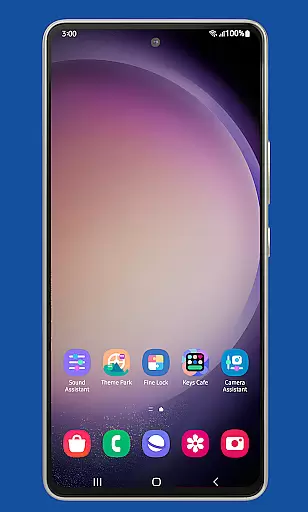
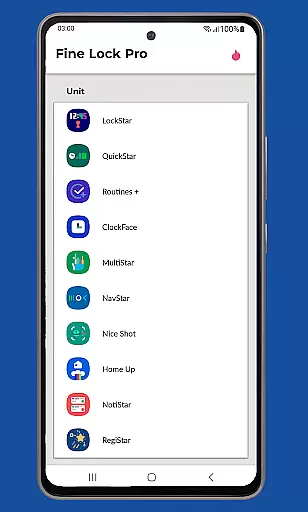
Fine Lock is a specialized launcher app designed exclusively for Samsung devices running official One UI. It enables users to access and utilize Good Lock and Galaxy Labs modules, which are typically restricted to specific markets. The app acts as a bridge, allowing Samsung users to customize and optimize their Android experience without regional limitations.
With its PRO features, Fine Lock offers advanced functionalities such as module app shortcuts, background update checks, and dynamic wallpapers that adapt to Dark/Night modes. This makes it an essential tool for power users seeking enhanced control over their device's appearance and performance. The app ensures compatibility with the latest Samsung software while providing a seamless experience for personalization enthusiasts.
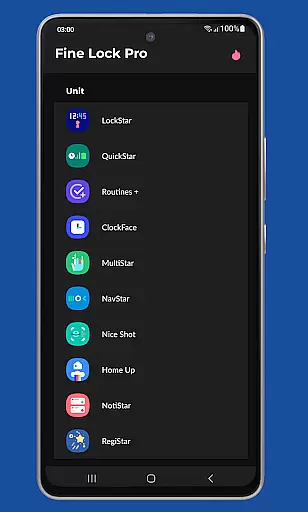
Fine Lock stands out with its unique ability to integrate Good Lock and Galaxy Labs modules into a unified interface. Users can conveniently manage these customization tools through a single platform, eliminating the need to search for individual modules in limited markets. The app also supports dynamic wallpapers, which automatically adjust based on the device's Dark/Night mode settings, offering a modern and adaptive visual experience.
Another notable feature is the background update check, ensuring that all installed modules remain up-to-date without manual intervention. Additionally, Fine Lock allows hiding uninstalled modules, keeping the interface clutter-free. These capabilities, combined with module app shortcuts on the home screen, make the app a powerful solution for Samsung users looking to maximize their device's potential while maintaining an organized and personalized setup.
Fine Lock offers a unique approach to personalizing Samsung devices by acting as a launcher for Good Lock and Galaxy Labs modules. These modules provide users with an extensive range of customization options that go beyond the standard settings available on Samsung's One UI.
With Fine Lock, users can access features such as module app shortcuts directly from the home screen, which enhances the convenience and accessibility of frequently used functions. This level of customization allows users to tailor their device's functionality to better suit their individual preferences and workflow.
The application also supports dynamic wallpapers, which automatically adjust based on the deviceu2019s Dark or Night mode settings. This feature not only adds a personalized touch to the user's home screen but also ensures optimal visibility and comfort during different times of the day.
By providing these advanced customization options, Fine Lock empowers users to create a more personalized and efficient mobile experience, making it an invaluable tool for those looking to enhance their Samsung device's interface beyond the default offerings.
Theme compatibility is a crucial aspect of any customization tool, and Fine Lock excels in this area by ensuring seamless integration with Samsung's One UI themes. This compatibility allows users to apply and enjoy a wide array of visual styles without encountering the glitches or inconsistencies that can occur with less compatible solutions.
Users of Fine Lock can take advantage of the theme system to transform the look and feel of their Samsung devices. Whether it's changing color schemes, icon shapes, or overall aesthetics, the app maintains visual consistency across the user interface, delivering a cohesive and polished appearance.
In addition to supporting official themes, Fine Lock also accommodates custom themes, giving users the freedom to express their personal style. The app ensures that all visual elements, from widgets to system menus, are displayed correctly, preserving the intended design and user experience.
Overall, Fine Lock's commitment to theme compatibility enhances the personalization potential of Samsung devices, allowing users to enjoy a customized yet harmonious visual experience that aligns with their preferences.
Enhances device customization
Supports dynamic wallpapers
Keeps modules updated
Organized interface
Exclusive to Samsung devices
Limited to Samsung devices
Does not support AOSP OS
Modules require separate download
PRO features need purchase
Potential compatibility issues

Glass style colourful icons with a One UI look and feel
 4.60
4.60
Ninja Turtles Cowabunga SE watch face for Wear OS
4.50
Realistic animated snow on your wrist, with 10 images landscapes to choose from
4.00
Shimeji adds cute animated characters to your screen, lively and fun.
4.70 4.50
4.50
⭐ OneUI inspired Fluffy Icon Pack – Soft. Stylish. Standout. ⭐
4.0
Vibrant Adaptive Icons with Material You and Enhanced Monet Colors.
4.50
One 8 icons glass color version
4.80
Create stunning widgets with Widget 2026: Aesthetic Widgets for Android!
4.60
Winter's Journey: digital watch face for Galaxy Watch & Wear OS
4.80
Wallpaper HD 4K Live - Thousands of high-quality Anime backgrounds for you.
4.80
Vertically oriented rectangular icons
4.70
Unique Android Launcher
4.60
Ultra realistic gold analog watch face with lots of customization options.
4.50
Color phone with cool effects for call screen, flash alert & ringtones music
4.50
Launcher OS™ Pro without ads help make your phone simple and pretty
4.30
Wear Os Watch Face - Seasonal - Animated Snow Effect - 9 Animals
4.20
Design your screen with unique, vibrant clocks
3.80
Adorable pets roam and play right on your phone screen!
3.30


User Reviews