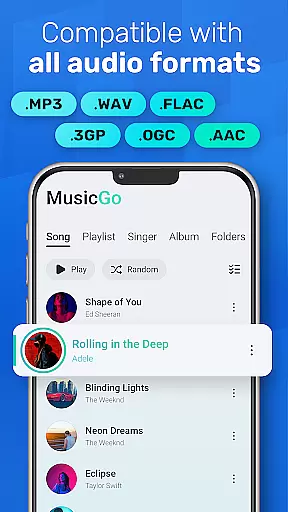
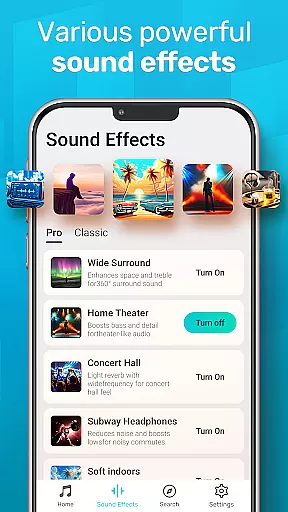
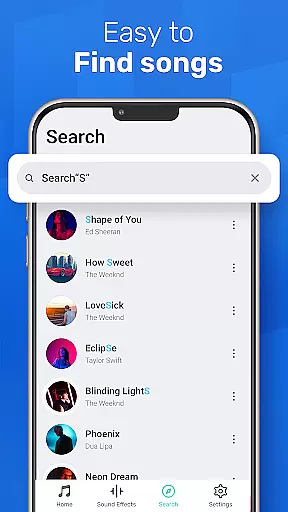
MusicGo is a versatile offline music player app designed for audiophiles who demand both quality and functionality. Supporting all major audio formats including MP3, FLAC, WAV, and AAC, it ensures optimal sound delivery across devices. With over 20 built-in equalizer presets tailored to various music genres, users can customize their listening experience with ease.
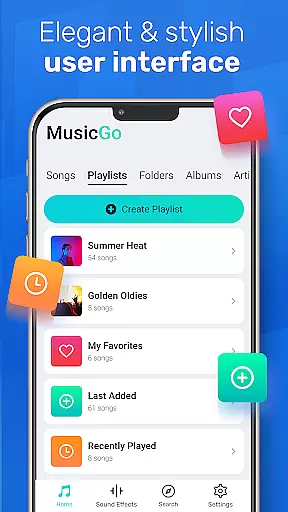
The app's intuitive interface combines style and usability, offering features like deep library scanning, automatic music organization, and smart playlists such as Most Played and Recently Played. Whether you're managing files or enjoying uninterrupted playback via Bluetooth or wired headphones, MusicGo delivers an exceptional audio experience that caters to both casual listeners and dedicated music enthusiasts.
MusicGo stands out with its robust feature set tailored for comprehensive music management and enhanced playback. The app supports an extensive range of audio formats, ensuring compatibility with files like MP3, FLAC, WAV, MIDI, AAC, and APE. Its powerful equalizer offers over 20 presets, including options for bass boost and reverb effects, allowing users to fine-tune audio output according to their preferences.
Additional functionalities include smart auto-playlists, background playback support, and seamless integration with both Bluetooth and wired audio devices. Users can browse and manage their music by albums, artists, or playlists while enjoying options like shuffle, loop, and repeat modes. The elegant user interface further enhances the experience with customizable themes, making MusicGo not just a tool but a personalized music companion.
MusicGo offers an extensive music library that supports all major audio formats including MP3 FLAC WAV MIDI AAC and APE. This ensures users have access to a wide variety of music options without worrying about format compatibility.
The app's deep scanning feature automatically refreshes the music library making it easy for users to manage their offline audio files. With this comprehensive format support MusicGo guarantees optimal quality playback for every song in your collection.
While MusicGo focuses on providing a versatile player it also emphasizes copyright authenticity by allowing users to play their legally acquired music files. This respects both the rights of artists and the user's ownership of purchased content.
One of MusicGo's standout features is its powerful equalizer which comes with over 20 built-in presets designed for various music genres such as classical dance folk and rock. These equalizer settings allow users to tailor their listening experience with bass boosts and reverb effects enhancing sound quality according to personal preferences.
In addition to the equalizer options MusicGo provides high-quality audio playback ensuring an outstanding listening experience. The app leverages cutting-edge audio technology to deliver clear and rich sound elevating the overall enjoyment of music.
Users can further customize their experience by choosing from different playback modes such as shuffle loop or repeat. This flexibility combined with background playback support ensures that MusicGo meets diverse user needs while maintaining exceptional audio quality.
User-friendly interface
Extensive format support
Powerful equalizer options
Smart playlist creation
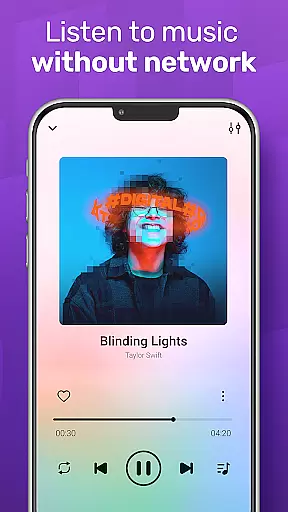
Offline playback capability
Limited social sharing
No cloud sync
Ads in free version
Occasional bugs
Heavy on storage

DJ Music Mixer - DJ Remix: remix songs, make beat music & record mix of DJ.
 4.40
4.40
Most Advanced AI Song Generator and Music Creator. Rap, Pop, Rock, Gospel & more
4.70
Record, Mix & Master with all n-Track effects, 64-bit audio and Stem Separation.
4.70
Enjoy singing any song, no matter how high or low it is
4.30
Voice recorder - Audio recorder. Best recorder for recording
4.90
Let your Android device with the sound effects you want
4.50
The iconic iOS metronome app is now on Android.
3.70
Get alarms that fit your lifestyle and wake up to the sounds you love.
4.80
Customize Your Favorite Songs and Videos with booster.
4.70
Full-featured, High-Quality Groovebox Workstation, perfect for Live Performance!
4.80
Brian Eno and Peter Chilvers’ acclaimed music app Bloom, radically reinvented.
4.80
Walkout Song DJ is the most intuitive app to manage your sports music.
4.70
Simple & Intuitive Metronome
4.70
AI Music Maker: Generate And Compose AI Tunes & AI Songs & AI Music & AI Melody!
4.60
Manage your Sonos system directly from your home-screen!
4.40
Next generation modular control surface
4.10
Simple mp3 and mp4 player with advanced features.
3.40
MilkDrop for Android TV
3.00
Make music anywhere. Turn your device into an instrument.
4.5


User Reviews