
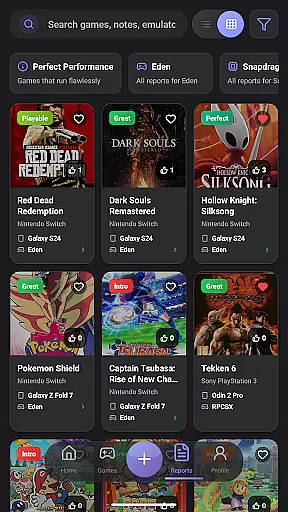
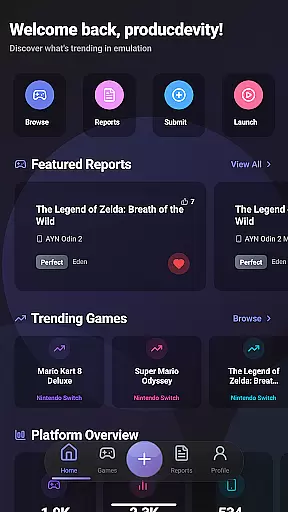
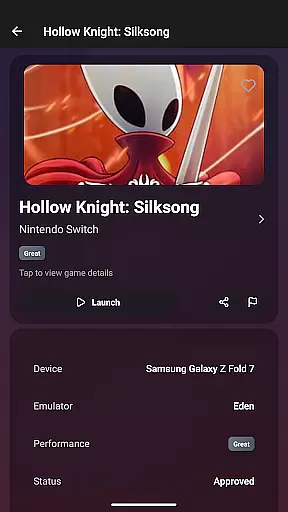
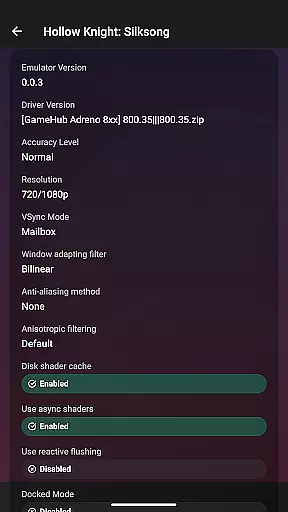
EmuReady Beta is a powerful tool designed to enhance your emulation experience by providing detailed compatibility reports for games across various devices and emulators. The app serves as a trusted guide, helping users determine which games will run perfectly on their specific hardware before investing time in trial and error.
With its extensive game compatibility database, EmuReady allows users to browse thousands of titles, view performance metrics, and access community-driven reports. Whether you're using a flagship smartphone or a budget tablet, the app delivers device-specific information and supports multiple emulator systems, including Nintendo Switch and 3DS.
The app's smart filtering system and performance tracking features make it easy to find optimal gaming experiences while saving favorites helps build a personal compatibility library. EmuReady is an essential companion for both novice and experienced emulation enthusiasts, ensuring you spend more time playing and less time configuring.
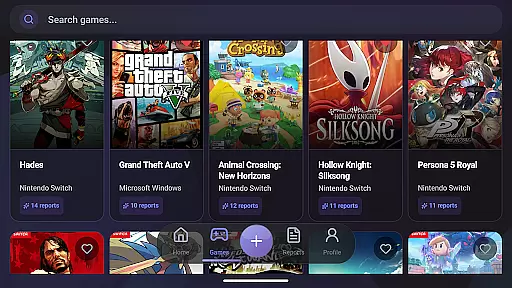
EmuReady Beta offers a comprehensive suite of features that cater to the needs of emulation enthusiasts. At its core, the app provides a vast game compatibility database where users can search by title, system, or browse through an extensive catalog to instantly see how different games perform across devices and emulators.
One standout feature is the community-driven reporting system, where real users contribute detailed compatibility reports. These include performance ratings, custom settings, and helpful notes, creating a valuable knowledge base for all users. The app also supports multiple emulators, allowing users to compare performance metrics such as FPS, graphical fidelity, and playability ratings from Perfect to Unplayable.
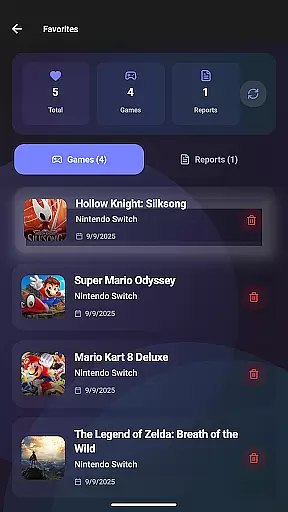
Additional features include smart filtering options for quick searches, a vote and comment system for community interaction, dark mode for comfortable viewing, and the ability to save favorite games. These tools collectively create a robust platform that saves users time and enhances their overall emulation experience.
EmuReady Beta focuses on providing accurate and effective core functions that cater to the needs of emulation enthusiasts. The app offers a comprehensive Game Compatibility Database, allowing users to browse thousands of games and instantly see how they perform across different devices and emulators. This feature ensures that users can make informed decisions about which games are most likely to run smoothly on their specific hardware.
The app's effectiveness is further enhanced by its community-driven platform. Real user reports provide detailed compatibility insights, including performance ratings, custom settings, and helpful notes. These reports are tailored to specific device models, ensuring that users receive precise information relevant to their devices. Whether using a flagship phone or a budget tablet, EmuReady Beta helps users discover what works best for their unique hardware configurations.
Additionally, EmuReady Beta supports multiple emulators, such as those for Nintendo Switch and 3DS, enabling users to compare performance metrics across different platforms. With features like smart filtering, users can quickly find reports based on specific criteria such as device, emulator, and performance rating. This functionality streamlines the process of identifying optimal gaming setups, saving users valuable time and effort.
Overall, EmuReady Beta's commitment to accuracy and effectiveness empowers users to optimize their emulation experiences. By delivering reliable compatibility data and fostering a supportive community, the app ensures that users can enjoy their favorite retro games with confidence.
EmuReady Beta excels in offering an interface that combines simplicity with intuitiveness, making it accessible even to those new to emulation. The app's design emphasizes ease of use, allowing users to effortlessly navigate through its extensive features. Key functionalities such as the Game Compatibility Database and Community Reports are easily accessible, ensuring that users can quickly find the information they need without unnecessary complexity.
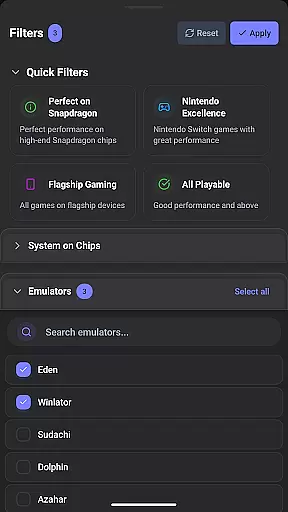
One of the standout aspects of EmuReady Beta's interface is its smart filtering capabilities. Users can filter reports by various criteria, including device, emulator, and performance ratings. This intuitive filtering system enables users to swiftly narrow down their search results, enhancing the overall user experience. Additionally, the app includes a Vote & Comment System, where users can upvote helpful reports and contribute their insights, fostering a collaborative environment.
EmuReady Beta also provides a comfortable viewing experience with its Dark Mode feature. This mode automatically switches based on the time of day, ensuring that users can browse compatibility reports comfortably regardless of lighting conditions. Such thoughtful design elements highlight the app's dedication to creating an intuitive and user-friendly interface.
By focusing on simplicity and intuitiveness, EmuReady Beta ensures that users can efficiently utilize its robust features. The app's streamlined design not only enhances usability but also encourages more users to engage with the world of emulation confidently and effectively.
User-friendly interface
Extensive game database
Community-driven reports
Device-specific optimization
Multiple emulator support
Beta version limitations
Occasional bugs
Limited emulator coverage
No direct emulation
Dependent on user reports

 4.50
4.50
Connect instantly to a fast, encrypted VPN with one tap
4.60
Extremely fast, secure, and protects your privacy
4.80
Quickly & easily calculate the spacing of handrail balusters
4.20
card-reader app
2.20
Forza Tuning Calculator App for Forza Horizon 5, Motorsport and Earlier Titles
4.40
Navigate with Ease and Style
4.90
The Ultimate Flex Drivers Utility App - Convenient Tapping & Block Filters
4.70
Enjoy a smooth mobile reading experience!
3.60
Enjoy smooth gameplay with Game Booster
4.90
Creation, Learning, Entertainment & More — The All-in-One AI Search Engine
4.70
Clean up large files and similar photos, fast and easy to use
4.40
An easy-to-use calculator designed to save time calculating and bending conduit
4.30
App that Recover your pictures, videos or files after you delete them.
4.20
An open-source APK explorer for Android!
4.10
1-Click close all background apps on Android TV
3.90
Fun lie-detection pranks for friends and parties.
3.80
A non-root local ADB shell client. READ BELOW!
3.40
Undelete and recover your lost or deleted files with DiskDigger!
3.40


User Reviews