
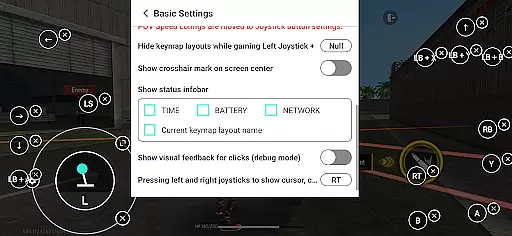
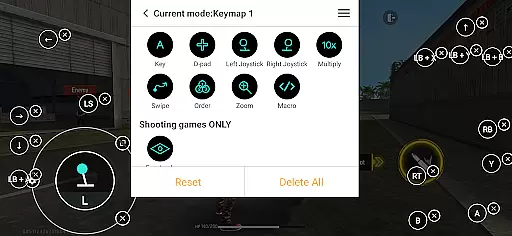
Panda Gamepad Pro is a powerful tool designed to enhance your mobile gaming experience by enabling seamless gamepad support. This app allows gamers to use their physical controllers with mobile games, providing superior precision and comfort compared to touch controls. Whether you're playing shooting games, MOBAs, or sports titles, Panda Gamepad Pro ensures an immersive and responsive gaming session.
One of the standout features is its direct game launch capability, which eliminates the need for cloning games. Additionally, it supports secure Google Play logins and offers ban-proof gaming through its unique technology. The app is compatible with nearly all gamepad brands and works across a wide range of Android devices, making it a versatile choice for mobile gamers.
Panda Gamepad Pro stands out with its extensive compatibility and user-friendly features. It supports almost all gamepad brands, ensuring that whether you have the latest controller or an older model, you can enjoy enhanced gaming control. The app's direct game launch feature lets users jump straight into their favorite games without any cloning hassle, streamlining the gaming process.
Security is also a priority, as Panda Gamepad Pro allows for safe Google Play logins, protecting your account while you play. Its ban-proof technology means you can game without worrying about restrictions from duplication running. Activation is straightforward too; Android 11+ users can activate directly on their device, while those on older versions can quickly set up via PC or Mac. Rooted devices benefit from automatic activation.
Panda Gamepad Pro is designed to provide unparalleled precision and effectiveness for mobile gaming enthusiasts. The app enables gamers to use their gamepads with direct game launch capabilities, which means you can jump straight into your favorite games without any cloning hassle. This seamless integration ensures that every button press on your controller translates directly into in-game actions, offering a highly responsive and accurate gaming experience.
One of the standout features of Panda Gamepad Pro is its extensive compatibility with nearly all gamepad brands. Whether you own the latest controller or an older model, this tool supports them all. Such universal support guarantees that no matter what type of gamepad you have, it will work efficiently with your mobile device, providing a consistent and reliable performance across different hardware setups.
For users concerned about security, Panda Gamepad Pro allows for secure Google Play logins. This feature not only enhances account safety but also ensures that your gaming progress and achievements are safely synced. With ban-proof gaming technology, players can enjoy their games without worrying about potential bans due to unauthorized duplication running practices. This peace of mind lets you focus solely on dominating the competition with precise controls tailored specifically for each game genre.
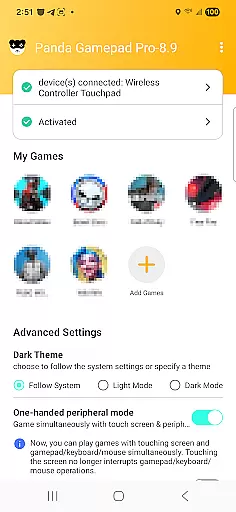
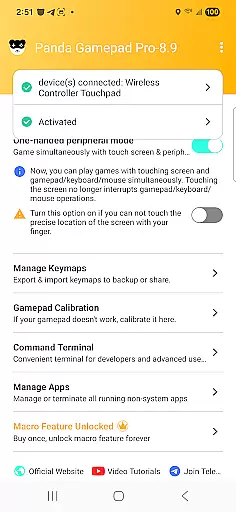
The interface of Panda Gamepad Pro has been crafted to offer simplicity and intuitiveness, making it accessible even for beginners. Upon launching the app, users are greeted with straightforward navigation options that guide them through activation processes depending on their Android versionu2014be it Android 11+ where activation occurs directly on the device, or earlier versions requiring quick PC/Mac activations. Rooted devices benefit from automatic activation, streamlining setup further.
Moreover, Panda Gamepad Pro provides comprehensive video tutorials available at https://www.youtube.com/@0xgary. These resources help demystify any complexities associated with setting up and using the application effectively. By offering visual guides alongside written instructions, the app ensures that users understand how to maximize its potential regardless of technical expertise level.
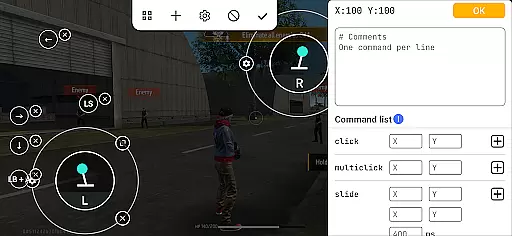
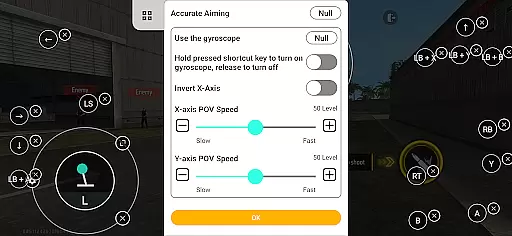
In addition to ease-of-use, another significant advantage lies in the app's extensive game support. From shooting games to MOBAs and sports titles, Panda Gamepad Pro caters to various genres by enhancing control schemes within these environments. Players can expect intuitive mappings that make gameplay feel natural while leveraging advanced functionalities provided by modern controllers. Overall, this combination of user-friendly design principles along with robust functionality makes Panda Gamepad Pro an indispensable tool for anyone looking to elevate their mobile gaming experience.
Enhanced gamepad support
Direct game launch
Ban-proof technology
Wide gamepad compatibility
Secure Google Play login
Requires initial setup
Limited iOS support
Premium version needed
Occasional bugs
Learning curve for new users

HD Video player and downloader for all formats, fast & smooth 4K video playback.
 4.60
4.60
App that Recover your pictures, videos or files after you delete them.
4.20
Optimize your WiFi network, turn your phone into Wifi Analyzer
4.70
Keep track of your Palia friendships, tasks, and inventory with Palia Notebook
4.60
An open-source APK explorer for Android!
4.10
Effortlessly run ADB commands directly on your device without a PC.
4.20
WiFi Signal Strength Meter help you detect WiFi Signal Strength in real time.
4.80
A clean app.
4.50
Your personal health butler
3.60
The ultimate tool for network analysis, wifi scanning and problem detection.
4.90
Powerful collection of electronics tools and reference.A must for any enthusiast
4.90
Learn the vast amount of system information about device and monitor it's state
4.70
App to pay for FUTO Keyboard
4.60
Mirror your screen to Chromecast and Android TV - Super fast and simple
4.60
Planner and Tracker for Stardew Valley
4.60 4.50
4.50
Pro Emulator is an easy to use game console emulator for a range of consoles.
4.40
A convenient photo, video, and file recovery tool.
4.00
This app unlocks the Pro features of the Central for DayZ app
3.60


User Reviews